Domain vs Hosting: The Address Costs ₹700+ a Year, the House ₹69+ a Month
Web Hosting & Servers 15 min read By David Johnson
In this articleTable of contents13
Last updated: 10 October 2026
You want to start a website, and every provider is pushing "domain + hosting" combos at you. But what exactly are you paying for? The domain vs hosting confusion is the most common question beginners ask before building a blog, a shop or a portfolio. In short, one is your website's address and the other is the computer where your website actually lives. This guide explains both in plain language, shows how DNS connects them, compares registrars and hosts, lists realistic Indian prices, and walks you through connecting a domain to hosting using nameservers or an A record.
Quick answer: A domain is your website's address (like technicaladda.in) that you rent yearly from a registrar. Hosting is the server space where your website's files, images and database are stored and served to visitors. You need both for a normal website. DNS links them by pointing the domain to the hosting server's IP address.
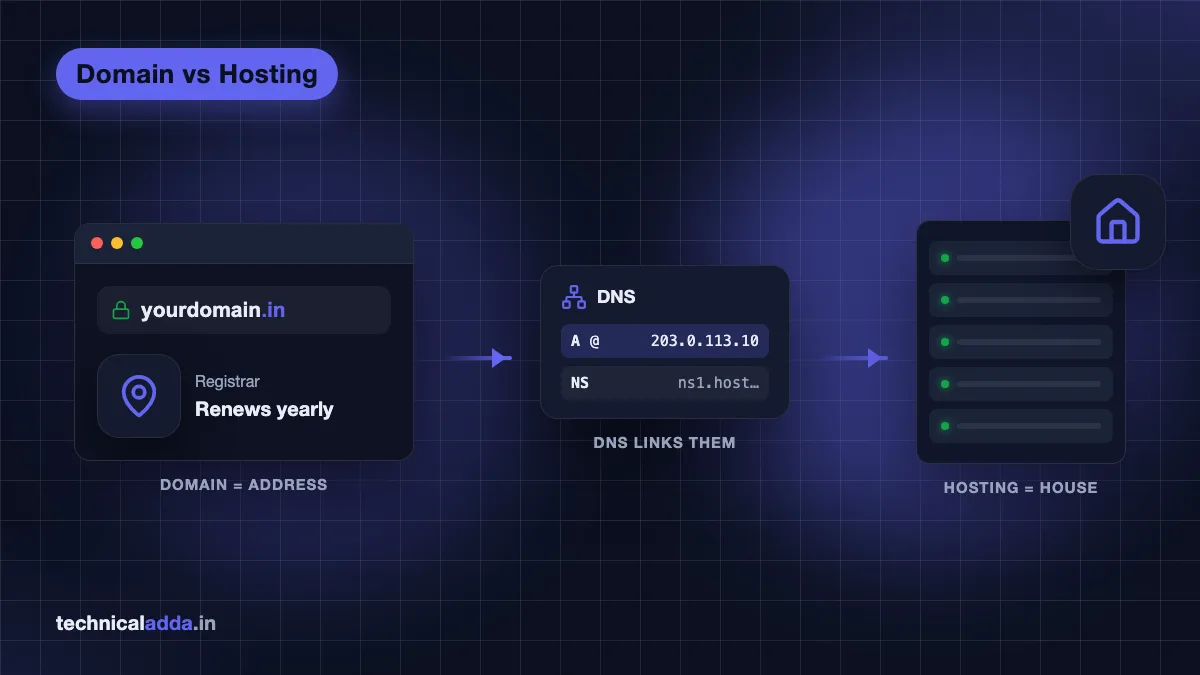
Domain vs hosting: the house and address analogy
Think of your website as a house.
- Hosting is the house itself. It is the land and building where all your furniture (files, photos, posts, database) sits. If there is no house, there is nothing to visit.
- The domain is the address. It tells people, and their browsers, where to find the house. "Flat 12, MG Road, Pune" is easier to remember than GPS coordinates.
- DNS is the city's address directory. When someone types your address, DNS looks up which plot (server IP address) it belongs to and sends them there.
You can own an address without building a house (a "parked" domain). You can also build a house without a nice address (a server reachable only by its IP number, like 203.0.113.10). But a real website that people can find and trust needs both.
One more detail from the analogy: you do not buy either forever. You rent the domain year by year from a registrar, and you rent hosting monthly or for a fixed term from a host. Stop paying, and you lose them.
What is a domain name?
A domain name is the human-friendly name of a website, such as technicaladda.in or google.com. Computers find each other using IP addresses, which are long numbers. Domains exist so people do not have to remember those numbers.
A domain has parts:
- Second-level name: the part you choose, like
technicaladda. - Extension (TLD): the ending, like
.com,.in,.co.in,.orgor.online. - Subdomain (optional): anything before the main name, like
blog.technicaladda.inorshop.example.com. You can create subdomains for free once you own the domain.
Who controls domains?
Domain extensions are managed by registries. For example, .in is run by the National Internet Exchange of India's .IN Registry (opens in new tab), and .com by Verisign. You never buy from the registry directly. You buy through an accredited registrar such as Hostinger, BigRock, GoDaddy or Namecheap. The global body that accredits registrars is ICANN, and its registrant resources (opens in new tab) explain your rights as a domain owner, including transfers and renewals.
What you get with a domain
- The right to use that name for the years you have paid for.
- Control over its DNS settings (where it points).
- The ability to transfer it to another registrar, usually after 60 days from registration.
What you do not get: storage space, a website or, usually, email. Those come from hosting or a separate email service.
What is web hosting?
Web hosting is a rented space on a server (a powerful computer that is always on and always connected to the internet). When someone visits your domain, the hosting server sends them your web pages.
A hosting plan typically gives you:
- Storage for files, images and your database (for example 10 GB to 100 GB on shared plans).
- Bandwidth or traffic allowance to serve visitors.
- A control panel such as cPanel or Hostinger's hPanel to manage files, databases, email and SSL. If you are new to this, our guide on what cPanel is and how it compares with hPanel explains the screens you will see.
- One-click installers for WordPress and other apps.
- Free SSL certificates (the padlock in the browser) on most plans today.
- Email accounts like
[email protected]on many plans.
Types of hosting
| Hosting type | What it means | Good for |
|---|---|---|
| Shared hosting | Many websites share one server's resources | Blogs, small business sites, beginners |
| Cloud / managed hosting | Resources spread across cloud servers, more isolation | Growing sites, agencies |
| VPS hosting | A virtual private server with dedicated CPU and RAM | Developers, apps, high-traffic sites |
| Dedicated server | A full physical server just for you | Very large sites, special needs |
Most first websites start on shared hosting. When you outgrow it, read our comparison of shared vs VPS hosting to decide the next step.
How DNS connects your domain to hosting
DNS (Domain Name System) is the internet's phonebook. It translates yourname.in into the IP address of your hosting server.
Here is what happens when someone types your domain:
- The browser asks a DNS resolver (usually run by Jio, Airtel or a public one like Google 8.8.8.8): "What is the IP of yourname.in?"
- The resolver asks the
.inregistry servers: "Who is responsible for yourname.in?" - The registry replies with your domain's nameservers, for example
ns1.dns-parking.com(Hostinger). - The resolver asks those nameservers, and they reply with the A record: the IP address of your hosting server.
- The browser connects to that IP, and your host sends back the website.
This all happens in milliseconds, and the answer is cached so the next visit is faster.
Key DNS records you will see
| Record | What it does | Example |
|---|---|---|
| NS (nameserver) | Says which DNS service controls the domain | ns1.yourhost.com |
| A | Points a name to an IPv4 address | @ → 203.0.113.10 |
| AAAA | Points a name to an IPv6 address | @ → 2001:db8::10 |
| CNAME | Points one name to another name | www → yourname.in |
| MX | Says which server receives email | @ → mx.zoho.in |
| TXT | Stores text for verification, SPF, DKIM | v=spf1 include:… |
If you want email on your own domain without paying for hosting email, MX records let you point mail to a separate provider. Our guide on Zoho Mail free with your own domain shows exactly which records to add.
Domain registrar vs web host: who does what
This is where people searching "domain hosting vs registrar" get confused, because many companies are both.
- Registrar: registers and renews the domain, holds your ownership record (WHOIS/RDAP data), and lets you set nameservers. Examples: BigRock, Namecheap, GoDaddy, Hostinger, Cloudflare Registrar.
- DNS host: runs the nameservers that answer DNS queries for your domain. This is often the registrar or the web host, but it can also be a third party like Cloudflare.
- Web host: stores and serves the website. Examples: Hostinger, Bluehost, MilesWeb, Cloudways.
So "domain hosting" sometimes means DNS hosting (who runs your DNS records), not website hosting. When a registrar says "free DNS management", it means they will host your DNS records, not your website.
Important: your domain stays with the registrar even if you move your website to a new host. You only change the nameservers or A record.
Difference between domain and hosting: comparison table
| Point | Domain | Hosting |
|---|---|---|
| What it is | Website address | Server space for website files |
| Analogy | House address | The house |
| Bought from | Registrar (BigRock, Namecheap, Hostinger, GoDaddy) | Web host (Hostinger, Bluehost, MilesWeb, Cloudways) |
| Billing | Yearly, up to 10 years at a time | Monthly or 1 to 4 year terms |
| Typical India cost | Roughly ₹750 to ₹1,600 per year at renewal (.in, .co.in, .com) | Roughly ₹69 to ₹280 per month on long-term shared promos |
| Can you move it? | Yes, transfer to another registrar | Yes, migrate files and database to another host |
| Works alone? | No website without hosting | Site reachable only by IP or temporary URL without a domain |
| What expires if unpaid | Domain stops resolving, can be lost | Website and email go offline |
Domain and hosting price in India
Prices change often, so treat these as ranges as of October 2026 and always check the cart before paying. Indian prices are usually shown without 18% GST, which is added at checkout.
Domain costs
| Extension | Typical first-year offer | Typical renewal per year |
|---|---|---|
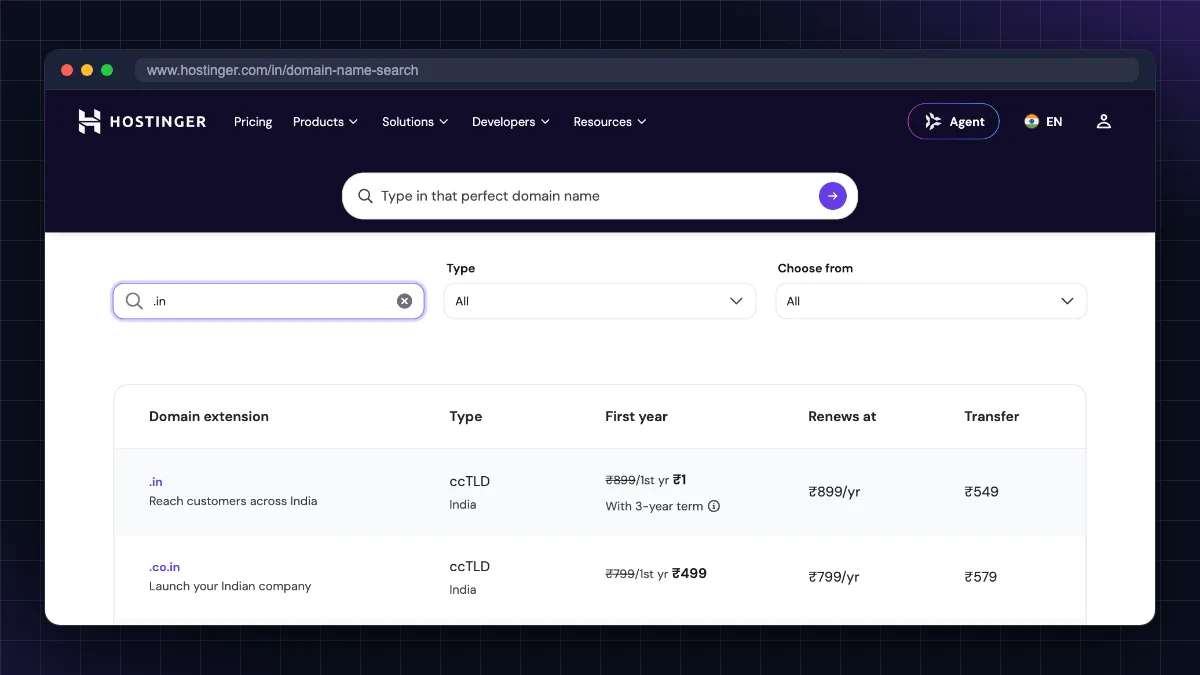
| .in | ₹1 with a 3-year purchase, or a few hundred rupees for one year | Around ₹899 |
| .com | ₹1 with a 3-year purchase at some registrars | Around ₹1,480 to ₹1,600 |
| .co.in | Low first year | Around ₹750 to ₹820 |
| .online / .site / .store | ₹99 or less first year | Can be ₹3,000 or more |
For example, as of October 2026 Hostinger India lists .in at ₹1 for the first year with a regular price of ₹899, and .com at ₹1 for the first year on a 3-year term with a regular price of ₹1,499. .online is ₹99 for the first year against a regular ₹3,489. GoDaddy India shows .in at ₹1 for the first year with a 3-year purchase required, then ₹899 per additional year. Cheap new extensions like .online look tempting, but their renewal can be several times higher than .com.
For a detailed registrar-by-registrar breakdown, see our domain name price in India guide.
Hosting costs
| Hosting type | Typical India starting price (long term) | Typical renewal |
|---|---|---|
| Shared hosting | ₹69 to ₹279 per month | ₹289 to ₹650 per month |
| Managed cloud (Cloudways-style) | Pay-as-you-go, priced in US dollars and billed by usage; see Cloudways pricing (opens in new tab) | Same, no promo |
| VPS (unmanaged) | ₹500 to ₹1,000 per month | ₹900 to ₹1,500 per month |
As one example, Hostinger India's Single shared plan is ₹69 per month on a 48-month term (₹3,312 paid upfront, excluding GST) and renews at ₹289 per month. Our best web hosting in India comparison lists starting and renewal prices for nine hosts side by side.
What a first website really costs
A realistic budget for a simple WordPress blog for one year:
- Domain (.in or .com): ₹0 (free with hosting first year) to ₹1,600
- Shared hosting: ₹3,000 to ₹7,000 for a multi-year term paid upfront
- GST at 18% on both
- SSL: ₹0 (free Let's Encrypt on most hosts)
- Theme and plugins: ₹0 with free options
Buy domain and hosting together or separately?
Both approaches work. Here is the honest trade-off.
Buying together (same company)
Pros
- Easiest setup: the domain is connected automatically, no DNS changes.
- Many hosts include a free domain for the first year on longer plans.
- One bill, one support team.
Cons
- The "free" domain renews at the host's regular rate from year two.
- If you leave the host, you must also manage or transfer the domain.
- If your hosting account is suspended (for example, unpaid renewal), your domain management can be stuck inside the same account.
Buying separately
Pros
- Your domain is independent. Switching hosts later is just a DNS change.
- You can pick the cheapest or most trusted registrar for long-term renewals.
- Less risk of losing both at once.
Cons
- You must connect them yourself (10 minutes with the steps below).
- Two accounts, two renewal dates to remember.
·.
Our recommendation
- Complete beginner, one blog: buy together for simplicity, but turn on auto-renew for the domain and note its renewal price.
- Business or long-term brand: register the domain separately with a reputable registrar and point it to your host. Your brand name should never be hostage to a hosting account.
- Developers using a VPS: always separate. Use the registrar or Cloudflare for DNS and point an A record to the VPS.
If you have not bought a name yet, follow our step-by-step guide on how to buy a domain name first.
How to connect a domain to hosting
There are two common methods. Pick one, not both.
Method 1: Change nameservers (best for beginners)
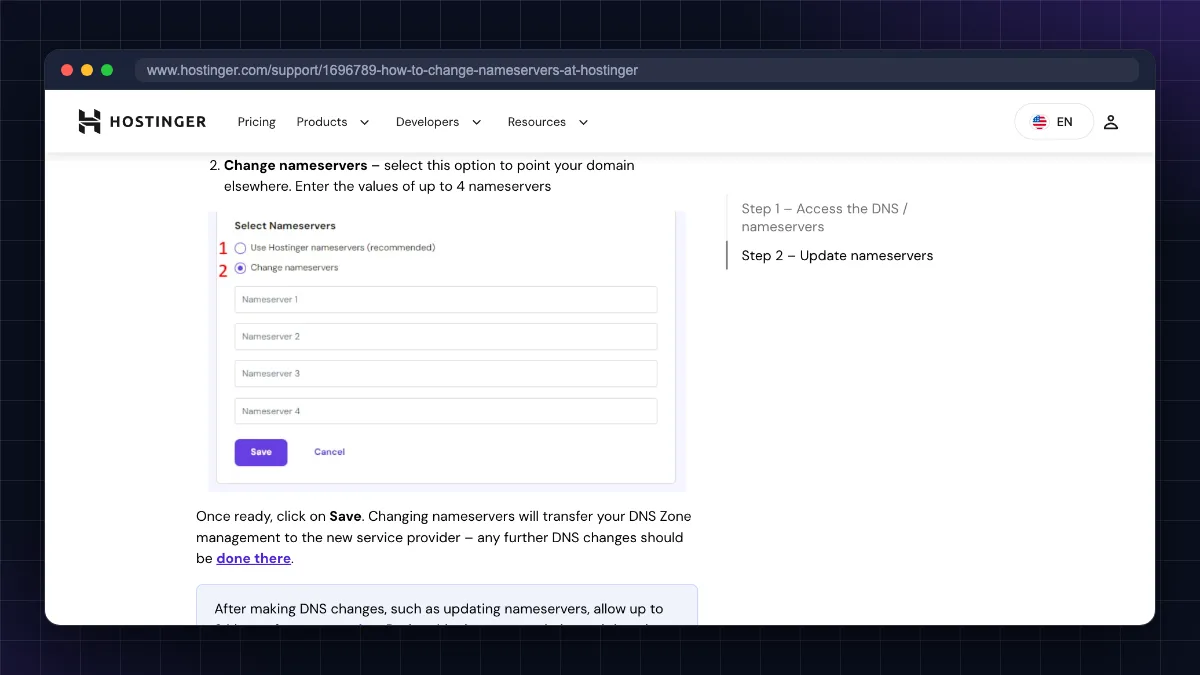
This hands the full DNS control of your domain to your web host. The host then creates all records (A, MX, CNAME) for you.
- Log in to your hosting account and find the nameservers. In Hostinger's hPanel they are shown under the website's DNS/Nameservers section; in cPanel hosts they are often in the welcome email (for example
ns1.example-host.comandns2.example-host.com). - Log in to your registrar (where you bought the domain).
- Open the domain's management page and find Nameservers or DNS Management.
- Choose Custom nameservers and paste the two (or more) nameservers from your host.
- Save. Delete old nameservers so only the host's remain.
- Add the domain in your hosting panel (as an "addon domain" or "new website") if the host asks.
- Wait for propagation. It is often quick, but can take up to 24 to 48 hours worldwide.
Downside: any DNS records you had at the registrar (such as email MX records) stop working unless you recreate them at the host.
Method 2: Add an A record (best when you want to keep DNS at the registrar)
Use this if you want email or other services to stay with your current DNS provider, or if you are pointing to a VPS.
- In your hosting panel, find the server's IP address (shared IP or VPS IP).
- At your registrar or DNS provider, open DNS records.
- Edit or add an A record: Host/Name
@, Value = your server IP, TTL default. - Add a CNAME record: Host
www, Valueyourdomain.in(or a second A record forwwwwith the same IP). - Save, then add the domain inside your hosting panel so the server knows which website to show.
- Install SSL once the domain resolves. Most hosts offer a free Let's Encrypt certificate in the control panel.
Nameservers vs A record: which one?
| Situation | Use |
|---|---|
| Shared hosting, no other services on the domain | Nameservers |
| You use Zoho Mail or Google Workspace and want to keep those records | A record (or recreate MX at host) |
| You use Cloudflare for DNS and CDN | A record inside Cloudflare |
| Pointing to a VPS (Contabo, Oracle Cloud, Hostinger VPS) | A record |
| You want the host to manage everything | Nameservers |
How to check if it worked
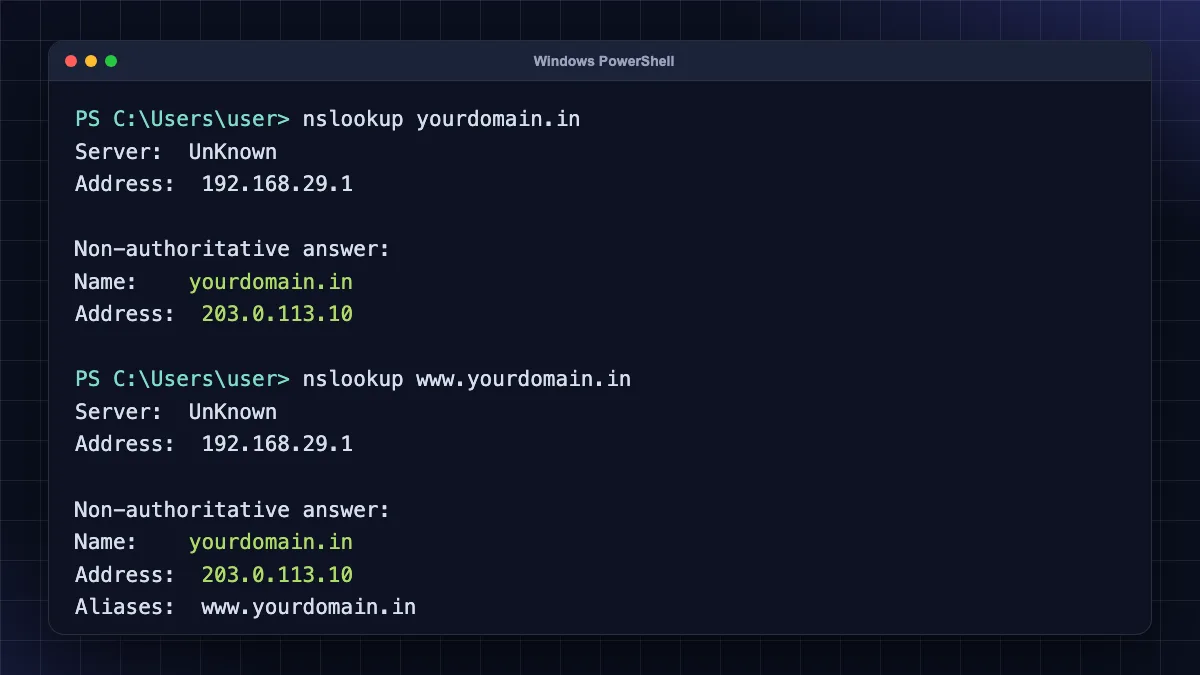
- On a computer, run
nslookup yourdomain.in(Windows, Mac or Linux terminal). It should show your host's IP. - On a phone, use any online DNS checker site and look for your new IP in most locations.
- If your browser still shows the old site, clear the browser cache or try mobile data instead of Wi-Fi, because your ISP's DNS may cache the old answer for a while.
Common mistakes to avoid
- Letting the domain expire. Hosting can be renewed late with some downtime, but an expired domain can be lost to someone else after the grace and redemption periods. Turn on auto-renew.
- Registering the domain in someone else's name. If a web designer buys it for you, make sure the registrant name and email are yours.
- Mixing both methods. Changing nameservers to the host and also editing A records at the registrar does nothing, because the registrar's DNS is no longer used.
- Forgetting email records. Switching nameservers can break existing business email. Note your MX and TXT records before changing.
- Judging by first-year price only. Always compare renewal prices for both domain and hosting.
- Ignoring domain lock and privacy. Keep the transfer lock on and enable free WHOIS privacy where offered.
Address, house, directory: the whole idea in six points
- A domain is your website's address; hosting is the server space where the website lives.
- DNS links them: nameservers decide who controls DNS, and the A record points the domain to the server IP.
- Registrars handle domains, web hosts handle websites; Hostinger and GoDaddy do both, which is why the two get confused.
- Budget roughly ₹750 to ₹1,600 a year to renew a .in, .co.in or .com, and ₹69 to ₹280 a month for a 3 to 4 year shared hosting promo, plus 18% GST.
- One blog: buying both together is fine. A brand you plan to keep: register the domain separately so a hosting account can't hold it hostage.
- Use nameservers for simple shared hosting, and an A record for VPS or when you want to keep email records.
Domain vs hosting: which to sort out first
Sort out the domain first: it is the address you keep for years, while hosts can come and go. Hosting is where the website lives, and DNS ties the two together through nameservers or an A record. Once the name is registered, choose hosting based on renewal price and support rather than the first-year deal, and connect them using the method that suits your setup. Ready to choose a host? Compare plans in our best web hosting in India guide, or browse more guides in our Web Hosting & Servers section.
FAQ
Frequently Asked Questions
What is the difference between domain and hosting?
A domain is the name people type to reach your website, while hosting is the server where your website's files and database are stored. The domain points to the hosting server through DNS. You rent the domain yearly from a registrar and the hosting monthly or yearly from a web host. A normal website needs both to work.
Can I buy a domain without hosting?
Yes. You can register a domain and keep it parked without any hosting. This is common to reserve a brand name early. You can still use the domain for email through a service like Zoho Mail or Google Workspace by adding MX records. When you are ready, buy hosting and point the domain to it.
Can I have hosting without a domain?
Yes, but visitors can only reach the site through the server's IP address or a temporary URL given by the host. That is fine for testing or development. For a public website, a domain is needed because people cannot remember IP numbers, browsers warn about SSL on raw IPs, and search engines treat it poorly.
Is a free domain with hosting really free?
It is usually free only for the first year. From the second year, the domain renews at the host's normal price, which is about ₹899 for a .in and ₹1,480 to ₹1,600 for a .com at Indian registrars, before GST. Some hosts also require a 12-month or longer hosting plan to get the free domain. Check the renewal price and whether you can transfer the domain out later.
Should I buy domain and hosting from the same company?
Buying both from one company is simplest for beginners because setup is automatic and there is one bill. Keeping the domain at a separate registrar is safer for businesses, since switching hosts later becomes just a DNS change and your domain is not tied to a hosting account. Both choices work if you track renewals.
How do I connect my domain to hosting?
Either change the domain's nameservers at your registrar to the ones your host gives you, or add an A record that points the domain to your hosting server's IP address. Nameservers are easiest for shared hosting. A records suit VPS servers or when you want to keep email records with your current DNS provider.
How long does it take for a domain to connect to hosting?
DNS changes often work within minutes to a few hours, but full worldwide propagation can take up to 24 to 48 hours. Your ISP's DNS cache may show the old result for a while. Check with nslookup or an online DNS checker, and try mobile data or another network if your browser still loads the old page.
What is the difference between a domain registrar and DNS hosting?
A registrar registers and renews your domain and records you as its owner. DNS hosting runs the nameservers that answer where your domain points. Often the registrar provides DNS hosting free, but you can move DNS to your web host or a service like Cloudflare while keeping the domain registered at the same registrar.
What happens if my hosting expires but my domain is active?
Your website and any hosting-based email go offline, but you still own the domain. Visitors may see an error or a suspended page. Renew the hosting or point the domain to a new host to restore the site. Keep backups, because some hosts delete account data a few weeks after expiry.
What happens if my domain expires but hosting is active?
Your website becomes unreachable by its name even though files remain on the server. Most registrars give a grace period to renew at the normal price, followed by a costlier redemption period. After that, the domain can be released and registered by anyone. Turn on auto-renew to avoid losing your brand name.
Where to buy
-
Visit official site (opens in new tab)
Buying together (same company)
-
Visit official site (opens in new tab)
Buying separately
-
Visit official site (opens in new tab)
Buying separately