UPI Autopay Cancel in PhonePe, GPay, Paytm: It Won’t End the Subscription
Digital India & UPI 13 min read By Richa Singh
In this articleTable of contents15
Last updated: 16 November 2026
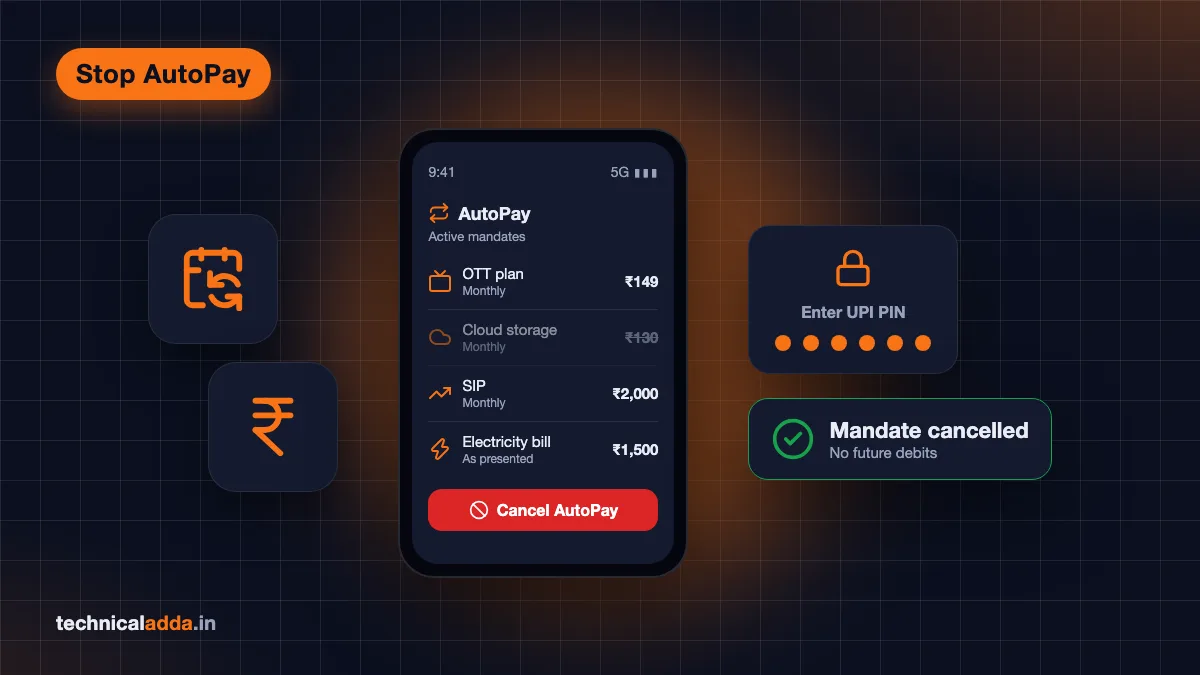
To do a UPI autopay cancel, open the UPI app you used to approve it, go to the AutoPay or Mandates section, pick the mandate and tap Cancel (or Remove, or Revoke), then enter your UPI PIN. It takes under a minute, and future debits stop at once.
The steps differ by app, and that's where people get stuck: the mandate isn't where they expect, the cancel button is missing for a loan EMI, or money still gets debited after cancelling. This guide covers PhonePe, Google Pay, Paytm, BHIM and bank apps one by one, plus pause vs cancel, scams that misuse autopay, and where to complain.
Quick answer: To cancel UPI autopay, open the app where you set up the mandate (PhonePe, Google Pay, Paytm, BHIM or your bank's app), go to AutoPay, Autopay or Mandates, select the mandate, tap Cancel, Remove or Revoke and confirm with your UPI PIN. Cancelling stops future debits only. It doesn't refund past ones or end the subscription itself.
What UPI AutoPay is and why cancelling works
UPI AutoPay is a standing instruction, called a mandate, that lets a merchant debit your bank account on a schedule without asking for your UPI PIN every time. NPCI launched it in 2020 for subscriptions, SIPs, insurance premiums, bills and EMIs.
When you approve a mandate, you set a maximum amount and a frequency (daily, weekly, monthly, yearly or as presented). The merchant can then pull money up to that limit. Under the RBI and NPCI rules, recurring debits up to ₹15,000 go through without your PIN. For mutual fund SIPs, insurance premiums and credit card bills, RBI raised that no-PIN limit to ₹1 lakh in December 2023.
The key point: the mandate lives with your bank and your UPI app, not only with the merchant. That's why you can cancel it yourself from the app, even if the merchant's website hides the cancel option.
Since you also get a pre-debit alert before each charge (RBI's e-mandate framework requires one at least 24 hours before the debit), you usually have a window to cancel before the next payment. NPCI's UPI AutoPay overview (opens in new tab) lists the categories and rules.
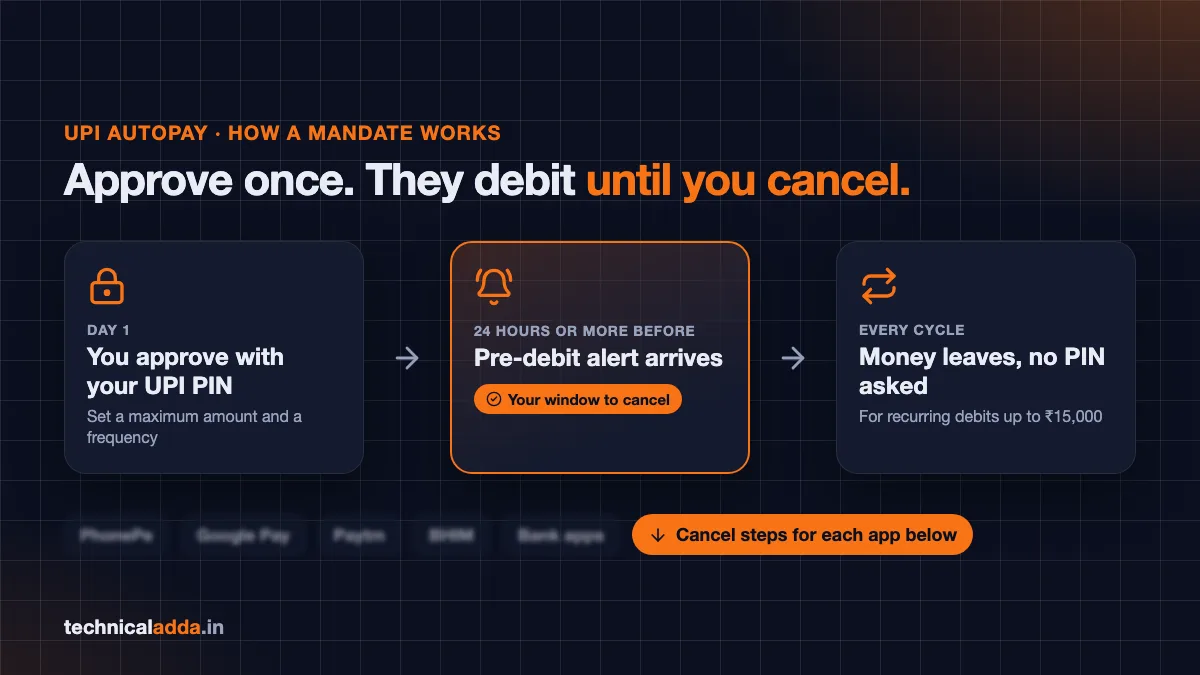
Approve a mandate once and the merchant keeps debiting until you cancel; the pre-debit alert, at least 24 hours ahead, is your window.
Before you cancel: three quick checks
Spend one minute on these, and you'll avoid the most common regrets.
- Find the right app. The mandate shows up most reliably in the UPI app you used when you approved it. Check your SMS or email for the approval message; it names the app or the UPI ID (like
name@yblfor PhonePe orname@okicicifor Google Pay). - Check if it's a loan EMI. Cancelling a loan mandate doesn't cancel the loan. Missed EMIs still attract late fees and hit your credit score. Set up another way to pay before you cancel, and talk to the lender.
- Decide whether you also need to end the subscription. Cancelling the mandate stops the money, not the service contract. For OTT apps, cloud storage or gym plans, also cancel inside the merchant's app so they don't keep billing you or sending dues reminders.
How to cancel autopay in PhonePe
PhonePe keeps mandates in its AutoPay settings, reached from your profile. PhonePe's own safety blog gives the route as Profile > Autopay Settings:
- Open PhonePe and tap your profile picture at the top left of the home screen.
- Tap AutoPay (shown as Autopay Settings, under Payment Management in many versions).
- You'll see your active mandates. Tap the one you want to stop.
- Tap Delete to cancel it, or Pause to stop debits for a while.
- Confirm and enter your UPI PIN if asked.
The mandate disappears from the active list and the merchant can't debit you any more. PhonePe sends a reminder 24 hours before each scheduled AutoPay debit, so that alert is your cue to delete a mandate you no longer want.
If AutoPay doesn't appear in your profile, update PhonePe from the Play Store or App Store and check again.
UPI autopay cancel in Google Pay
Google Pay's official help page on UPI Autopay (opens in new tab) gives these steps:
- Open Google Pay and tap your profile picture at the top right.
- Tap Autopay.
- In the Live tab, tap the mandate you want to change.
- Tap Cancel autopay. To stop it only for a while, tap Pause autopay and choose a start and end date.
- Enter your UPI PIN.
- Check the Live tab again to confirm the status shows paused or cancelled.
Two Google Pay rules catch people out. First, a mandate set up for a loan can't be cancelled in Google Pay; Google tells you to contact the lender. Second, if you get an error while cancelling, the bank account linked to that mandate must be active. Reactivate a dormant account first, then cancel.
To raise a dispute about a debit, open the mandate in the Live tab, tap the three-dot menu, then Get help, choose the issue and tap Create a ticket.
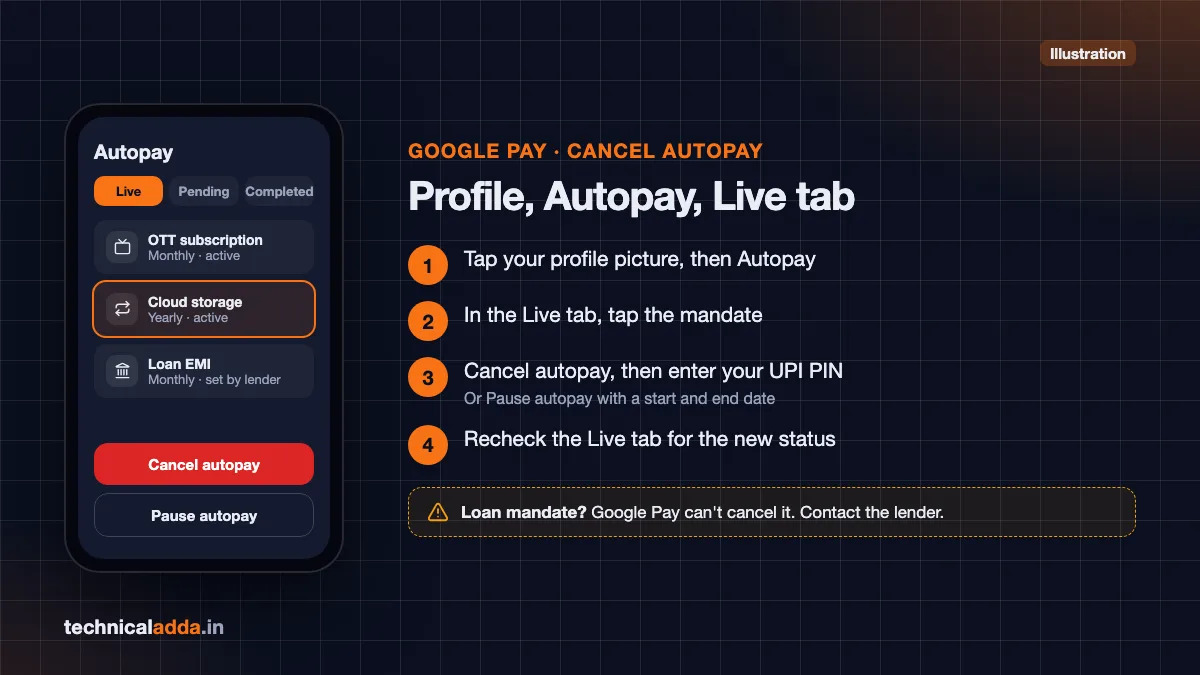
In Google Pay: profile picture, Autopay, Live tab, pick the mandate, Cancel autopay and your UPI PIN; loan mandates go to the lender.
How to cancel autopay in Paytm
Paytm groups mandates under Automatic Payments in its UPI settings. Menu labels shift between app versions, but the path is:
- Open Paytm and tap the profile icon at the top left.
- Tap UPI & Payment Settings.
- Under UPI settings, tap Automatic Payments (some versions say Manage Automatic Payments or UPI AutoPay).
- Pick the mandate from the active list.
- Tap Cancel (or Pause, with dates).
- Enter your UPI PIN.
Can't find it? Try the search bar at the top of the Paytm home screen and type "automatic payments".
Paytm also shows wallet and card-based automatic payments on the same screen. Only the UPI ones need your UPI PIN to cancel.
How to revoke a mandate in BHIM
BHIM, NPCI's own UPI app, calls them mandates rather than autopay:
- Open BHIM and go to the Mandates section (in recent versions, from the home screen or under Bank Accounts).
- Select the mandate under the active list.
- Tap Revoke (some versions say Cancel).
- Enter your UPI PIN.
BHIM is a useful fallback if you've deleted the app you originally used. Link the same bank account and check its Mandates list.
Cancel UPI autopay in bank apps
Most banks' UPI apps have a mandate section for UPI mandates on your account. Look for one of these labels:
- Mandates, My Mandates or UPI Mandates (for example, BHIM PNB shows active mandates under My Mandates, where you can modify or revoke them with your UPI PIN)
- AutoPay, Manage AutoPay or Standing Instructions inside the UPI menu
- Recurring Payments in net banking
PNB's own help page warns that a revoked mandate can't be resumed. That's true for every app: once cancelled, the merchant must send a fresh mandate request if you want to restart.
If your bank app shows nothing and the mandate still debits money, call the bank's customer care and ask them to stop the UPI mandate. Banks can see and block it on their side.
App-by-app summary
Use this table as the quick reference. Menu names were checked against each app's help pages and current versions in November 2026; apps rename buttons often, so the closest match is usually right.
| App | Where to find it | Button | Pause option | PIN needed |
|---|---|---|---|---|
| PhonePe | Profile > AutoPay (Autopay Settings) | Delete | Yes | Yes, usually |
| Google Pay | Profile > Autopay > Live tab | Cancel autopay | Yes, with dates | Yes |
| Paytm | Profile > UPI & Payment Settings > Automatic Payments | Cancel | Yes, with dates | Yes |
| BHIM | Mandates (home or Bank Accounts) | Revoke | Varies by version | Yes |
| Bank UPI apps | My Mandates, UPI AutoPay or Standing Instructions | Revoke or Cancel | Varies | Yes |
| Merchant app (Netflix, Hotstar and others) | Account > Subscription or Billing | Cancel subscription | Sometimes | No |
NPCI has announced a framework that lets any UPI app show all your active AutoPay mandates, including ones created in other apps, and lets you move a mandate between apps. Apps are adding it at different speeds, so if a mandate doesn't show up, check the app you originally used.
Pause vs cancel: which to pick
Pause when you'll want the same subscription back. Cancel when you're done with it.
Pause keeps the mandate but blocks debits between the dates you choose. Use it when you're travelling, between seasons of a show, or short on balance this month. Google Pay and Paytm let you set start and end dates. After the end date, the mandate resumes on its own.
Cancel (also called revoke or remove) deletes the mandate permanently. The merchant can't charge you again unless you approve a new request with your PIN.
One thing to know about pausing: it may not stop a debit that the merchant has already scheduled for the current cycle, especially if the pre-debit alert has already gone out. If a charge is due tomorrow and you want to be sure, cancel instead.
Also note that a bounced autopay because of low balance is not a safe way to "cancel". Business Standard reported in September 2025 that over 20 million UPI AutoPay mandates are revoked every month because of insufficient balance, and banks may charge a fee for failed debits.
Can't find the mandate or the cancel button?
Work through these in order:
- Check the other UPI apps on your phone. The mandate is often in the app you used once and forgot, like Paytm for an OTT trial.
- Update the app. Older versions of Google Pay and PhonePe hide or lack the AutoPay screen.
- Open your bank's UPI app or BHIM linked to the same account, and check its mandate list.
- It's a loan mandate. Many apps don't allow cancelling loan EMIs. Contact the lender (bank or NBFC) in writing, and ask them to stop the mandate once you've arranged another payment method.
- It isn't UPI at all. Card mandates (shown on your card statement) and NACH or e-NACH mandates (set up with a cheque or net banking for loans and SIPs) can't be cancelled from a UPI app. Cancel card mandates through your card issuer, and NACH mandates through your bank or the lender.
Not sure if a debit was UPI? Check the bank SMS. UPI debits show a 12-digit UPI reference number (UTR) and usually mention "UPI" or "Mandate".
Money debited after cancelling: what to do
If money was debited after you cancelled, act within a day or two. Here is the order that works.
- Check the timing. If the debit happened before you cancelled, or the merchant presented it just before, it's valid. Cancelling doesn't reverse earlier debits.
- Raise a complaint in the UPI app. In Google Pay, use Get help on the mandate. In PhonePe and Paytm, open the transaction from history and tap Help or Report a problem. Keep screenshots of the cancellation confirmation.
- Use NPCI's UPI Help. NPCI runs UPI Help (opens in new tab), where you can check a transaction's status and raise a UPI complaint if the app's own support doesn't help.
- Contact the merchant for a refund. Most subscription services refund a charge made after cancellation when you send proof.
- Escalate to the bank, then RBI. If the bank doesn't resolve it within 30 days, file a complaint on the RBI Complaint Management System (opens in new tab) under the Integrated Ombudsman Scheme.
For failed transactions where money left your account but didn't reach anyone, follow our guide on UPI transaction failed but money debited, which covers refund timelines and penalties banks owe you.
UPI autopay scams to watch for
Fraudsters misuse autopay because a mandate approved once can debit you again and again. Watch for these patterns.
- Fake "refund" or "cashback" mandate. You get a request saying you'll receive money. Any screen that asks for your UPI PIN is taking money from you, never sending it. Receiving money never needs a PIN.
- "₹1 verification" mandates. A caller pretending to be from a courier, KYC team or electricity board asks you to approve a tiny mandate "to verify". The mandate's real maximum can be thousands of rupees.
- Fake subscription sites. Cheap OTT or app "lifetime plans" sold on social media ads set up a recurring mandate in the background.
NPCI ended person-to-person collect requests on UPI from 1 October 2025, which removed one common trick. Merchant mandate requests still exist, so read the merchant name, amount and frequency on every approval screen.
If you approved a fraudulent mandate, cancel it at once using the steps above, call your bank to block further debits, and report it on the National Cyber Crime Helpline 1930 or at cybercrime.gov.in. Our explainer on how to identify a fake UPI payment screenshot covers related scams, and the digital arrest scam guide shows how pressure tactics work on calls.
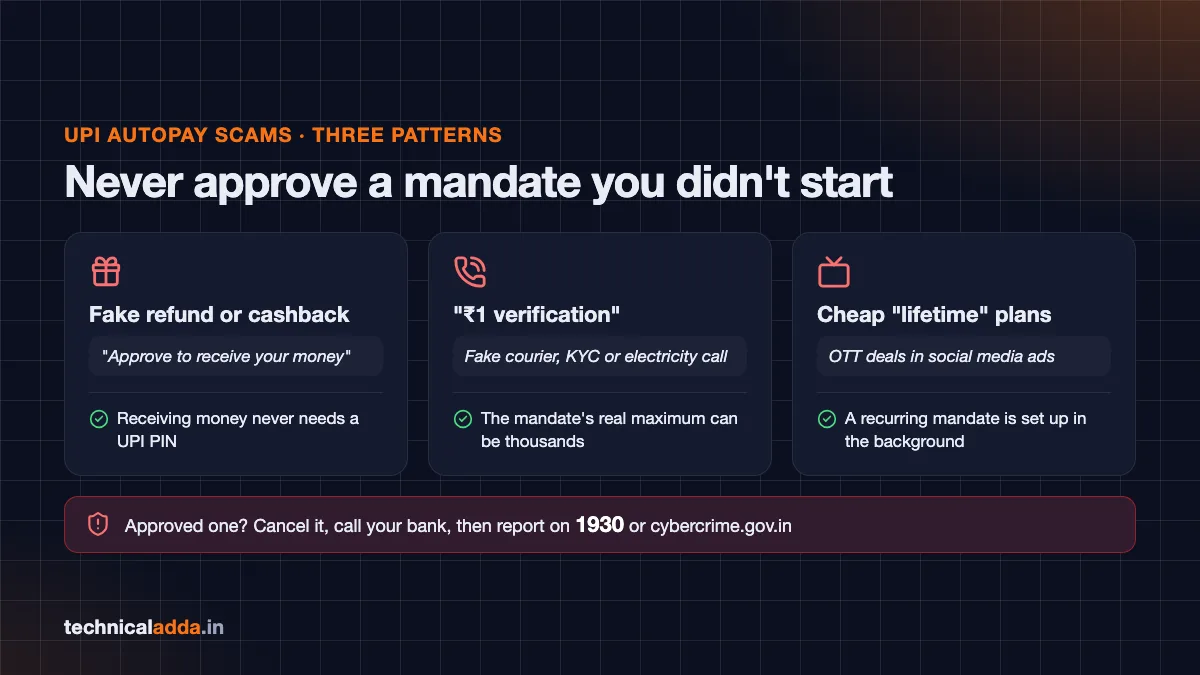
Receiving money never needs a UPI PIN; if you approved a mandate you didn't start, cancel it, call your bank and report on 1930.
What to remember before you cancel a UPI mandate
- UPI autopay cancel happens in the app's AutoPay or Mandates section: select the mandate, tap Cancel, Remove or Revoke, enter your UPI PIN.
- Check the app you approved it in first, then BHIM or your bank's UPI app.
- Cancelling stops future debits only. End the subscription with the merchant too, and arrange another way to pay loan EMIs.
- Pause when you'll return to the service; cancel when you're done. A revoked mandate can't be restarted.
- Any mandate request that promises you money is a scam. Report it on 1930 or cybercrime.gov.in.
- Debited after cancelling? Complain in the app, then UPI Help, then the bank and RBI CMS.
Cancel the mandate, then end the subscription too
Once you know where the mandate lives, a UPI autopay cancel takes less than a minute: AutoPay in PhonePe and Google Pay, Automatic Payments in Paytm, Mandates in BHIM and bank apps. Cancel the subscription with the merchant too, and keep the confirmation screenshot.
While you're cleaning up payments, set up UPI Lite for small daily spends so you can keep your main account's mandates under control, and find more UPI and government service guides in Digital India.
FAQ
Frequently Asked Questions
How do I cancel UPI autopay?
Open the UPI app you used to set up the mandate, go to its AutoPay, Autopay or Mandates section, tap the mandate, choose Cancel, Remove or Revoke, and enter your UPI PIN. The mandate stops immediately, so no future debits go through. If you can't find it, check your other UPI apps, BHIM or your bank's UPI app, or call your bank.
How do I cancel autopay in Google Pay?
Tap your profile picture at the top right, select Autopay, open the Live tab and tap the mandate. Choose Cancel autopay, enter your UPI PIN, and check the Live tab to confirm the status changed. Google Pay doesn't let you cancel mandates set up for loans; for those, contact the lender directly.
Where is autopay in PhonePe?
In PhonePe, tap your profile picture on the home screen and open AutoPay (Autopay Settings, under Payment Management in many versions). All active mandates are listed there. Tap one and choose Delete to cancel it. If the option is missing, update the app from the Play Store or App Store and check again.
Does cancelling UPI autopay cancel my subscription?
No. Cancelling the UPI mandate only stops the money from leaving your account. The service contract stays with the merchant, who may mark your account as unpaid or keep sending reminders. Cancel the subscription in the merchant's app or website as well, and keep a screenshot of both cancellations as proof.
Can I pause UPI autopay instead of cancelling?
Yes, in most apps. Google Pay and Paytm let you pause a mandate with a start and end date, after which it resumes automatically. PhonePe also offers Pause in its AutoPay settings, while bank apps offer it on some mandates only. Pause if you plan to return to the service. A pause may not stop a debit already scheduled for the current billing cycle.
Can I cancel a loan EMI autopay mandate?
You can request it, but many apps, including Google Pay, don't allow cancelling loan mandates in the app. Contact the lender instead. Cancelling the mandate doesn't cancel the loan or the EMI, so missed payments still bring late fees and lower your credit score. Arrange another repayment method before asking the lender to stop it.
Why was money debited after I cancelled autopay?
Usually the merchant presented the debit before your cancellation went through, or you cancelled a different mandate. Check the date and time on the bank SMS against your cancellation screenshot. If the debit came after, raise a complaint in the UPI app, then on NPCI's UPI Help, and ask the merchant for a refund with proof.
What is the UPI autopay limit without a PIN?
Recurring UPI AutoPay debits up to ₹15,000 go through without your UPI PIN after you approve the mandate once. For mutual fund SIPs, insurance premiums and credit card bill payments, RBI raised this no-PIN limit to ₹1 lakh per debit in December 2023. Amounts above these limits need your PIN each time.
How do I report a UPI autopay scam?
Cancel the mandate right away in your UPI app, then call your bank to block further debits. Report the fraud on the National Cyber Crime Helpline 1930 or at cybercrime.gov.in as soon as possible, because quick reports improve the chance of freezing the money. Keep screenshots of the mandate request, SMS alerts and any chats.