Deploy Full Stack App for Free: Skip Render Postgres, It Expires in 30 Days
Web Hosting & Servers 16 min read By Xavio Thomas
In this articleTable of contents15
Last updated: 15 November 2026
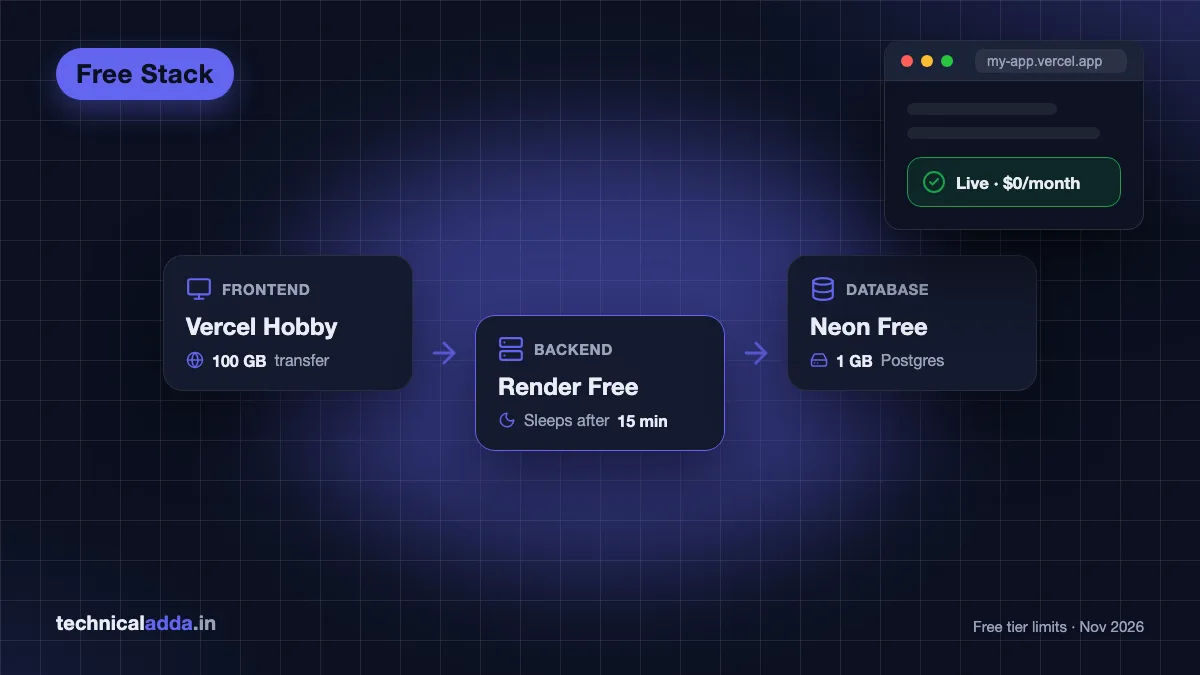
The best way to deploy a full stack app for free in 2026 is to split it into three free services: the React frontend on Vercel, the Node.js API on Render, and the Postgres database on Neon. Each has a permanent free plan, none of them needs a card to start, and the whole stack can be live in about an hour.
The catch is that free plans sleep, expire or ban commercial use, and most tutorials skip that. Below are the exact limits as of November 2026, the order to deploy in, and fixes for the three errors almost everyone hits: CORS, missing environment variables and the 404 on page refresh.
Quick answer: To deploy a full stack app for free, put the database on Neon (free Postgres, no card), deploy the Node.js backend as a free web service on Render, and deploy the React frontend on Vercel Hobby or Netlify. Connect them with environment variables and a CORS allowlist. Expect a one-minute cold start on Render after 15 idle minutes.
How to deploy a full stack app for free in 2026
Use three services, one per layer. A single free platform that hosts everything well does not exist any more: Heroku ended its free dynos in 2022, Railway's free plan gives only $1 of usage a month, and Koyeb's pricing page no longer lists a free compute instance.
Here is the split we recommend for a MERN-style or PERN-style project (React, Express, a database):
- Frontend (React, Vite, Next.js static pages): Vercel Hobby. Free, fast CDN, preview links for every Git branch.
- Backend (Express, Fastify, NestJS, Django, Flask): Render free web service. Runs a real long-lived server process, which Vercel functions do not.
- Database: Neon free Postgres. If your project already uses MongoDB, MongoDB Atlas M0 does the same job.
Why not run the API on Vercel too? You can, as serverless functions, but an Express app with WebSockets, background jobs or a long-lived database pool fits a normal server better. Render runs your npm start exactly like your laptop does.
If you are only hosting static HTML, you don't need any of this. Our guide on how to host a website for free covers the simpler options.
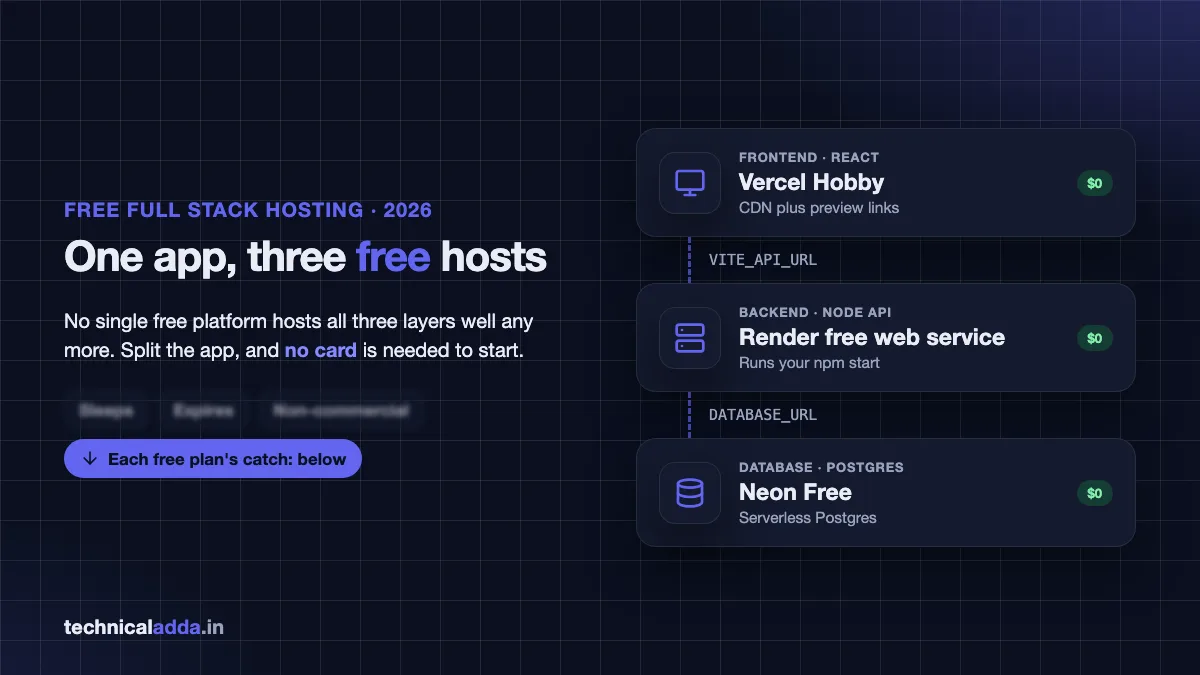
One app, three free hosts: the frontend, API and database each go to the free plan that suits them, wired together with environment variables.
Free tier limits compared
Every limit below was checked on the official pricing and docs pages in November 2026. Free plans change often, so open the linked pages before you commit a client project.
| Service | Layer | What's free | The catch |
|---|---|---|---|
| Vercel Hobby | Frontend | 100 GB data transfer, 100 deployments a day | Personal, non-commercial use only; runtime logs kept 1 hour |
| Netlify Free | Frontend | 300 credits a month | Sites pause when credits run out |
| Render free web service | Backend | 750 instance hours a month per workspace | Sleeps after 15 minutes idle, about 1 minute to wake |
| Render free Postgres | Database | 1 GB, one per workspace | Expires 30 days after creation |
| Neon Free | Database | 100 projects, 1 GB storage per project, 100 CU-hours of compute per project | Scales to zero after 5 idle minutes |
| Supabase Free | Database + auth | 500 MB database, 50,000 monthly users, 2 active projects | Paused after 1 week of inactivity |
| MongoDB Atlas M0 | Database | 512 MB storage, 500 connections | Backups only if you turn them on; paused after 30 days with zero connections |
| Railway Free | Backend | $1 of usage a month, 0.5 GB RAM per service | Too small for most apps beyond a demo |
| Cloudflare Workers Free | Backend | 100,000 requests a day | 10 ms CPU time per request, not plain Express |
Sources: Render free tier docs (opens in new tab), Neon pricing (opens in new tab), Vercel limits (opens in new tab) and Supabase pricing (opens in new tab).
Two rows matter most. Render's own free Postgres is deleted after its 30 days plus a 14-day grace period, which is why we put the database on Neon instead. And Vercel Hobby bans commercial use, so a client site or anything with AdSense needs Netlify or a paid plan. Our Vercel vs Netlify comparison explains exactly where that line sits.
Before you start: prepare the repo
Spend ten minutes here and every later step is a few clicks. Put the frontend and backend in one GitHub repo, in two folders:
my-app/
  client/     (React + Vite)
  server/     (Express API)
  .gitignore  (node_modules, .env, dist)
Make three small code changes before your first push.
1. Read the port from the environment. Render tells your app which port to use through PORT:
const PORT = process.env.PORT || 4000;
app.listen(PORT, "0.0.0.0", () => console.log(`API on ${PORT}`));
2. Read the database URL and frontend URL from the environment. Never hard-code localhost:
const db = new Pool({ connectionString: process.env.DATABASE_URL });
app.use(cors({ origin: process.env.CLIENT_URL, credentials: true }));
3. Point the frontend at an API URL variable. In Vite, only variables that start with VITE_ reach the browser:
const API = import.meta.env.VITE_API_URL;
const res = await fetch(`${API}/api/todos`);
Also add a /health route that returns 200 OK. You'll use it for Render's health check and for testing.
Step 1: Create a free Postgres database on Neon
Start with the database, because the backend needs its connection string. Neon is serverless Postgres: you get a normal Postgres database that shuts down when nobody uses it and wakes up on the next query.
- Sign up at neon.com with GitHub or Google. No card is needed.
- Create a project. Pick the AWS Singapore region (
ap-southeast-1), the closest Neon region to India at the time of writing, so queries from India and from Render's Singapore region stay fast. - On the project dashboard, click Connect and copy the connection string. Turn on Connection pooling first; the hostname then contains
-pooler. - Keep the
?sslmode=requirepart at the end. Neon refuses connections without SSL.
The string looks like this:
postgresql://app_owner:[email protected]/appdb?sslmode=require
Create your tables from your laptop with psql or your ORM's migration command (npx prisma migrate deploy, npx drizzle-kit push or npx knex migrate:latest) using that same URL. Running migrations from your machine once is simpler than wiring them into a free build.
Neon's free plan gives each project 1 GB of storage and 100 CU-hours of compute. A student project with a few thousand rows uses a tiny fraction of that.
Step 2: Deploy the backend on Render for free
Render is the easiest place to deploy a Node.js backend for free, because it runs your normal npm start on a real server process.
- Sign up at render.com with your GitHub account.
- Click New > Web Service and pick your repo.
- Fill the form:
- Root Directory:
server - Runtime: Node
- Build Command:
npm ci - Start Command:
npm start(ornode index.js) - Region: Singapore
- Instance Type: Free
- Root Directory:
- Under Environment Variables, add
DATABASE_URL(the Neon string),NODE_ENV=productionandCLIENT_URL(leave a placeholder for now; you'll fill it after Step 3). - Under Advanced, set the Health Check Path to
/health. - Click Deploy Web Service.
The first build takes two to five minutes. When it finishes you get a URL like https://my-app-api.onrender.com. Open https://my-app-api.onrender.com/health and you should see OK.
Every push to main now redeploys the backend automatically. If you use TypeScript, set the build command to npm ci && npm run build and the start command to node dist/index.js.
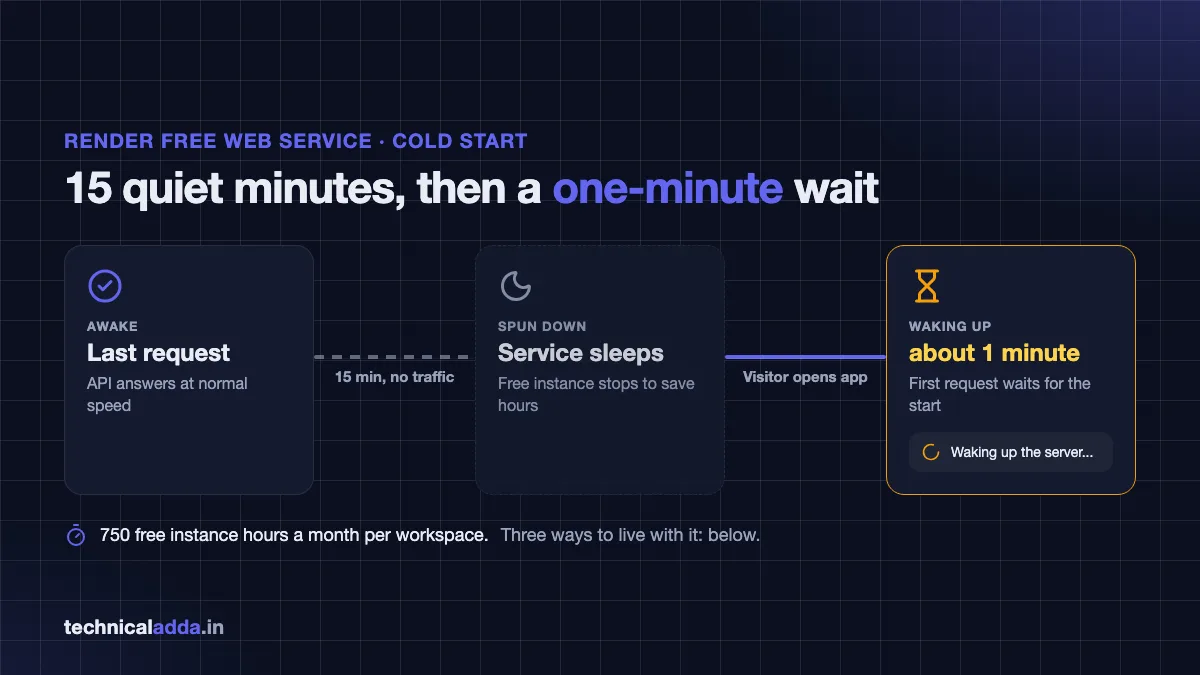
Render's free service sleeps after 15 idle minutes, so the first request after a break waits about a minute while it wakes.
Step 3: Deploy the React app for free on Vercel
Deploy the frontend last, because it needs the backend URL at build time.
- Sign in at vercel.com with GitHub and click Add New > Project.
- Import the same repo.
- Set Root Directory to
client. Vercel detects Vite and fills innpm run buildand thedistoutput folder. - Add the environment variable
VITE_API_URLwith your Render URL, for examplehttps://my-app-api.onrender.com. - Click Deploy.
You'll get a URL like https://my-app.vercel.app within a minute or two.
If you use React Router, add a vercel.json file in the client folder so that refreshing a page like /dashboard doesn't return a 404:
{
  "rewrites": [{ "source": "/(.*)", "destination": "/index.html" }]
}
Prefer Netlify? The steps match: base directory client, build command npm run build, publish directory client/dist, plus a _redirects file in client/public with the line /* /index.html 200.
Step 4: Connect frontend and backend
Go back to Render, set CLIENT_URL to your exact Vercel URL (https://my-app.vercel.app, no trailing slash) and save. Render redeploys with the new value.
Now open your Vercel site, open the browser console (F12) and use the app. If data loads, you're live. If you see a red CORS error, the origin in CLIENT_URL doesn't match the browser's address bar exactly. http vs https, www vs no www and a trailing slash all count as different origins.
Login cookies need one more decision. Your frontend (vercel.app) and backend (onrender.com) are different sites, so the browser treats the API's cookie as a third-party cookie. Safari and Brave block those by default. You have two clean fixes:
- Send a token instead. Return a JWT on login and send it in the
Authorizationheader. No cookies, no third-party problem. - Proxy the API through Vercel. Add a rewrite so the browser calls
/apion your own Vercel domain and Vercel forwards it to Render. The cookie becomes first-party.
{
  "rewrites": [
    { "source": "/api/(.*)", "destination": "https://my-app-api.onrender.com/api/$1" },
    { "source": "/(.*)", "destination": "/index.html" }
  ]
}
With the proxy, set VITE_API_URL to an empty string so requests go to /api/... on the same domain. Keep the /api rule above the catch-all rule.
Step 5: Add a custom domain
A free vercel.app address works, but a real domain looks better on a resume and avoids a reported issue: community threads on Vercel's and Railway's forums describe free platform subdomains failing to load on some Jio connections while working on other networks. A custom domain sidesteps most of those reports.
A .in or .com domain costs a few dollars a year (a few hundred rupees in India). Our guide on how to buy a domain name walks through it. Then:
- In Vercel, open Project > Settings > Domains, add
myapp.inandwww.myapp.in. - Add the A and CNAME records Vercel shows in your registrar's DNS panel.
- Optionally add
api.myapp.inin Render under Settings > Custom Domains with the CNAME it shows. - Update
CLIENT_URLon Render andVITE_API_URLon Vercel to the new addresses, then redeploy the frontend.
Both platforms issue free HTTPS certificates automatically once DNS points at them.
Living with cold starts
A Render free service sleeps after 15 minutes without traffic, and the next visitor waits about a minute while it wakes. This is the single biggest complaint about free backend hosting, and there are three honest ways to handle it.
Show a loading state. Put a spinner and a line like "Waking up the server, this takes up to a minute on the free plan" on the first request. Recruiters checking a portfolio project accept this when they're told.
Wake the API early. Call /health from the frontend as soon as the page loads, before the user clicks anything. The API is often awake by the time they log in.
Ping it every 14 minutes. Uptime monitors like UptimeRobot or cron-job.org can hit /health on a schedule so the service never sleeps. Do the maths first: one service awake all month uses about 744 of your 750 free hours, so a second free service in the same workspace gets suspended when the hours run out. Pinging also doesn't fix Neon's own 5-minute scale-to-zero, though Neon wakes in well under a second.
If one minute of waiting is unacceptable, you have outgrown the free tier. That is a good problem.
Other free options: Supabase, MongoDB Atlas, Railway, Oracle
The Vercel + Render + Neon stack fits most projects, but swap a layer when your project needs it.
Supabase gives you Postgres plus login, file storage and auto-generated APIs. For a project where the backend is mostly CRUD and authentication, Supabase can replace your Express server entirely. Watch the 500 MB database limit and the pause after one week without activity; a paused project must be restored from the dashboard.
MongoDB Atlas M0 is the free choice for MERN projects. It gives 512 MB of storage and up to 500 connections. Free clusters keep daily snapshots only if you enable backups, and they pause after 30 days with zero connections, so export your data now and then.
Railway has the nicest deploy experience, but its Free plan's $1 of monthly usage runs out quickly. Its Hobby plan at $5 a month includes $5 of usage and keeps small apps running without sleep.
What is the cost in Indian rupees? Railway bills in US dollars, so at ₹95 per dollar Hobby works out to about ₹475 a month before GST, plus any usage above $5 and your card's foreign currency markup.
Oracle Cloud Always Free gives you real virtual machines that never sleep, enough to run the frontend, backend and database on one server. Sign-up needs a card for verification and free capacity in Indian regions is not always available. Our Oracle Cloud free tier VPS guide covers sign-up. The AWS free tier is another option, explained in our AWS free tier guide, but it is credit-based and easy to overspend on.
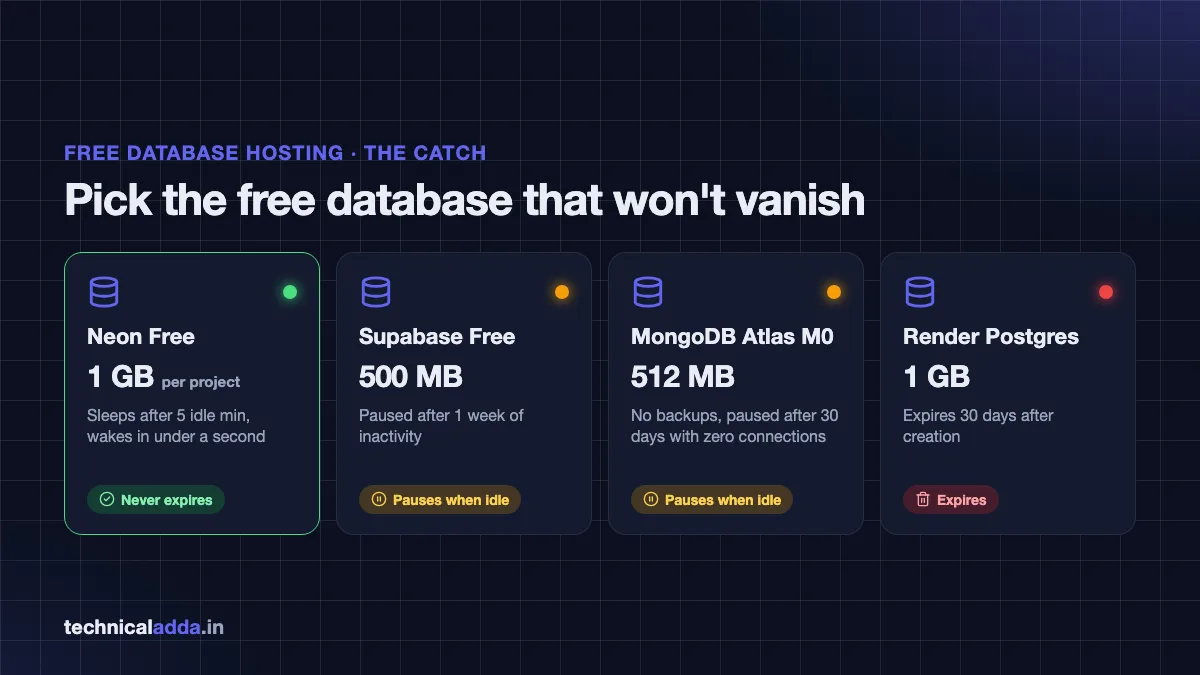
Every free database has a catch: Supabase and Atlas pause when idle, Render's free Postgres expires after 30 days, and Neon doesn't expire.
Common errors and fixes
Most failed free deployments come down to the same few mistakes. Match the symptom first.
| Symptom | Likely cause | Fix |
|---|---|---|
| CORS error in the browser console | CLIENT_URL doesn't match the site's origin |
Copy the exact URL from the address bar, no trailing slash, redeploy the backend |
Frontend calls undefined/api/... |
VITE_API_URL missing or added after the build |
Add it in Vercel, then redeploy; Vite bakes variables in at build time |
404 when refreshing /dashboard |
No SPA fallback | Add the vercel.json rewrite or Netlify _redirects file |
| Render deploy fails with "port scan timeout" | App listens on a fixed port or localhost |
Use process.env.PORT and bind to 0.0.0.0 |
connection is insecure from Postgres |
SSL missing in the URL | Keep ?sslmode=require on the Neon connection string |
| Login works on Chrome but not Safari | Third-party cookie blocked | Use a JWT header or proxy /api through Vercel |
| First request takes about 60 seconds | Render free service was asleep | Loading message, early wake-up call, or a paid instance |
| Data gone after a month | Used Render's free Postgres | Move to Neon or Supabase, which don't expire |
If your API ever moves to your own server and shows a 502 page, our Node.js deployment guide covers PM2 and Nginx fixes.
When to stop using free hosting
Move off free tiers when real users or money depend on the app. The signs are simple: you're showing a loading message to customers, a client is paying you, or you've added ads. Vercel Hobby forbids that last case outright.
The cheapest next step is usually not three paid plans. A small VPS runs the frontend, backend and database together for one fixed monthly price and never sleeps. Hostinger's KVM 1 VPS (1 vCPU, 4 GB RAM) costs $6.49 a month on hostinger.com as of October 2026, paid upfront for the term and renewing at $11.99. Our Node.js deployment guide shows how to move this exact app onto one.
or if you want more RAM per dollar.
| Stage | Setup | Monthly cost |
|---|---|---|
| Learning, portfolio | Vercel + Render free + Neon free | $0 |
| Side project with steady users | Vercel + Railway Hobby + Neon free | About $5 plus usage |
| Paying customers | One VPS with PM2, Nginx and Postgres | From $6.49 |
What is the cost in Indian rupees? The free stack is ₹0. Railway Hobby is about ₹475 a month plus usage at ₹95 per dollar. Hostinger KVM 1 is ₹599 a month on hostinger.in (renews at ₹999), before 18% GST.
Six rules that keep a free deploy alive
- To deploy a full stack app for free, split it: frontend on Vercel or Netlify, backend on Render, database on Neon, Supabase or MongoDB Atlas.
- Render free web services sleep after 15 idle minutes and take about a minute to wake. Plan your UI around it.
- Don't keep data in Render's free Postgres. It expires 30 days after creation.
- Vite bakes
VITE_variables in at build time, so redeploy the frontend after changing them. - Vercel Hobby is non-commercial only. Paid work or ads need Netlify, a paid plan or a VPS.
- Proxying
/apithrough Vercel fixes both CORS and Safari cookie problems in one rule.
Ship it free now, move to a VPS when it earns
You can deploy a full stack app for free today with Vercel for the frontend, Render for the API and Neon for the database. Prepare the repo once with environment variables, deploy in the order database, backend, frontend, and handle the cold start in your UI instead of fighting it.
When the app starts earning or needs to stay awake, move it to one small server with our Node.js deployment guide, and browse more server tutorials in Web Hosting & Servers.
FAQ
Frequently Asked Questions
Can I deploy a full stack app for free?
Yes. Host the React frontend on Vercel Hobby or Netlify, the Node.js backend on a Render free web service and the database on Neon, Supabase or MongoDB Atlas. All have permanent free plans. The trade-offs are cold starts on Render after 15 idle minutes, storage caps of 0.5 to 1 GB, and non-commercial use on Vercel Hobby.
Where can I deploy a backend for free?
Render is the most practical free backend host in 2026: it runs a normal Node.js, Python or Go server with 750 free instance hours a month, but sleeps after 15 minutes idle. Cloudflare Workers is free for 100,000 requests a day but needs Worker-style code. Railway's Free plan gives only $1 of usage a month, and Oracle Cloud's free VMs need a card.
Is Render free tier good enough for production?
No, not for paying users. Render's free web services spin down after 15 minutes without traffic and take about a minute to start again, and the free Postgres database expires after 30 days. It's good for portfolios, college projects and hackathon demos. For production, use a paid Render instance or a small VPS that stays on all the time.
How do I deploy a MERN stack app for free?
Create a free MongoDB Atlas M0 cluster and copy its connection string. Deploy the Express and Node.js API as a Render free web service with that string in MONGODB_URI. Deploy the React frontend on Vercel or Netlify with the Render URL in an environment variable, then allow the frontend's URL in your CORS settings.
Why does my Render app take so long to load?
Your free service went to sleep. Render spins down free web services after 15 minutes with no incoming traffic, and the next request waits about a minute while it starts. Show a loading message, call a health route when the page first loads, or move to a paid instance. Pinging it to stay awake uses up most of your 750 monthly free hours.
Which free database is best for a full stack project?
Neon is the best free Postgres for most projects: no card, 1 GB per project and it doesn't expire. Choose Supabase if you also want built-in login and file storage, but note it pauses after a week of inactivity. Choose MongoDB Atlas M0 for MERN projects that already use MongoDB, with its 512 MB storage limit.
Can I deploy a full stack app on Vercel alone?
Yes, if your backend can run as serverless functions, such as Next.js API routes or route handlers. Vercel then hosts both layers, and you add a database like Neon or Supabase. A traditional Express server with WebSockets or background jobs fits better on Render. Remember that Vercel Hobby only allows personal, non-commercial projects.
Do I need a credit card to deploy for free?
Not for the main stack. Neon says no card is needed for its free plan, and Vercel, Netlify, Render and MongoDB Atlas let you start free plans without one. Oracle Cloud's Always Free tier does ask for a card for identity verification, and AWS needs a card for its free tier.
How do I fix CORS errors after deploying?
Set your backend's allowed origin to the exact frontend URL from the browser's address bar, including https and without a trailing slash, then redeploy the backend. If you use cookies for login, also enable credentials: true on both sides, or proxy /api through your frontend host so frontend and API share one domain.
Where to buy
-
Visit official site (opens in new tab)
Hostinger
-
Visit official site (opens in new tab)
Contabo