Self Hosted Supabase on a VPS: Docker Bypasses ufw, So Close These 3 Ports
Web Hosting & Servers 13 min read By David Johnson
In this articleTable of contents13
Last updated: 28 November 2026
Self hosted Supabase runs well on a VPS with 8 GB RAM and 2 or more vCPUs, using the official Docker setup script. It's worth it if you need data on your own server, want no project pausing, or have outgrown the free tier's limits. If you just want a free database for a side project, Supabase Cloud is less work.
This guide covers the official requirements, the one-line installer, the secrets you must change, HTTPS with Caddy, the database ports most guides forget to block, backups, and Coolify and Hostinger shortcuts. Commands were checked against Supabase's docs and GitHub repo in October 2026.
Quick answer: To self-host Supabase, take a fresh Ubuntu 24.04 VPS with at least 4 GB RAM (8 GB recommended), run
curl -fsSL https://supabase.link/setup.sh | sh, enter your domain when asked, thencd supabase-project && sh run.sh start. Add HTTPS withsh run.sh config add caddy, and block ports 5432 and 6543 in your cloud firewall.
What self hosted Supabase gives you (and what it doesn't)
Supabase is an open-source backend built on PostgreSQL. It bundles a database, user login (Auth), auto-generated REST APIs, file storage, realtime updates and edge functions behind one dashboard called Studio. The GitHub repo (opens in new tab) is licensed Apache 2.0, so you can run the whole stack on your own server for free.
Why Indian developers look at it:
- No pausing. Supabase's free cloud projects pause after one week of inactivity. Your own server doesn't.
- Your domain, your server. In late February 2026, Supabase's API domains became unreachable for many users on Jio, Airtel and ACT Fibernet after what Supabase called a ministry order, MediaNama reported (opens in new tab). Access was restored on 5 March 2026. A self-hosted instance on your own domain doesn't depend on the
supabase.codomains. - Fixed cost. You pay for a VPS, not per user or per gigabyte of egress.
What you give up, per Supabase's self-hosting overview (opens in new tab): branching, managed backups, point-in-time recovery (PITR) and advanced metrics. Self-hosted Studio handles one project per stack, not multiple organisations. Support is community-only through GitHub, Discord and Reddit.
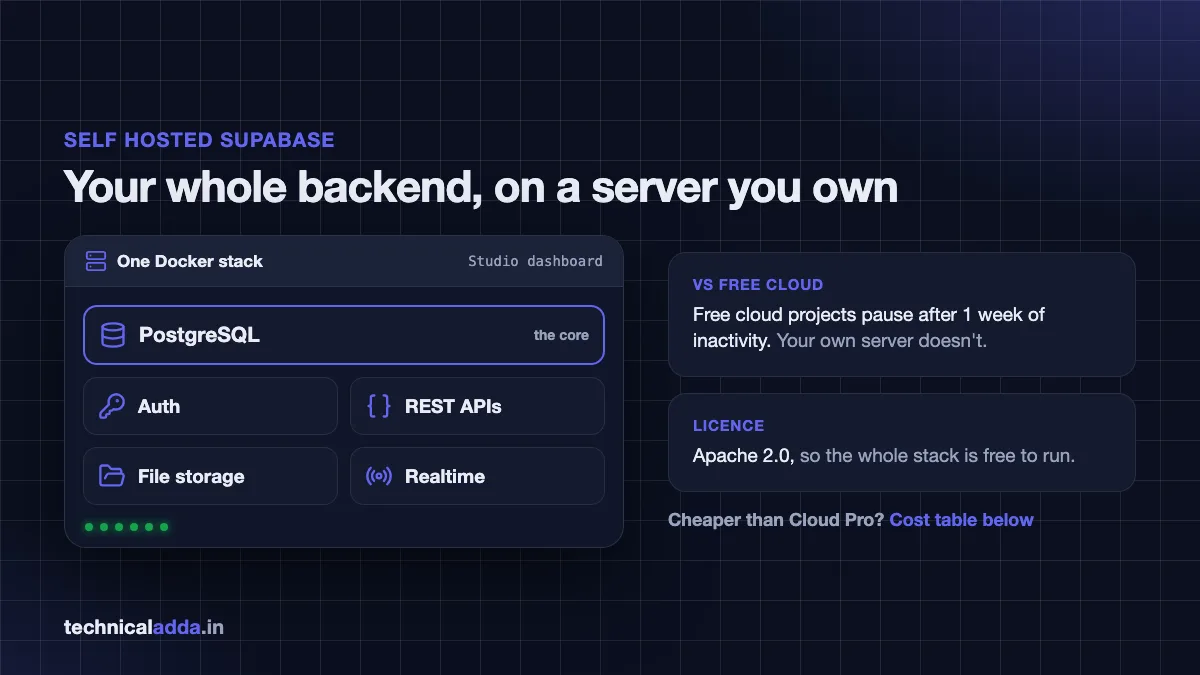
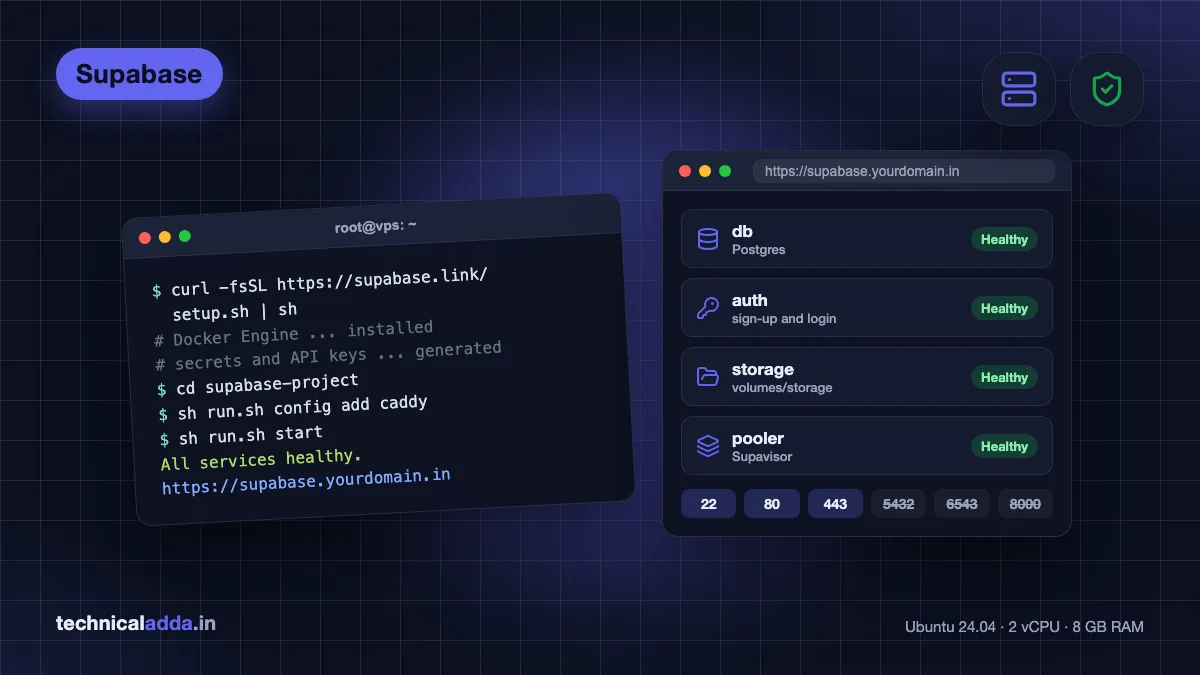
One self-hosted Supabase stack runs Postgres, Auth, the REST APIs, storage and Realtime on your own server, and it never pauses.
Supabase self hosted requirements
The official Docker guide (opens in new tab) lists these:
| Resource | Minimum | Recommended |
|---|---|---|
| RAM | 4 GB | 8 GB+ |
| CPU | 2 cores | 4 cores+ |
| Disk | 40 GB SSD | 80 GB+ SSD |
| OS for the setup script | Debian/Ubuntu or RHEL/CentOS/Fedora | Ubuntu 24.04 LTS |
| Software | Git, Docker Engine, Docker Compose | Installed by the script if missing |
The stack runs about a dozen containers: Studio, an API gateway (Envoy by default, Kong optional), Auth, PostgREST, Realtime, Storage, imgproxy, postgres-meta, Postgres, Edge Runtime and the Supavisor connection pooler. Logflare and Vector for logs are optional and off by default.
RAM is the tight resource. The docs say you can remove services you don't use, such as Realtime, Storage, imgproxy or Edge Runtime, from docker-compose.yml to lower the requirement. If your app only needs a database, Auth and the REST API, trimming saves real memory.
Self hosted Supabase vs Supabase Cloud cost
Prices checked in October 2026 on the vendors' US dollar pricing pages.
| Option | What you get | Price | Watch out for |
|---|---|---|---|
| Supabase Cloud Free | 500 MB database, 1 GB storage, 50,000 monthly active users, 2 active projects | $0 | Pauses after 1 week of inactivity |
| Supabase Cloud Pro | Includes $10/month compute credits (one Micro instance) | From $25/month | Billed in USD, usage charges on top |
| Hostinger KVM 2 (self-hosted) | 2 vCPU, 8 GB RAM, 100 GB NVMe | $8.79/month promo, renews $14.99/month | Long upfront term for the promo |
| Hostinger KVM 4 (self-hosted) | 4 vCPU, 16 GB RAM, 200 GB NVMe | $12.99/month promo, renews $28.99/month | Overkill for one small app |
| Oracle Cloud Always Free | Arm instance | $0 | Card needed, capacity not always available |
Sources: Supabase pricing (opens in new tab), Hostinger VPS plans (opens in new tab).
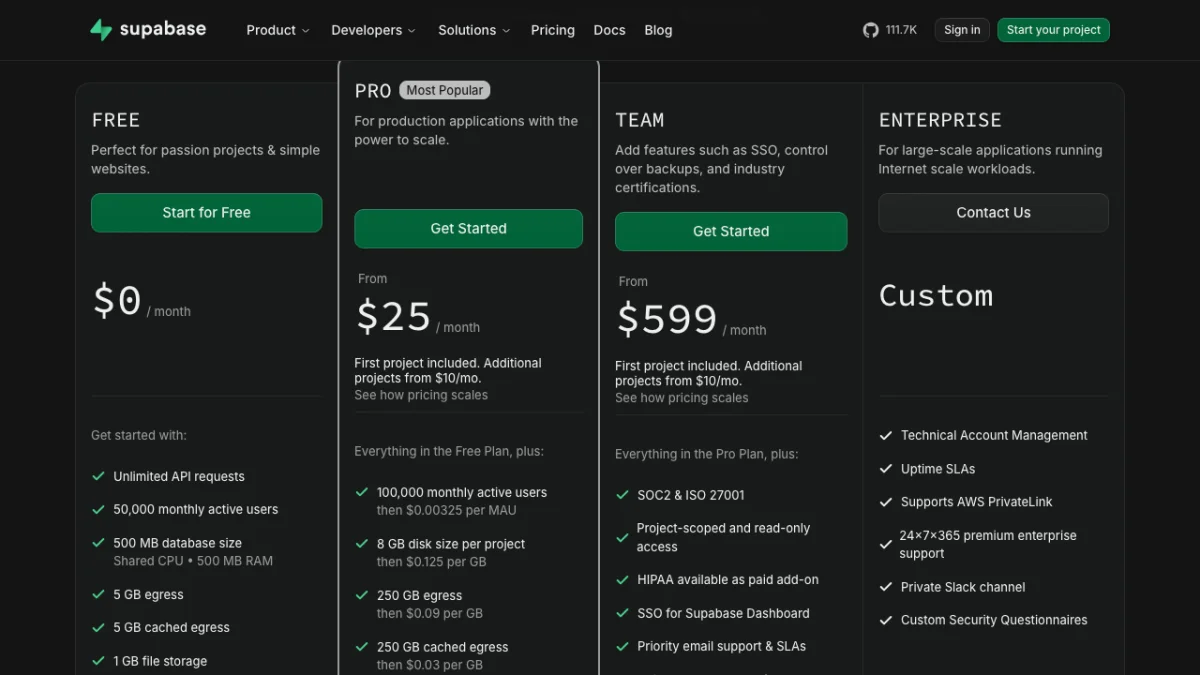
Supabase Cloud Pro starts at $25 a month with usage charges on top, which is the number a self-hosted VPS has to beat.
What is the cost in Indian rupees? Supabase Pro bills in dollars, about ₹2,375 a month at ₹95 per dollar plus usage. On hostinger.in, KVM 2 is ₹779 a month promo (renews at ₹1,199) and KVM 4 ₹1,099 (renews at ₹2,399), before 18% GST. The free options stay ₹0.
Hostinger's KVM 1 has 4 GB RAM but only 1 vCPU, which is below Supabase's 2-core minimum, so start at KVM 2.. Contabo gives more RAM per dollar but bills in USD or EUR; our Contabo VPS review covers the catch. For a free Arm server to learn on, follow our Oracle Cloud free tier VPS guide. Comparing more hosts? See our best VPS hosting in India list.
Our take: stay on Supabase Cloud Free for prototypes. Self-host when you need data control, run several small apps on one bill, or keep hitting the pause and size limits.
Before you start
- A fresh VPS with Ubuntu 24.04 LTS, 8 GB RAM and 2+ vCPU. Nothing else should be using ports 80 and 443.
- SSH access. New to it? Read how to connect to a VPS using SSH.
- Basic hardening done: a sudo user, SSH keys and updates. Our Ubuntu VPS initial server setup guide covers this in 15 minutes.
- A domain or subdomain such as
supabase.yourdomain.in, with an A record pointing to the server IP. - An SMTP account for sign-up and password reset emails. Supabase's docs suggest AWS SES; any SMTP provider works.
How to install self hosted Supabase with Docker
These steps follow Supabase's official Docker guide. Run them as root or with sudo.
Step 1: Update the server
ssh root@your-server-ip
apt update && apt upgrade -y
Reboot if a new kernel was installed, then log back in.
Step 2: Run the setup script
curl -fsSL https://supabase.link/setup.sh | sh
The script installs git, openssl, jq and Docker Engine with the Compose plugin if they're missing, downloads the official docker folder, creates a supabase-project directory and generates every secret and API key for you.
It then asks for four values:
| Prompt | What to enter |
|---|---|
| SUPABASE_PUBLIC_URL | https://supabase.yourdomain.in (Studio and APIs) |
| API_EXTERNAL_URL | https://supabase.yourdomain.in/auth/v1 (accept the default) |
| SITE_URL | Your frontend app's URL, used for Auth redirects |
| PROXY_DOMAIN | supabase.yourdomain.in (used by Caddy for HTTPS) |
Prefer doing it by hand? The docs also show a manual route: git clone --depth 1 --branch self-hosted/v0.8.3 https://github.com/supabase/supabase, copy supabase/docker/. into a project folder, copy .env.example to .env, then run sh utils/generate-keys.sh and sh utils/add-new-auth-keys.sh. Version v0.8.3 was the latest tag when we checked; use whatever the docs show today.
Step 3: Check the secrets
cd supabase-project
sh run.sh secrets
Copy these into a password manager. The ones that matter most:
POSTGRES_PASSWORD: the database password.SUPABASE_PUBLISHABLE_KEY: safe for client code (anon role).SUPABASE_SECRET_KEY: server-side only. Never put it in a frontend or a mobile app.DASHBOARD_USERNAMEandDASHBOARD_PASSWORD: the Studio login.
If you used the manual route, open .env and confirm none of the example defaults remain. The file itself says to change every default before the first start, and other guides warn that a stack started with demo secrets is open to anyone who finds it.
Step 4: Set up email
Edit .env and replace the fake mail values with your SMTP provider's details:
[email protected]
SMTP_HOST=your-smtp-host
SMTP_PORT=587
SMTP_USER=your-smtp-user
SMTP_PASS=your-smtp-password
SMTP_SENDER_NAME=Your App
Without this, sign-up confirmation and password reset emails never arrive.
Step 5: Start the stack
sh run.sh start
sh run.sh status
run.sh start runs docker compose up -d --wait. The setup script already pulled the images, so this step mostly waits for health checks. Every container should show as running or healthy.
Add HTTPS with Caddy
Out of the box, Studio and the APIs sit on plain HTTP at port 8000. The docs recommend a reverse proxy, and the repo ships a ready Caddy override:
sh run.sh config add caddy
sh run.sh start
Caddy reads PROXY_DOMAIN from .env, gets a Let's Encrypt certificate on ports 80 and 443, and sends API paths (/auth/v1, /rest/v1, /storage/v1 and others) to the gateway. Everything else goes to Studio behind a password prompt using your dashboard username and password. The override also removes the gateway's public port 8000 binding.
Check that it works:
curl -I https://supabase.yourdomain.in/auth/v1/
A 401 response is correct here. If you changed API_EXTERNAL_URL after the first start, run sh run.sh recreate. Prefer Nginx? sh run.sh config add nginx uses Certbot and also needs CERTBOT_EMAIL set. The HTTPS guide (opens in new tab) covers both.
For how free certificates work, see our free SSL certificate guide.
Connect your app and the database
In your frontend, use the Supabase JS client with your own URL:
import { createClient } from '@supabase/supabase-js'
const supabase = createClient('https://supabase.yourdomain.in', 'YOUR_PUBLISHABLE_KEY')
For direct Postgres access (migrations, ORMs like Prisma or Drizzle), Supavisor pools connections on two ports. Per the Accessing Postgres guide (opens in new tab):
| Mode | Port | Username format | Use for |
|---|---|---|---|
| Session (default) | 5432 | postgres.your-tenant-id |
Long-lived servers, migrations |
| Transaction | 6543 | postgres.your-tenant-id |
Serverless and edge functions, no prepared statements |
| Direct | Not exposed by default | postgres |
Admin work, after you add a port mapping |
The tenant ID comes from POOLER_TENANT_ID in .env (default your-tenant-id). Leaving it out of the username is a common cause of the "Tenant or user not found" error.
Block these ports from the internet. The default compose file publishes 5432 and 6543 on the host. Docker writes its own iptables rules, so ufw deny 5432 may not stop it. Close 5432 and 6543 in your VPS provider's cloud firewall, and connect through an SSH tunnel instead:
ssh -L 5432:localhost:5432 user@your-server-ip
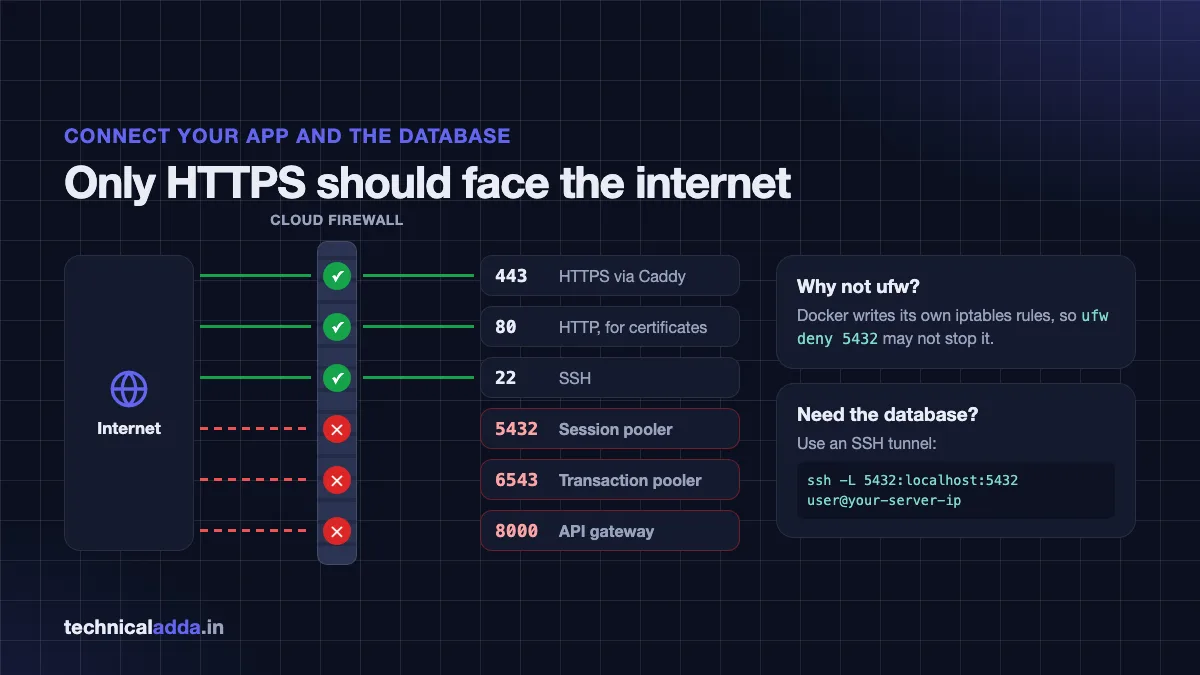
Only HTTPS should face the internet; block the Postgres ports in the cloud firewall because Docker can bypass ufw.
Shortcuts: Coolify and the Hostinger template
Coolify supabase. If you already run Coolify, Supabase is in its one-click services. Coolify handles the domain and HTTPS, and shows keys under Environment Variables (the anon key is SERVICE_SUPABASEANON_KEY). Coolify's Supabase docs (opens in new tab) note a bug with making the database public and give a compose-file workaround. Our Coolify install guide sets up the base server.
Hostinger template. Hostinger offers an "Ubuntu 24.04 with Supabase" VPS template with the stack preinstalled. Its support guide (opens in new tab) says Studio opens at http://your-vps-ip:8000, with username supabase and the password you set during VPS setup. You still need to add HTTPS, set SMTP and lock down ports yourself.
| Method | Setup effort | HTTPS | Best for |
|---|---|---|---|
| Official script | About 15 minutes | Caddy or Nginx override | Most people, full control |
| Coolify one-click | A few clicks on an existing Coolify server | Automatic | Several apps on one server |
| Hostinger template | Pick at VPS setup | Manual | Fastest start on Hostinger |
Backups, updates and security
Backups are your job now. Self-hosted Supabase has no managed backups or PITR. Back up three things:
- The database. The Supabase CLI's
supabase db dump --db-url "<connection string>"exports roles, schema and data (--role-only, default schema,--data-only) as separate SQL files, and it skips Supabase's internal schemas. Run it nightly from cron. - Stored files in
volumes/storage. A database restore without them leaves file records pointing at nothing. - The
.envfile, kept off the server. It holds every secret.
Copy backups to another server or S3-compatible storage, take provider snapshots before big changes, and test a restore once. A backup you've never restored is a guess.
Updates. sh run.sh pull pulls new images, and update.sh handles full version upgrades with a merge of your config. Don't mix image tags from different releases; the docs say mixed versions aren't guaranteed to work.
Security checklist:
- No example secrets left in
.env. - Studio only behind HTTPS with a strong dashboard password.
- Ports 5432, 6543 and 8000 closed in the cloud firewall; only 22, 80 and 443 open.
SUPABASE_SECRET_KEYonly on servers, never in client code.- Row Level Security (RLS) enabled on every table your app exposes.
- SSH key login with passwords disabled. Our secure Linux VPS server checklist covers the rest.
Common problems and fixes
Studio keeps asking for a password. It uses basic auth. The dashboard password must contain at least one letter and no special characters, per the docs. Change it in .env and run sh run.sh recreate.
Containers restart in a loop. Usually RAM. Check docker stats, add swap, or remove services you don't need from docker-compose.yml.
Emails never arrive. SMTP still points to the default fake mail server. Fill the SMTP_ values and recreate the Auth container.
Auth redirects to localhost. SITE_URL or API_EXTERNAL_URL still holds a localhost value. Fix both in .env and run sh run.sh recreate.
"Tenant or user not found" from Postgres. Your username is missing the tenant ID. Use postgres.your-tenant-id, not just postgres.
Certificate not issued. DNS isn't pointing to the server yet, or port 80 is closed. Check with nslookup supabase.yourdomain.in and read docker logs supabase-caddy.
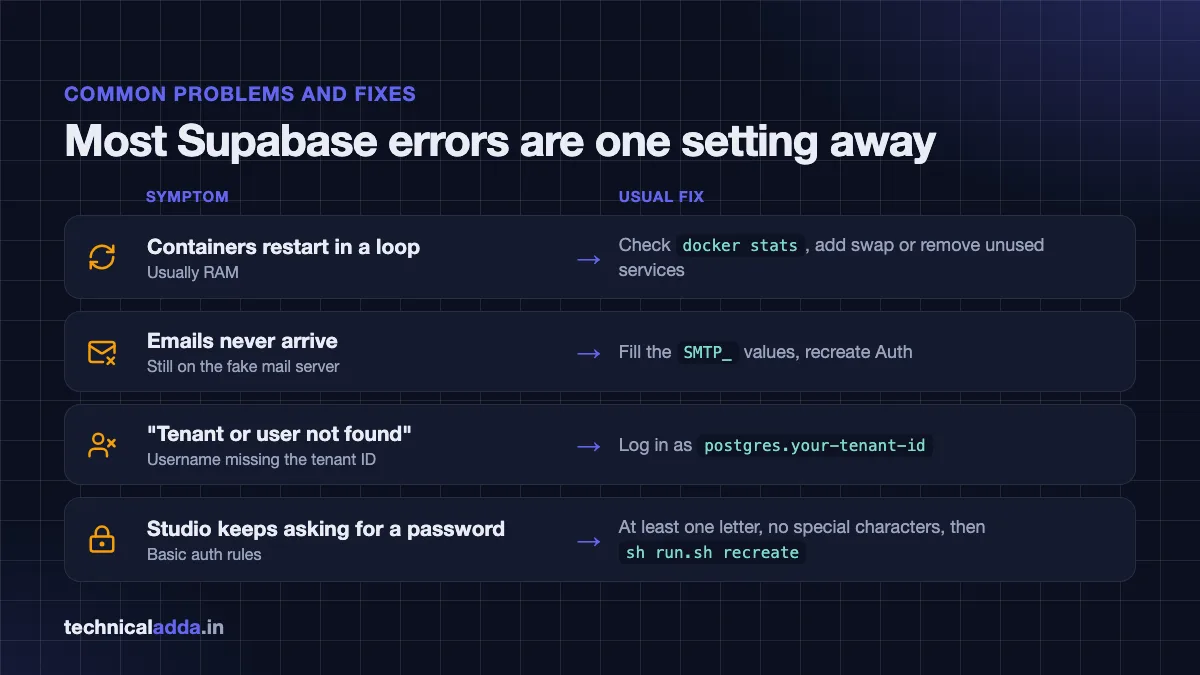
Four common self-hosted Supabase problems and the setting that usually fixes each one.
Before you put Supabase on your own VPS
- Self hosted Supabase needs 4 GB RAM, 2 cores and 40 GB SSD at minimum; 8 GB RAM is the practical start.
- Install with
curl -fsSL https://supabase.link/setup.sh | sh, thensh run.sh startinsidesupabase-project. - Add HTTPS with
sh run.sh config add caddyand aPROXY_DOMAINthat points to your server. - Close ports 5432, 6543 and 8000 in the cloud firewall, because Docker can bypass ufw.
- You own backups: database dumps, the
volumes/storagefolder and.env. - Stay on Supabase Cloud Free for prototypes; self-host for data control, no pausing and one fixed bill.
Self-host Supabase when control beats convenience
If you want your data on your own server, no free-tier pausing and one fixed monthly bill, self hosted Supabase is worth the extra work. Start with an 8 GB Ubuntu 24.04 VPS, run the setup script, add Caddy for HTTPS, close the database ports and set up backups on day one.
Planning more self-hosted tools on the same server? Our guide to self host n8n with Docker pairs well with Supabase for automations, and more server guides live in our hosting category.
FAQ
Frequently Asked Questions
Is self hosted Supabase free?
Yes. Supabase is open source under the Apache 2.0 licence, and self-hosting has no licence fee. You pay only for the server. On Hostinger, a KVM 2 plan with 2 vCPU and 8 GB RAM costs $8.79 a month on promo and renews at $14.99 on hostinger.com (₹779 and ₹1,199 on hostinger.in, before GST), as of October 2026.
What are the minimum requirements to self-host Supabase?
Supabase's Docker guide lists 4 GB RAM, 2 CPU cores and 40 GB SSD as the minimum, with 8 GB RAM, 4 cores and 80 GB SSD recommended. You also need Docker Engine, Docker Compose and Git, which the official setup script installs on Debian, Ubuntu, RHEL, CentOS and Fedora.
Which features are missing in self hosted Supabase?
Per Supabase's docs, self-hosted setups don't get branching, managed backups, point-in-time recovery or advanced metrics. Studio supports one project per stack, not multiple organisations or projects. Logs are off by default and need an override. Support comes from the community through GitHub, Discord and Reddit, not a paid support team.
How do I add HTTPS to self hosted Supabase?
Set PROXY_DOMAIN in .env to a domain pointing at your server, then run sh run.sh config add caddy and sh run.sh start. Caddy fetches a Let's Encrypt certificate and serves Studio and the APIs on port 443. Check with curl -I https://your-domain/auth/v1/, which should return 401.
Can I run Supabase on a 4 GB VPS?
Yes, 4 GB is Supabase's stated minimum, but it's tight with every service running. Remove services you don't use, such as Realtime, Storage, imgproxy or Edge Runtime, and add swap. Also check the CPU: some 4 GB plans, like Hostinger KVM 1, have one vCPU, below the 2-core minimum.
How do I connect to Postgres on self hosted Supabase?
Use Supavisor on port 5432 for session mode or 6543 for transaction mode. The username must include the tenant ID, in the format postgres.your-tenant-id, with POSTGRES_PASSWORD as the password. Keep these ports closed to the internet and connect over an SSH tunnel from your laptop or app server.
Can I install Supabase with Coolify?
Yes. Supabase is one of Coolify's one-click services, and Coolify handles the domain and HTTPS for you. The anon key appears under Environment Variables as SERVICE_SUPABASEANON_KEY. Coolify's docs mention a bug when making the database public, with a compose-file workaround, so keep the database private if you can.
Does self hosting avoid the Supabase block in India?
It removes your dependence on Supabase's own supabase.co domains, which some Indian ISPs blocked from late February 2026 until access was restored on 5 March 2026. A self-hosted instance runs on your domain and server. It's a reason to consider self-hosting, but you take on backups, updates and uptime yourself.
How do I update self hosted Supabase?
Run sh run.sh pull to fetch new images, then sh run.sh recreate to restart on them, or use the update.sh script for full version upgrades, which merges your configuration. Back up the database, storage folder and .env first. Supabase's docs warn that mixing image tags from different releases isn't guaranteed to work.
Where to buy
-
Visit official site (opens in new tab)
Hostinger