Self Host n8n With Docker and Postgres: Never Run docker compose down -v
AI Coding 19 min read By David Johnson
In this articleTable of contents14
Last updated: 20 November 2026
If you want to self host n8n for real work, run it on Docker Compose with PostgreSQL, a separate task runner container and Caddy for free HTTPS. That's the setup this guide builds. It costs nothing in licence fees under n8n's Community Edition, and on a $6.49 to $12 a month VPS (about ₹600 to ₹1,000 in India) it handles far more executions than n8n Cloud's entry plan.
Our earlier guide to install n8n on a VPS uses n8n's quick-start stack: SQLite and Traefik. It's fine for learning. This one is the step up: a real database, backups you can restore while n8n keeps running, the n8n 2.x task runner sidecar, and a clean path to migrate your existing SQLite data.
Quick answer: To self host n8n in production, rent a VPS with 4 GB RAM, point a subdomain at it, install Docker, then run a Compose stack with four containers: Caddy (automatic Let's Encrypt SSL), n8n, the n8nio/runners task runner and PostgreSQL. Set N8N_ENCRYPTION_KEY yourself, back up with pg_dump, and never run docker compose down -v.
Ways to self host n8n in 2026
There are five realistic ways to run n8n yourself. Pick by how much server work you want to do.
| Option | Database | SSL | Effort | Best for |
|---|---|---|---|---|
| Hostinger n8n VPS template | Template default | Template default | Lowest | Beginners who want n8n preinstalled |
| DigitalOcean Marketplace 1-click | Not stated on the listing | Not stated on the listing | Low | Existing DigitalOcean users |
| Docker Compose with SQLite and Traefik | SQLite | Traefik, automatic | Medium | Learning, personal use (our guide) |
| Docker Compose with Postgres and Caddy | PostgreSQL | Caddy, automatic | Medium | Business workflows, AI agents, anything you can't lose (this guide) |
| Coolify or another self-hosted PaaS | Your choice | Automatic | Medium | Running n8n beside other apps (Coolify install guide) |
For comparison, n8n Cloud's Starter plan is about $22 a month billed annually for 2,500 executions (n8n lists it as €20), per n8n's pricing page (opens in new tab) on 20 October 2026. Self-hosted Community Edition has no execution cap from n8n; your server is the limit.
What is the cost in Indian rupees? n8n Cloud Starter is about ₹2,130 a month at ₹95 per dollar, billed yearly in euros, so your bank's foreign currency markup applies. The self-hosted Community Edition is ₹0 in licence fees.
"Free" has a catch worth stating. The software is free under n8n's Sustainable Use License for your own or your company's internal use. The server isn't free, and you become the person who patches, backs up and fixes it at midnight.
Why PostgreSQL instead of SQLite
SQLite is a single file inside the n8n volume. It works well until three things happen at once: you run many executions, you store big execution logs, and you need a backup you can trust. PostgreSQL handles all three better.
- Queue mode needs it. n8n's queue mode docs say running a distributed setup over SQLite isn't supported. If you ever add workers, you'll need Postgres anyway.
- Disk space comes back. n8n's execution data docs note that with SQLite, pruned data doesn't free disk space automatically; you need
DB_SQLITE_VACUUM_ON_STARTUPor a manual VACUUM. - Live backups.
pg_dumptakes a consistent snapshot while n8n keeps running. With SQLite, the safest copy means stopping the container. - Your tools work. You can query execution stats, connect a read-only dashboard or point a managed database at it later.
The cost is one more container to update and about 15 more lines of config. For anything that touches customers or money, that's a good trade.
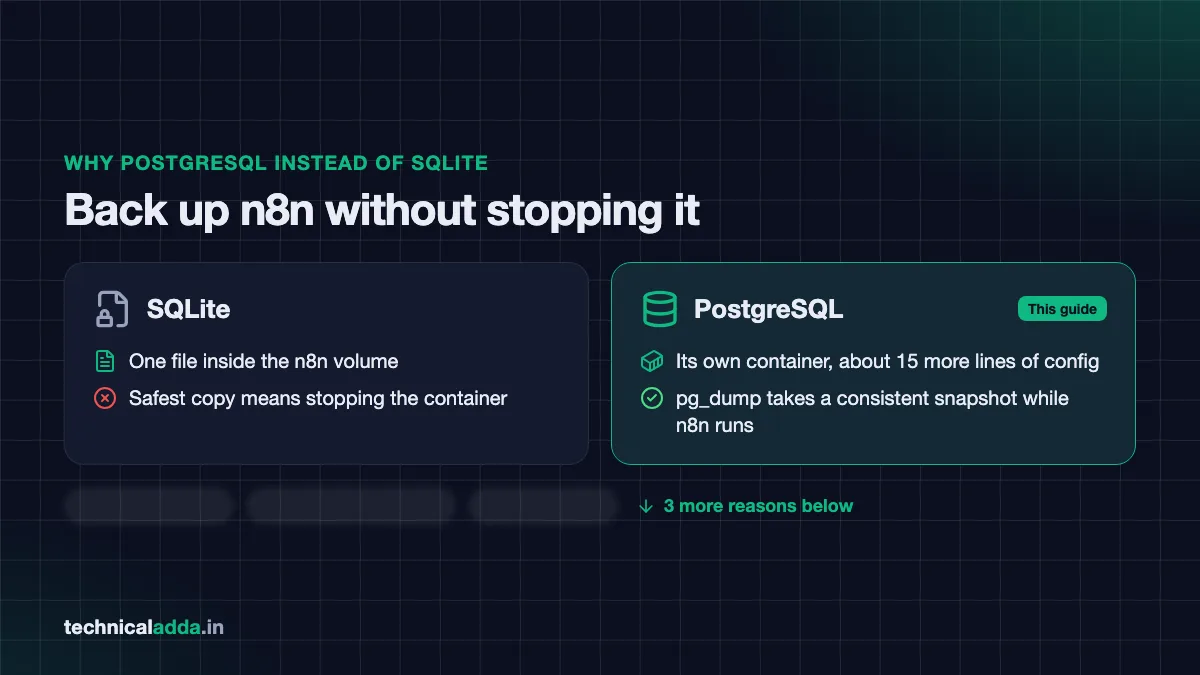
The biggest reason to switch: pg_dump backs up PostgreSQL while n8n keeps running. Three more reasons follow below.
Which VPS for n8n
n8n itself is light when idle, but its memory docs explain that usage climbs with Code nodes, large JSON or binary data and many workflows running at once. Add Postgres, the task runner and Caddy, and 2 GB gets tight. Our recommendation is 4 GB RAM as the starting point for this stack.
Hostinger sells VPS plans with n8n preinstalled through an "Ubuntu 24.04 with n8n" template, and also offers a queue mode template. Prices on its n8n hosting page (opens in new tab) on 20 October 2026:
| Plan | Specs | Intro price | Renewal |
|---|---|---|---|
| KVM 1 | 1 vCPU, 4 GB RAM, 50 GB NVMe | $6.49/month | $11.99/month |
| KVM 2 | 2 vCPU, 8 GB RAM, 100 GB NVMe | $8.79/month | $14.99/month |
| KVM 4 | 4 vCPU, 16 GB RAM, 200 GB NVMe | $12.99/month | $28.99/month |
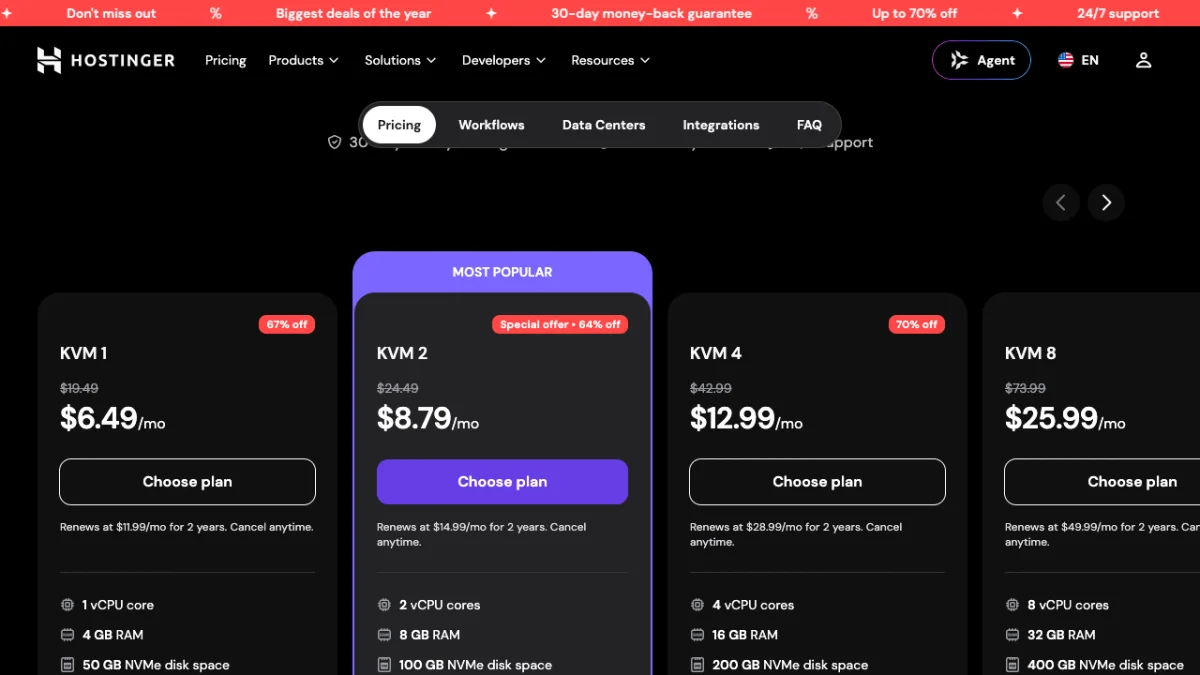
Hostinger's n8n VPS plans start at KVM 1 with 4 GB RAM, and each card shows the higher renewal price under the intro price.
What is the cost in Indian rupees? On hostinger.in (checked 20 October 2026): KVM 1 is ₹599 a month (renews at ₹999), KVM 2 ₹779 (renews at ₹1,199) and KVM 4 ₹1,099 (renews at ₹2,399), all before 18% GST.
Hostinger says plans are paid upfront, so check the term length, the total and GST at checkout. Even on Hostinger, you can pick plain Ubuntu 24.04 and follow this guide instead of the template, which gives you full control over the database and versions. Our Hostinger review covers support and renewal pricing.
DigitalOcean's Marketplace has an n8n 1-click image on Ubuntu 24.04, listed by a third party (automaze.me) rather than by n8n. Check what it configures before using it for production. For more providers, see our list of the best VPS hosting in India.
Before you start
You need:
- A VPS with Ubuntu 24.04, root or sudo access and a public IPv4 address. New to servers? Read how to connect to a VPS using SSH first, then lock it down with our secure Linux VPS checklist.
- A subdomain such as
n8n.yourdomain.inwith an A record pointing to the VPS IP. DNS must resolve before Caddy can fetch a certificate. - Ports 80 and 443 open in your provider's cloud firewall and in UFW.
- Docker Engine and the Compose plugin. Install them from Docker's official Ubuntu repository as shown in our install n8n on VPS guide (Step 4), then check with
docker compose version. The commands below assume your user is in thedockergroup; if not, prefix them withsudo.
Open the firewall ports:
sudo ufw allow OpenSSH
sudo ufw allow 80/tcp
sudo ufw allow 443/tcp
sudo ufw enable
This allows SSH, HTTP (needed for Let's Encrypt) and HTTPS, then turns the firewall on. In this stack only Caddy publishes ports, so n8n and Postgres are never reachable from the internet directly.
Self host n8n with Docker Compose, Postgres and Caddy
This stack follows n8n's official withPostgres example (opens in new tab) from its n8n-hosting repository (checked 20 October 2026, pinned to n8n 2.43.8, the stable release that day), with Caddy added for SSL and production settings from the n8n docs.
Step 1: Create the project folder
mkdir -p ~/n8n-prod/local-files ~/n8n-prod/backups
cd ~/n8n-prod
sudo chown 1000:1000 local-files
This creates the project folder, a shared files folder and a backups folder. The chown gives the shared folder to user ID 1000, which the n8n container runs as.
Step 2: Generate secrets
openssl rand -hex 32
Run this four times and keep the outputs. You'll use them for the Postgres admin password, the n8n database password, the n8n encryption key and the task runner token.
Step 3: Create the .env file
nano .env
Paste this, replacing the domain and every paste-... value:
N8N_VERSION=2.43.8
DOMAIN=n8n.yourdomain.in
GENERIC_TIMEZONE=Asia/Kolkata

POSTGRES_USER=pgadmin
POSTGRES_PASSWORD=paste-secret-1
POSTGRES_DB=n8n
POSTGRES_NON_ROOT_USER=n8n
POSTGRES_NON_ROOT_PASSWORD=paste-secret-2

N8N_ENCRYPTION_KEY=paste-secret-3
RUNNERS_AUTH_TOKEN=paste-secret-4
Then lock the file down with chmod 600 .env. Copy the whole file into your password manager now. The encryption key protects every saved credential, and without it a database backup can't decrypt your API keys.
Step 4: Create the database init script
nano init-data.sh
Paste n8n's official script, which creates a separate, non-admin database user for n8n:
#!/bin/bash
set -e;
if [ -n "${POSTGRES_NON_ROOT_USER:-}" ] && [ -n "${POSTGRES_NON_ROOT_PASSWORD:-}" ]; then
  psql -v ON_ERROR_STOP=1 --username "$POSTGRES_USER" --dbname "$POSTGRES_DB" <<-EOSQL
    CREATE USER ${POSTGRES_NON_ROOT_USER} WITH PASSWORD '${POSTGRES_NON_ROOT_PASSWORD}';
    GRANT ALL PRIVILEGES ON DATABASE ${POSTGRES_DB} TO ${POSTGRES_NON_ROOT_USER};
    GRANT CREATE ON SCHEMA public TO ${POSTGRES_NON_ROOT_USER};
EOSQL
fi
Make it executable with chmod +x init-data.sh. It runs only once, on the first start with an empty database.
Step 5: Create the Caddyfile
nano Caddyfile
n8n.yourdomain.in {
    reverse_proxy n8n:5678
}
Use your real subdomain. Caddy fetches and renews a Let's Encrypt certificate on its own, redirects HTTP to HTTPS and passes the WebSocket connections the n8n editor needs. No Certbot, no cron job.
Step 6: Create compose.yaml
nano compose.yaml
services:
  caddy:
    image: caddy:2
    restart: always
    ports:
      - "80:80"
      - "443:443"
    volumes:
      - ./Caddyfile:/etc/caddy/Caddyfile:ro
      - caddy_data:/data
      - caddy_config:/config
    depends_on:
      - n8n

  postgres:
    image: postgres:18
    restart: always
    environment:
      - POSTGRES_USER
      - POSTGRES_PASSWORD
      - POSTGRES_DB
      - POSTGRES_NON_ROOT_USER
      - POSTGRES_NON_ROOT_PASSWORD
      - PGDATA=/var/lib/postgresql/data
    volumes:
      - db_storage:/var/lib/postgresql/data
      - ./init-data.sh:/docker-entrypoint-initdb.d/init-data.sh
    healthcheck:
      test: ["CMD-SHELL", "pg_isready -h localhost -U ${POSTGRES_USER} -d ${POSTGRES_DB}"]
      interval: 5s
      timeout: 5s
      retries: 10

  n8n:
    image: docker.n8n.io/n8nio/n8n:${N8N_VERSION}
    restart: always
    environment:
      - DB_TYPE=postgresdb
      - DB_POSTGRESDB_HOST=postgres
      - DB_POSTGRESDB_PORT=5432
      - DB_POSTGRESDB_DATABASE=${POSTGRES_DB}
      - DB_POSTGRESDB_USER=${POSTGRES_NON_ROOT_USER}
      - DB_POSTGRESDB_PASSWORD=${POSTGRES_NON_ROOT_PASSWORD}
      - N8N_ENCRYPTION_KEY=${N8N_ENCRYPTION_KEY}
      - N8N_HOST=${DOMAIN}
      - N8N_PROTOCOL=https
      - N8N_PROXY_HOPS=1
      - N8N_WEBHOOK_URL=https://${DOMAIN}/
      - GENERIC_TIMEZONE=${GENERIC_TIMEZONE}
      - TZ=${GENERIC_TIMEZONE}
      - NODE_ENV=production
      - N8N_ENFORCE_SETTINGS_FILE_PERMISSIONS=true
      - N8N_RESTRICT_FILE_ACCESS_TO=/files
      - EXECUTIONS_DATA_PRUNE=true
      - EXECUTIONS_DATA_MAX_AGE=168
      - N8N_RUNNERS_MODE=external
      - N8N_RUNNERS_AUTH_TOKEN=${RUNNERS_AUTH_TOKEN}
      - N8N_RUNNERS_BROKER_LISTEN_ADDRESS=0.0.0.0
    volumes:
      - n8n_storage:/home/node/.n8n
      - ./local-files:/files
    depends_on:
      postgres:
        condition: service_healthy

  n8n-runner:
    image: n8nio/runners:${N8N_VERSION}
    restart: always
    environment:
      - N8N_RUNNERS_AUTH_TOKEN=${RUNNERS_AUTH_TOKEN}
      - N8N_RUNNERS_TASK_BROKER_URI=http://n8n:5679
    depends_on:
      - n8n

volumes:
  caddy_data:
  caddy_config:
  db_storage:
  n8n_storage:
What each part does:
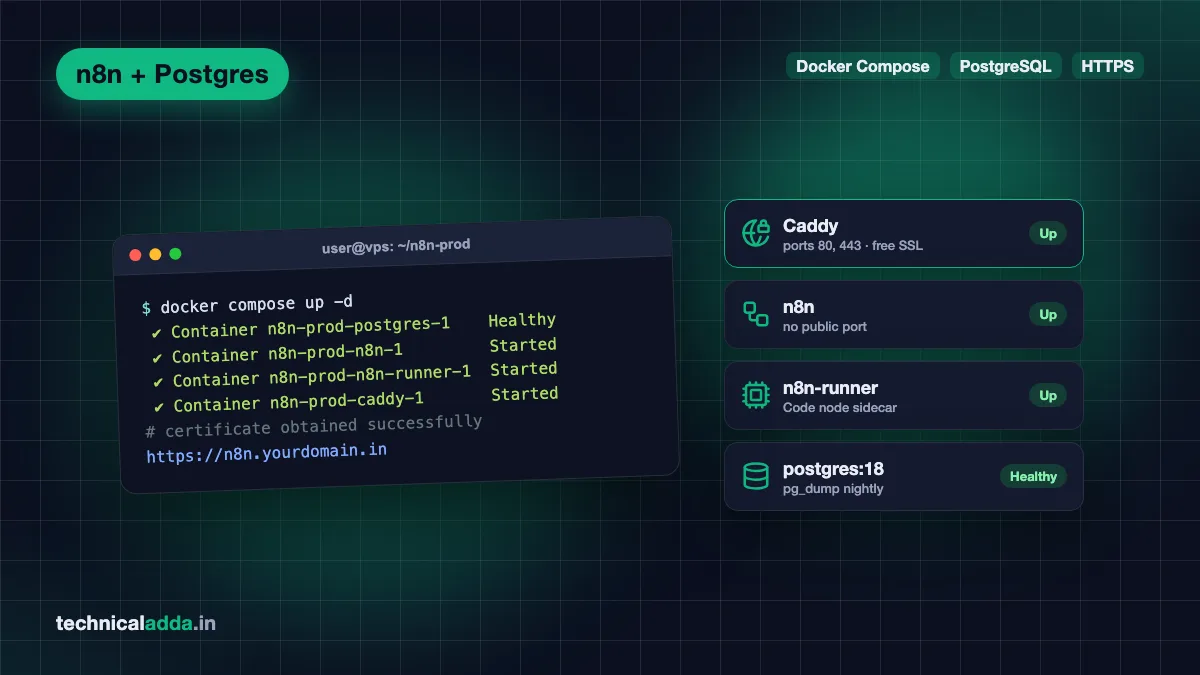
- caddy is the only container with public ports. It serves HTTPS and forwards traffic to n8n over Docker's private network.
- postgres runs PostgreSQL 18. The
PGDATAline comes from n8n's example: Postgres 18 moved its default data folder, and pinning it keeps your volume working across upgrades. Don't delete it. - n8n connects to Postgres as the limited
n8nuser, uses your own encryption key, and starts only after the database health check passes.N8N_PROXY_HOPS=1tells it one proxy sits in front, andN8N_WEBHOOK_URLmakes webhook URLs show your HTTPS domain. That variable needs n8n 2.30.0 or later; older versions useWEBHOOK_URL, now a deprecated alias. - n8n-runner is the task runner sidecar that executes Code node JavaScript and Python outside the main n8n process. n8n's task runner docs call external mode the production choice in 2.x and say the runner image version must match the n8n version, which is why both read
N8N_VERSION.
Notice there's no ports: line on n8n or Postgres. That avoids a known trap: ports published by Docker skip UFW rules, so a careless 5678:5678 would expose n8n to the whole internet.
Step 7: Start the stack
docker compose up -d
docker compose ps
docker compose logs -f caddy n8n
These start all four containers in the background, list their status, and stream the Caddy and n8n logs. Wait for Caddy to log that it obtained a certificate and for n8n to report the editor URL, then press Ctrl+C to stop following logs.
Step 8: Create the owner account
Open https://n8n.yourdomain.in. You'll see the owner setup screen. Create the account right away with a strong, unique password, because until you do, anyone who finds the URL can claim it. Then turn on two-factor authentication under your user settings.
Quick test: create a workflow with a Webhook trigger and check that the production URL starts with your HTTPS domain, not localhost:5678.
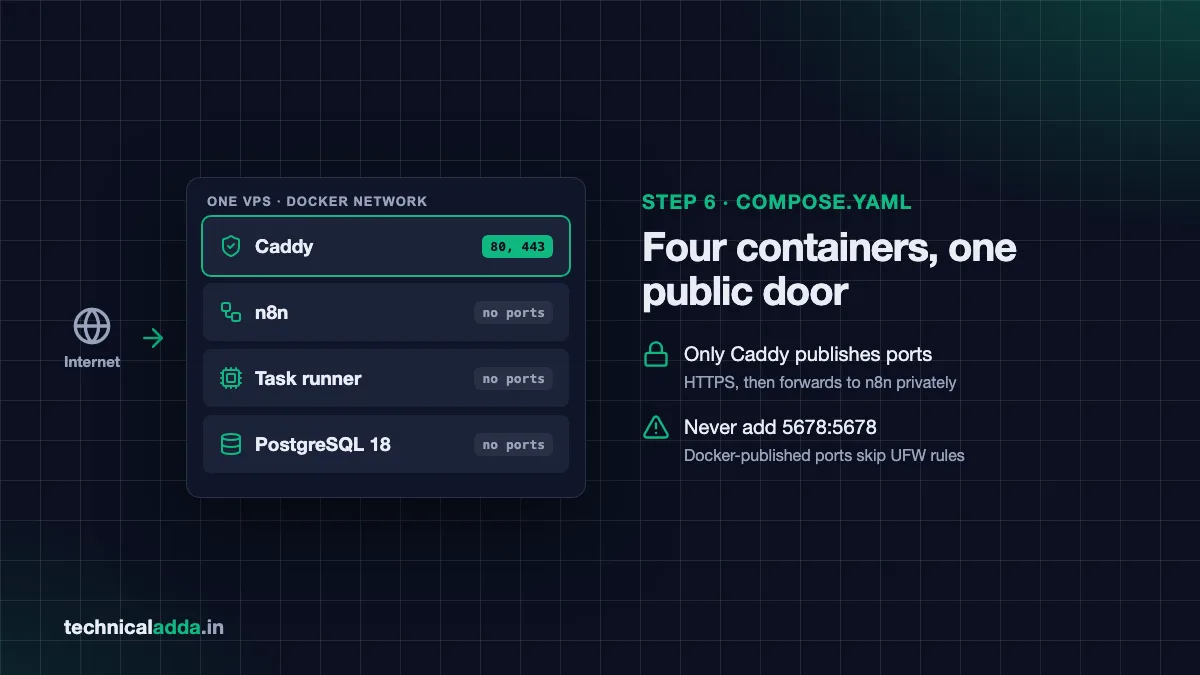
Four containers, one public door: only Caddy publishes ports, so n8n and Postgres stay off the internet.
Back up and restore n8n with pg_dump
A self-hosted n8n backup has two parts: the Postgres database and your .env file with the encryption key. Miss either and the restore fails.
Back up the database:
cd ~/n8n-prod
docker compose exec -T postgres sh -c 'pg_dump -U "$POSTGRES_USER" -d "$POSTGRES_DB" -Fc' > backups/n8n-$(date +%F).dump
This runs pg_dump inside the Postgres container using its own environment variables and saves a compressed, dated dump in backups/. n8n keeps running while it does.
Add a readable copy of your workflows as well:
docker compose exec n8n n8n export:workflow --backup --output=/files/workflows/
This uses n8n's CLI to write one JSON file per workflow into local-files/workflows/ on the server. Handy for Git, or for finding one old workflow without restoring a whole database.
Restore into a fresh stack (same .env, same encryption key):
docker compose up -d postgres
docker compose exec -T postgres sh -c 'pg_restore -U "$POSTGRES_USER" -d "$POSTGRES_DB" --clean --if-exists' < backups/n8n-2026-11-20.dump
docker compose up -d
These start only Postgres, load the dump into it, then start everything else. Starting n8n first would make it build an empty schema that clashes with the import.
Automate the dump with crontab -e, for example nightly at 2 am, and copy the backups/ folder off the server with scp or rclone. A backup that lives only on the same VPS doesn't survive losing the VPS.
The one command never to run here: docker compose down -v. The -v deletes every volume, including n8n_storage, and n8n's example repository warns that losing it makes every saved credential unreadable. Use docker compose down without it.
Migrate from SQLite to Postgres
If you followed our install n8n on VPS guide, your data is in SQLite. n8n's CLI has export:entities and import:entities commands for moving data between SQLite and Postgres.
- Back up the old setup first (volume copy, as in that guide).
- Copy the old encryption key. In the old project folder run
docker compose exec n8n cat /home/node/.n8n/configand put theencryptionKeyvalue into the new.envasN8N_ENCRYPTION_KEY. Without the same key, migrated credentials won't decrypt. - Export from the old instance:
cd ~/n8n-compose
docker compose exec n8n n8n export:entities --outputDir=/files/migration
This writes all workflows, credentials, users and settings to local-files/migration/. Add --includeExecutionHistoryDataTables=true if you also want old execution logs; n8n leaves them out by default because they can be huge.
- Stop the old stack with
docker compose downso both don't fight for ports 80 and 443. - Copy the export into the new project:
sudo cp -r ~/n8n-compose/local-files/migration ~/n8n-prod/local-files/and fix ownership withsudo chown -R 1000:1000 ~/n8n-prod/local-files. - Start the new stack, then import. Don't create the owner account on the new instance first; the import brings your users across.
cd ~/n8n-prod
docker compose up -d
docker compose exec n8n n8n import:entities --inputDir /files/migration --truncateTables true
docker compose restart n8n
The import expects an empty database, which is why --truncateTables true is there. As a precaution, run the same n8n version on both sides during the move, then upgrade afterwards.
Update n8n and Postgres safely
n8n ships updates often. To update:
- Take a
pg_dumpbackup. - Read the release notes for the version you're moving to.
- Change
N8N_VERSIONin.envto the new version. Both the n8n and runner images read it, so they stay matched. - Run
docker compose pullthendocker compose up -d.
Pinning a version number, instead of using latest, means an update only happens when you choose it.
Postgres is different. Minor updates within version 18 are safe with a pull. A major upgrade, such as 16 to 18, is breaking: n8n's repository notes that Postgres 18 can't read a data folder written by 16 and fails with "database files are incompatible with server". The fix is dump and restore into a fresh volume, using the backup steps above. If you're on 16 already, staying there is fine; it's still supported.
Keep the database small: execution pruning
Every workflow run saves execution data, and AI workflows with long prompts fill a database fast. n8n prunes by default, keeping finished executions for 336 hours (14 days) and at most 10,000 of them, per its execution data docs.
This stack sets EXECUTIONS_DATA_MAX_AGE=168, which keeps 7 days. You can trim more:
| Variable | Default | What it does |
|---|---|---|
EXECUTIONS_DATA_PRUNE |
true | Turns automatic pruning on |
EXECUTIONS_DATA_MAX_AGE |
336 (hours) | Deletes finished executions older than this |
EXECUTIONS_DATA_PRUNE_MAX_COUNT |
10000 | Maximum finished executions kept (0 means no limit) |
EXECUTIONS_DATA_SAVE_ON_SUCCESS |
Set per need | Set none to skip saving successful runs |
EXECUTIONS_DATA_SAVE_ON_ERROR |
Set per need | Set all to keep failed runs for debugging |
Saving only failed executions is a sensible pattern for high-volume webhooks: you keep what you need to debug and drop the rest.
When you outgrow one container: queue mode
One n8n container runs workflows in its own process. When heavy workflows start blocking the editor or webhooks, n8n's answer is queue mode: a main instance accepts triggers, Redis holds a job queue, and separate worker containers run the executions.
What it needs, per n8n's queue mode docs:
EXECUTIONS_MODE=queueon the main instance and every worker- A Redis container
- PostgreSQL (SQLite isn't supported here), which you already have
- The same encryption key on every worker
n8n's hosting repository has a withPostgresAndWorker example to start from, and Hostinger offers a queue mode template. Note that n8n's pricing page lists queue mode among Business plan features, so check the licence terms for your use before you plan around it. Most small teams and freelancers never need it; a 4 to 8 GB VPS with a single instance handles a lot.
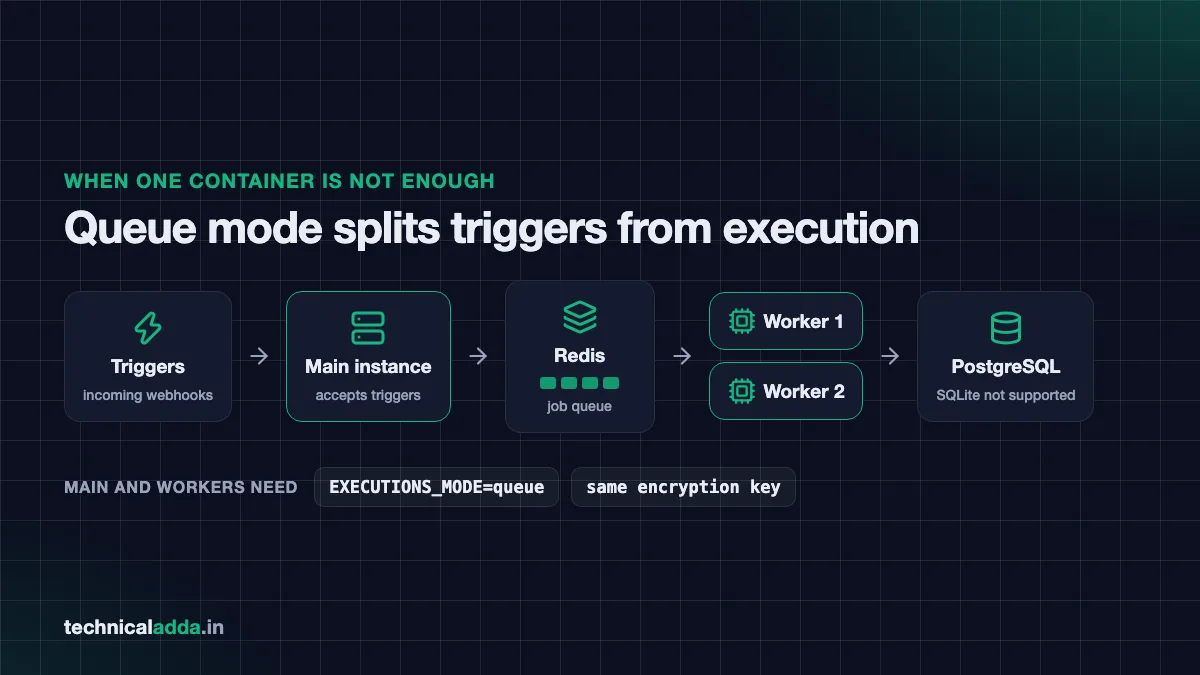
Queue mode: the main instance takes triggers, Redis queues the jobs and workers run them, all sharing one encryption key.
Troubleshooting
| Problem | Likely cause | Fix |
|---|---|---|
| Caddy logs certificate errors | DNS not pointing to the VPS yet, or port 80 blocked | Check the A record and cloud firewall, then docker compose restart caddy |
| n8n container restarts in a loop | Wrong database password, or Postgres not ready | Check docker compose logs n8n; compare .env values |
role "n8n" already exists |
init script ran against an existing volume | Harmless on restore; the data still imports |
| Saved credentials stop working after a restore | Different N8N_ENCRYPTION_KEY |
Put back the key from the original .env |
| Code node fails or hangs | Runner token or version mismatch | Same RUNNERS_AUTH_TOKEN on both, same N8N_VERSION for both images |
Webhook URLs show localhost:5678 |
N8N_WEBHOOK_URL missing or old n8n version |
Set it, or use WEBHOOK_URL before 2.30.0 |
| Postgres won't start after an image bump | Major version jump | Pin back to the old version, then dump and restore |
| 502 error in the browser | n8n still starting, or crashed | Wait a minute, then check logs; see our 502 bad gateway fix |
The rules that keep a self-hosted n8n stack safe
- To self host n8n for real work, run Docker Compose with PostgreSQL, the n8nio/runners sidecar and Caddy for automatic SSL.
- Only Caddy should publish ports. Never add
5678:5678on a public VPS. - Set
N8N_ENCRYPTION_KEYyourself and store.envin a password manager; it's half of every backup. - Back up nightly with
pg_dump, copy dumps off the server, and never rundocker compose down -v. - Pin
N8N_VERSIONand update both images together; treat Postgres major upgrades as dump and restore. - Start with 4 GB RAM. Queue mode with Redis and workers is the next step only when one instance struggles.
Build the Postgres stack once, then test a restore
The Postgres, task runner and Caddy stack in this guide is the way to self host n8n for work that matters: no exposed ports, automatic SSL, live backups and a clear upgrade path. Build it once, test a restore, and your automations stop depending on one fragile SQLite file.
If you're new to servers, start with our Ubuntu VPS initial server setup guide, and find more developer tutorials in AI coding.
FAQ
Frequently Asked Questions
Is self-hosted n8n free?
Yes, the Community Edition is free to self host under n8n's Sustainable Use License for your own or your company's internal use. You pay only for the server, typically a VPS from around $6.49 a month (about ₹600 in India). Paid features like SSO and Git version control need a licence key, and you handle updates, backups and security yourself.
How much RAM does n8n need?
n8n is light when idle, but its docs note that memory use grows with Code nodes, large files and concurrent workflows. For a stack with PostgreSQL, a task runner and Caddy, start with 4 GB RAM and 2 vCPU if possible. A 1 to 2 GB VPS can work for light personal use if you add swap.
Should I use SQLite or PostgreSQL for n8n?
Use SQLite for learning and light personal use, and PostgreSQL for anything you depend on. Postgres supports queue mode, frees disk space after pruning without manual VACUUM, and lets you take live backups with pg_dump. n8n's queue mode docs say a distributed setup over SQLite isn't supported.
How do I add SSL to self-hosted n8n?
Put a reverse proxy in front of n8n that gets a free Let's Encrypt certificate. Caddy is the simplest: a two-line Caddyfile with your subdomain and reverse_proxy n8n:5678 handles certificates, renewals, HTTPS redirects and WebSockets. n8n's own quick-start uses Traefik. Point your subdomain's A record at the VPS and open ports 80 and 443 first.
What is the n8n task runner container?
The task runner, from the n8nio/runners image, runs Code node JavaScript and Python in a separate container instead of inside the main n8n process. n8n's docs recommend external mode for production on n8n 2.x. Both containers share an auth token, and the runner image version must match your n8n version.
How do I back up self-hosted n8n with Postgres?
Run pg_dump inside the Postgres container to create a compressed dump while n8n keeps running, and keep a copy of your .env file with the N8N_ENCRYPTION_KEY. Without that key, restored credentials can't be decrypted. Schedule the dump with cron and copy it to another machine or cloud storage.
Can I move my n8n data from SQLite to Postgres?
Yes. n8n's CLI has export:entities to export workflows, credentials and settings from SQLite, and import:entities to load them into an empty Postgres database. Copy the old encryption key into the new setup first, and keep the same n8n version on both sides during the move to reduce surprises.
Is Hostinger good for n8n?
Hostinger is a practical choice in India because it sells KVM VPS plans with an n8n template preinstalled, from $6.49 a month intro ($11.99 renewal) on hostinger.com, or ₹599 (₹999 renewal) on hostinger.in, for 1 vCPU and 4 GB RAM as listed on 20 October 2026. You can also choose plain Ubuntu and build this Postgres stack yourself for more control.
How do I update self-hosted n8n?
Back up first with pg_dump, read the release notes, then change N8N_VERSION in your .env file and run docker compose pull followed by docker compose up -d. Because the runner image reads the same variable, both stay matched. Pin a specific version rather than latest so updates happen only when you choose.
Where to buy
-
Visit official site (opens in new tab)
Hostinger
-
Visit official site (opens in new tab)
Digitalocean