WordPress Plugin Zoho Mail: Free Accounts Can Fail SMTP, So Use the API Plugin
Web Hosting & Servers 14 min read By David Johnson
In this articleTable of contents11
Last updated: 10 November 2026
The best WordPress plugin for Zoho Mail is Zoho's own free "Zoho Mail for WordPress" plugin. It sends through the Zoho Mail API over HTTPS, so it works even when your host blocks SMTP ports. If you'd rather use plain SMTP with email logs, FluentSMTP (also free) with Zoho's SMTP server is the second choice.
Either way, the goal is the same: stop WordPress from sending mail through your server's PHP mail function, which is why contact forms, password resets and WooCommerce orders vanish or land in spam. Below you'll find both setups step by step, the exact Zoho SMTP settings, the Contact Form 7 fields people get wrong, and fixes for every common error.
Quick answer: Install "Zoho Mail for WordPress", create a Server-based client in Zoho's API console (api-console.zoho.in for India accounts), paste the Client ID and Secret into the plugin, pick your region and click Authorize. For SMTP instead, use FluentSMTP with your Zoho server, port 465 (SSL) or 587 (TLS), full email as username and an app password.
Why WordPress emails fail without SMTP
WordPress sends every email through wp_mail(), which by default hands it to your web server's PHP mail program. The server sends it from its own IP, with no login to any real mailbox. Gmail then checks SPF and DKIM for your domain, the server fails both because your email lives at Zoho, and the form email goes to spam or disappears.
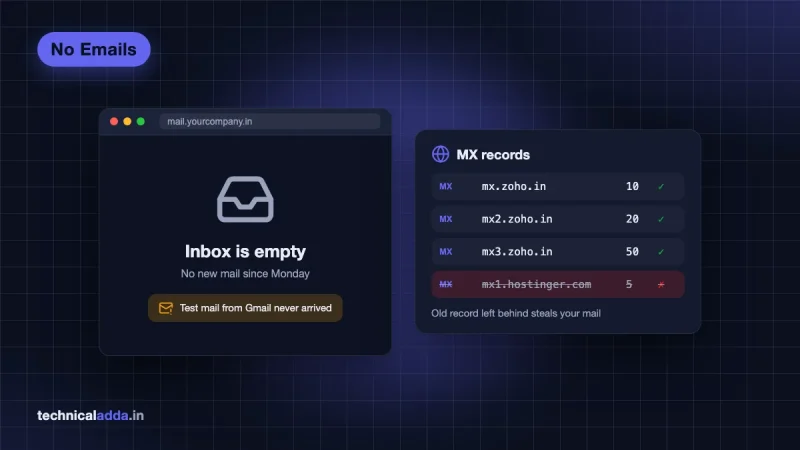
There is a quieter failure too. On cPanel hosting, the server may think it handles your domain's mail itself and drop the form email into a local mailbox nobody reads. Our business email not receiving emails guide shows how to switch cPanel's Email Routing to "Remote Mail Exchanger" for that case.
An SMTP or API plugin fixes both problems. WordPress logs into your actual Zoho mailbox and sends from Zoho's servers, which your SPF and DKIM records already trust.
Before you start: three things to check
1. Your Zoho data centre. Zoho runs separate data centres, and an Indian account is often on the India one (zoho.in) rather than the US one (zoho.com). If you log in at mail.zoho.in, you're on the India DC. Every setting below depends on this, and a mismatch is the single most common cause of failed setups.
2. Your Zoho plan. Zoho's IMAP help page (opens in new tab) says IMAP access is not available to newly signed-up Forever Free users. SMTP is less clear: Zoho's SMTP page still lists smtp.zoho.com for free organisation users, but many new free accounts report login failures. If you're on the free plan, try Method 1 first and test it. If sending fails, Mail Lite costs $1 per user a month (5 GB, billed annually) on Zoho's pricing page. Zoho's pricing page lists "IMAP/POP/Active Sync not included" only against the Forever Free plan.
3. Your From address. Zoho only lets you send as the mailbox you log in with, or an alias of it. Decide now which address WordPress will send from, for example [email protected] or [email protected], and make sure it exists in Zoho as a user or an alias.
If your domain email isn't on Zoho yet, set it up first with our Zoho Mail free with own domain walkthrough, including the SPF and DKIM records.
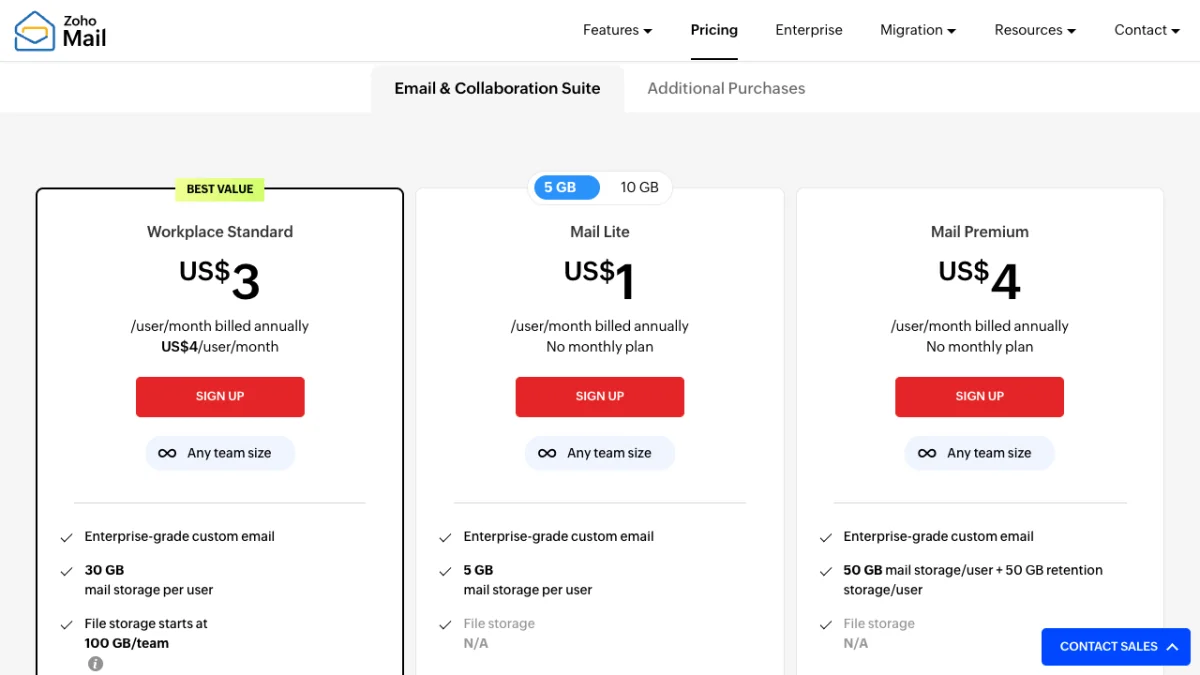
Mail Lite at $1 per user a month is the cheapest paid Zoho plan, and the fallback if the free plan can't send from WordPress.
What is the cost in Indian rupees? On Zoho's India pricing page (zoho.com/en-in) Mail Lite is ₹59 per user a month for 5 GB or ₹75 for 10 GB, Workplace Standard ₹99 and Mail Premium ₹199, all billed annually plus 18% GST.
Which WordPress plugin for Zoho Mail to use
Four plugins come up in every search. Details below are from each plugin's WordPress.org page, checked 10 November 2026.
| Plugin | Price | How it sends | Active installs | Best for |
|---|---|---|---|---|
| Zoho Mail for WordPress (by Zoho) | Free ($0) | Zoho Mail API with OAuth 2.0 over HTTPS | 20,000+ | Most sites, and any host that blocks SMTP ports |
| FluentSMTP | Free ($0), no paid version | SMTP (has a "Zoho Mail (SMTP)" option) | 700,000+ | Sites that want email logs and a fallback connection |
| WP Mail SMTP Lite | Free ($0) | "Other SMTP" mailer | 4+ million | People who already use it |
| WP Mail SMTP Pro | $49/year for 1 site, renews at $99 | Native Zoho Mail API | Part of the 4+ million | Agencies who want logs, backup mailer and support |
What is the cost in Indian rupees? The three free plugins cost ₹0. WP Mail SMTP sells Pro only in US dollars on wpmailsmtp.com, so at ₹95 per dollar it's about ₹4,655 for the first year and about ₹9,405 a year at renewal, before any card markup or GST.
Our pick: the official Zoho plugin for a simple site. It never stores your password, ignores blocked SMTP ports, and sent mail shows up in your Zoho Sent folder. Its weak points are a 3.8 rating from 41 reviews and no email log, so for WooCommerce or proof of every email sent, use FluentSMTP.
Run only one mail plugin at a time. Two plugins both hooking into wp_mail() is a classic cause of "it worked yesterday".

The official plugin sends each form email over HTTPS through Zoho's API, so it reaches your inbox even when the host blocks SMTP ports.
Method 1: official Zoho Mail for WordPress plugin
The official plugin uses OAuth 2.0, so you create an API client in Zoho once and authorise WordPress to send on your behalf. It needs WordPress 4.8+ and PHP 5.6+, and the current version is 1.6.3. Plan for about 15 minutes.
Step 1: install the plugin
- In WordPress, go to Plugins > Add New and search "Zoho Mail".
- Install and activate Zoho Mail for WordPress by Zoho Mail. Check the author name; there are look-alikes.
- Open the plugin's account configuration page and copy the Authorized Redirect URI it shows. Keep this tab open.
Step 2: create a client in Zoho's API console
- Open the API console for your data centre:
api-console.zoho.infor India accounts,api-console.zoho.comfor US accounts. Log in with your Zoho admin account. - Click Add Client and choose Server-based Applications.
- Fill in a client name (for example "My website"), your site's homepage URL, and paste the Authorized Redirect URI from Step 1.
- Click Create. Zoho shows a Client ID and Client Secret. Copy both.
Step 3: authorise and choose the From address
- Back in WordPress, select the region where your Zoho account is hosted (India for zoho.in).
- Paste the Client ID and Client Secret, then click Authorize.
- Zoho opens a consent screen. Accept it, and you return to WordPress.
- Pick the From email address from the list (it shows your mailbox and aliases), choose the mail format, and enter a From Name such as your business name.
- Save, then use the plugin's test email option to send a message to a Gmail address you can check.
If the test lands in Gmail's inbox, you're done. Every WordPress email, including Contact Form 7, WPForms, password resets and WooCommerce receipts, now goes out through Zoho.
Method 2: Zoho SMTP with FluentSMTP or WP Mail SMTP
Use SMTP if you want email logs, or if your host allows outgoing SMTP and you prefer a familiar setup. You'll need your Zoho password, or an app-specific password if two-factor authentication is on (it should be).
Zoho Mail SMTP settings
| Setting | Value |
|---|---|
| SMTP host (US data centre, personal or free org) | smtp.zoho.com |
| SMTP host (US data centre, paid org with your domain) | smtppro.zoho.com |
| SMTP host (India data centre) | Usually smtp.zoho.in or smtppro.zoho.in; confirm in your account |
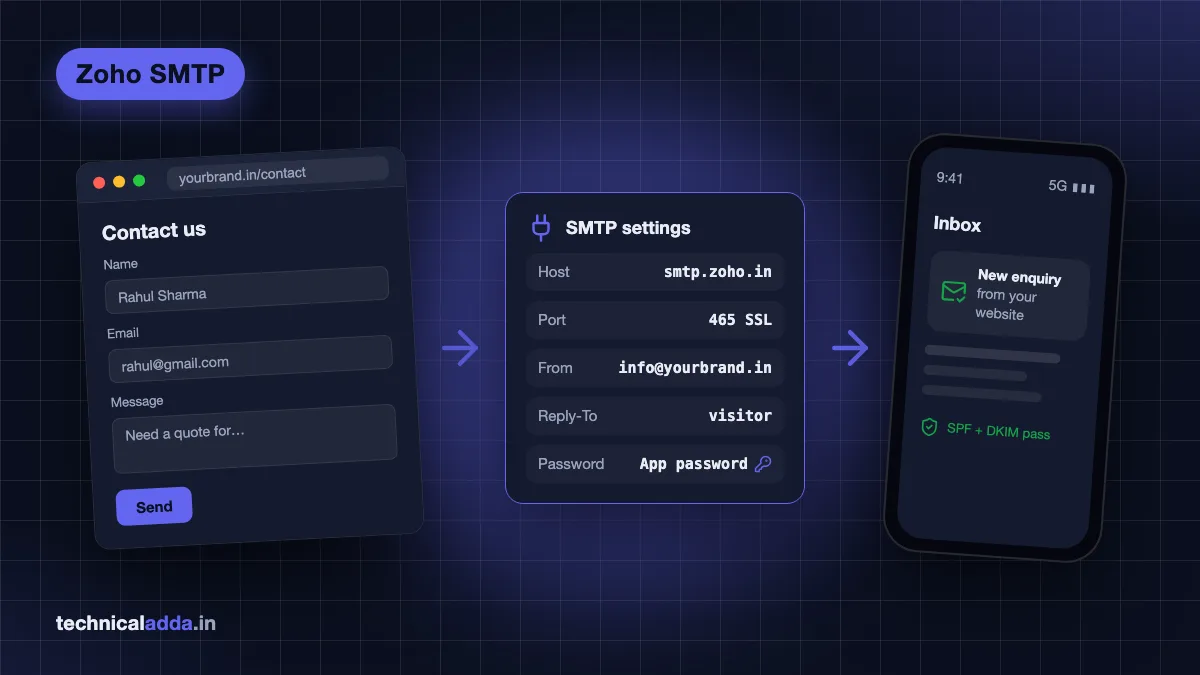
| Port and encryption | 465 with SSL, or 587 with TLS |
| Authentication | Required |
| Username | Your full email address, e.g. [email protected] |
| Password | App-specific password if 2FA is on |
| From address | Must match the login mailbox or one of its aliases |
The .com values are from Zoho's SMTP configuration page (opens in new tab). Zoho says the exact server for your account depends on account type and data centre and appears in your Zoho Mail settings under Mail Accounts, in the server configuration details. Copy it from there rather than guessing. Port 25 is not used.
Create an app-specific password
- Go to your Zoho account security settings (accounts.zoho.in for India accounts).
- Open Security > App passwords, click Generate New Password and name it "WordPress".
- Copy it once. You won't see it again. Use it in the plugin instead of your login password.
Set up FluentSMTP
- Install and activate FluentSMTP from Plugins > Add New.
- Go to Settings > FluentSMTP and add a new connection. Choose Zoho Mail (SMTP) or Other SMTP.
- Enter the From email and From name. Tick the option to force the From email so plugins can't override it with an address Zoho will reject.
- Fill in host, port 465 with SSL (or 587 with TLS), "use authentication" on, your full email as username and the app password.
- Save and send a test email from the plugin's Email Test tab.
FluentSMTP logs every email with the server's response and supports a fallback connection if Zoho is down.
Already on WP Mail SMTP? Pick its free Other SMTP mailer, enter the same settings and turn on Force From Email. Its native Zoho mailer and email logs need Pro.

With SMTP, WordPress logs in to your Zoho mailbox using an app password, so the mail server accepts and signs every message.
Contact Form 7 with Zoho Mail
Contact Form 7 is where most Zoho setups break, because its default Mail tab puts the visitor's email address in the From field. Zoho then refuses to send it, since you can't send "as" a stranger's Gmail address.
Set the Mail tab like this:
| CF7 field | What to enter | Why |
|---|---|---|
| To | [email protected] | Where you want enquiries |
| From | [_site_title] <[email protected]> |
Must be your Zoho mailbox or alias |
| Subject | New enquiry: [your-subject] |
Easy to filter in Zoho |
| Additional headers | Reply-To: [your-email] |
Hitting Reply goes to the visitor |
CF7 shows a yellow warning if the From address doesn't belong to your site's domain. Fix that first. Then submit the form yourself from a phone on mobile data, so you see what a real visitor sees.
The same rule applies to WPForms, Elementor forms, Fluent Forms and WooCommerce: From is always your own Zoho address, and the visitor goes in Reply-To.
Fixes for common Zoho Mail WordPress errors
Send a test first, then match the error you see.
| Error or symptom | Likely cause | Fix |
|---|---|---|
| "SMTP Error: Could not authenticate" or "535 Authentication Failed" | Wrong password, normal password with 2FA on, or wrong data centre host | Generate a new app password, use the full email as username, use the host from your Zoho settings (.in vs .com) |
| "Relaying disallowed" or "Sender is not allowed to relay" | From address doesn't match the login mailbox or an alias | Set From to your Zoho address and force it in the plugin; move the visitor to Reply-To |
| "Could not connect to SMTP host" or connection timed out | Host or firewall blocks outgoing ports 465/587 | Try the other port, ask your host to open it, or switch to the official Zoho plugin (uses HTTPS) |
| "Invalid Client Secret" (official plugin) | Region or domain in the plugin doesn't match the Zoho client | Create the client in the right console (zoho.in vs zoho.com) and pick the same region |
| Test works, but form emails never arrive | Form's From is the visitor's address, or a second mail plugin overrides | Fix CF7 From, deactivate the other mail plugin |
| Emails arrive in spam | Missing SPF or DKIM for Zoho, or From domain differs from your site | Add Zoho's SPF include and DKIM record; send from your own domain |
| Every email appears twice in Zoho Sent | Zoho saves a copy automatically | In Zoho Mail, go to Settings > Mail Accounts, pick the address and untick "Save copy of sent emails" under SMTP |
| Worked for months, then stopped | App password revoked, password changed, or plan downgraded | Create a new app password or re-authorise the plugin |
Hosts that block SMTP ports
Some cloud providers block outgoing SMTP to stop spam from new servers. DigitalOcean's own support docs (opens in new tab) say SMTP ports 25, 465 and 587 are blocked on Droplets by default, and recommend a third-party email service instead. If you run WordPress on a VPS, as in our install WordPress on a VPS guide, check this before blaming Zoho:
nc -vz smtp.zoho.in 465
If it times out, the port is blocked. The official Zoho plugin, which sends over normal HTTPS on port 443, is the easiest way around it.
Fix SPF and DKIM once
Zoho's SPF value and DKIM key are in the Domains section of the Zoho Mail Admin Console. Your domain must have only one SPF TXT record. If your web host or a newsletter tool also sends as your domain, merge them into that one record. Once SPF and DKIM pass, add a DMARC record starting with p=none to monitor.
When to use ZeptoMail instead
ZeptoMail is Zoho's separate service for transactional email, the automated messages a website sends: order confirmations, password resets, OTPs. Use it when your site sends more than a handful of emails a day, for example a WooCommerce store.
According to ZeptoMail's pricing page (opens in new tab), one credit costs $2.50 and covers 10,000 emails, the first credit is free, and email credits stay valid for 6 months. ZeptoMail offers both an SMTP relay and an email API, so FluentSMTP's "Other SMTP" option works with it. You still need to verify your domain and add its SPF and DKIM records.
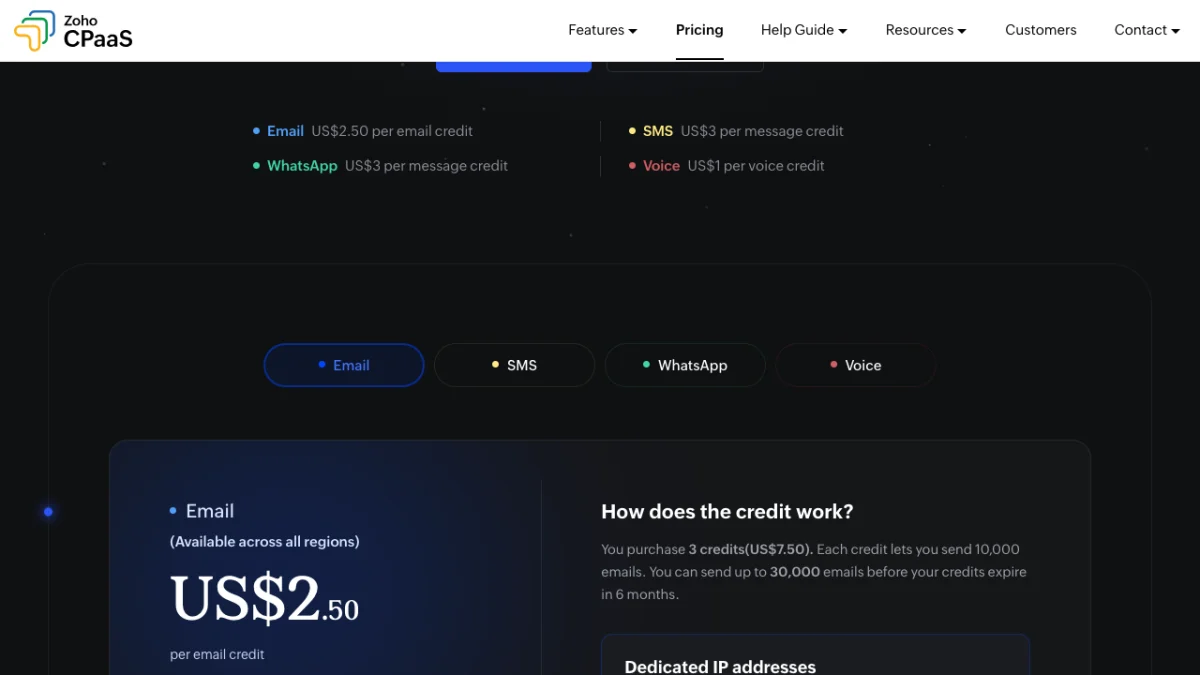
ZeptoMail's pricing now sits on Zoho's CPaaS page: $2.50 buys one credit of 10,000 emails, valid for 6 months.
What is the cost in Indian rupees? At ₹95 per dollar, one $2.50 credit (10,000 emails) works out to about ₹240. Zoho shows its own rupee price per credit when you open the pricing page from India, and GST is added on Indian invoices.
For a typical small business site with a contact form and a few enquiries a day, the official Zoho Mail plugin on your existing mailbox is enough. Our business email providers in India comparison helps if you're still deciding between Zoho and other providers.

A contact form sends a handful of emails a day, while a busy store sends thousands, which is when a transactional service like ZeptoMail fits better.
What to get right before your first test email
- The best WordPress plugin for Zoho Mail is Zoho's free "Zoho Mail for WordPress"; it uses the Zoho Mail API over HTTPS and stores no password.
- FluentSMTP is the best free SMTP option with Zoho, with email logs and a fallback connection. WP Mail SMTP needs Pro for its native Zoho mailer.
- Match everything to your Zoho data centre: zoho.in accounts need the India API console, region and SMTP host.
- The From address must be your Zoho mailbox or alias. Put the visitor's email in Reply-To.
- New Forever Free accounts don't get IMAP, and SMTP may fail; Mail Lite at $1/user/month (billed annually) is the cheap fix.
- If ports 465 and 587 are blocked on your VPS, use the API plugin instead of SMTP.
Start with the official plugin, switch only if you need logs
Setting up a WordPress plugin for Zoho Mail takes about 15 minutes, and it fixes the most common reason small business sites lose enquiries. Install Zoho's official plugin, create the API client in the console that matches your data centre, send from your own Zoho address, and put visitors in Reply-To. Use FluentSMTP if you want logs, and ZeptoMail once order emails pile up.
If you're moving your site to a new server at the same time, read our guide to transfer your website and email to a new host so mail keeps flowing, and browse more guides in our hosting section.
FAQ
Frequently Asked Questions
Which is the best WordPress plugin for Zoho Mail?
Zoho's own free plugin, Zoho Mail for WordPress, is the best choice for most sites. It connects through the Zoho Mail API using OAuth 2.0, so your password is never stored and blocked SMTP ports don't matter. If you want email logs and a fallback connection, use the free FluentSMTP plugin with Zoho's SMTP server instead.
What are the Zoho Mail SMTP settings for WordPress?
Use smtp.zoho.com for personal and free organisation accounts or smtppro.zoho.com for paid domain accounts on the US data centre, and the .in equivalent shown in your settings for India accounts. Use port 465 with SSL or 587 with TLS, turn authentication on, enter your full email as username, and use an app-specific password.
Why is my WordPress website not sending emails?
By default WordPress sends mail through your server's PHP mail function, which has no login and usually fails SPF and DKIM checks, so emails land in spam or are dropped. On cPanel hosting, the server may also deliver your domain's mail to a local mailbox. Install an SMTP or API plugin connected to your Zoho mailbox to fix both.
Does Zoho Mail free plan work with WordPress SMTP?
Not reliably. Zoho says IMAP is not available to new Forever Free sign-ups, and many free users report SMTP login failures. Try the official Zoho Mail plugin first and send a test. If it fails, upgrade to Mail Lite, which costs $1 per user a month billed annually (₹59 plus GST on Zoho's India page), a paid plan without the free plan's IMAP and POP restriction.
How do I fix "Relaying disallowed" in Zoho SMTP?
This error means the From address in WordPress doesn't match the Zoho mailbox you logged in with or one of its aliases. Change the From email in your SMTP plugin and in Contact Form 7 to your own Zoho address, and turn on the plugin's force From option. Put the visitor's email in a Reply-To header instead.
How do I connect Contact Form 7 to Zoho Mail?
Contact Form 7 has no Zoho setting of its own. It uses WordPress mail, so install the Zoho Mail plugin or FluentSMTP first. Then, in the form's Mail tab, set From to your Zoho address, add the header Reply-To: [your-email], and send a test submission to confirm the email arrives in your Zoho inbox.
Why does Zoho SMTP say "Could not authenticate"?
Usually the password is wrong or you used your normal login password while two-factor authentication is on. Generate an app-specific password in your Zoho account security settings and use it in the plugin. Also use your full email address as the username and the SMTP host for your data centre, since .in accounts can fail on .com servers.
Should I use ZeptoMail or Zoho Mail for WooCommerce emails?
Use ZeptoMail if your store sends many automated emails like order confirmations and password resets. It is built for transactional mail: one credit covers 10,000 emails, the first credit is free, and credits last six months. For a small site with a contact form and a few enquiries a day, your normal Zoho Mail mailbox is enough.
Where to buy
-
Visit official site (opens in new tab)
2. Your Zoho plan.
-
Visit official site (opens in new tab)
Other SMTP
-
Visit official site (opens in new tab)
ZeptoMail