Cursor AI Alternative Free: 9 Tools Now That Claude in Cursor Needs the $30 Plan
AI Coding 15 min read By David Johnson
In this articleTable of contents10
Last updated: 7 November 2026
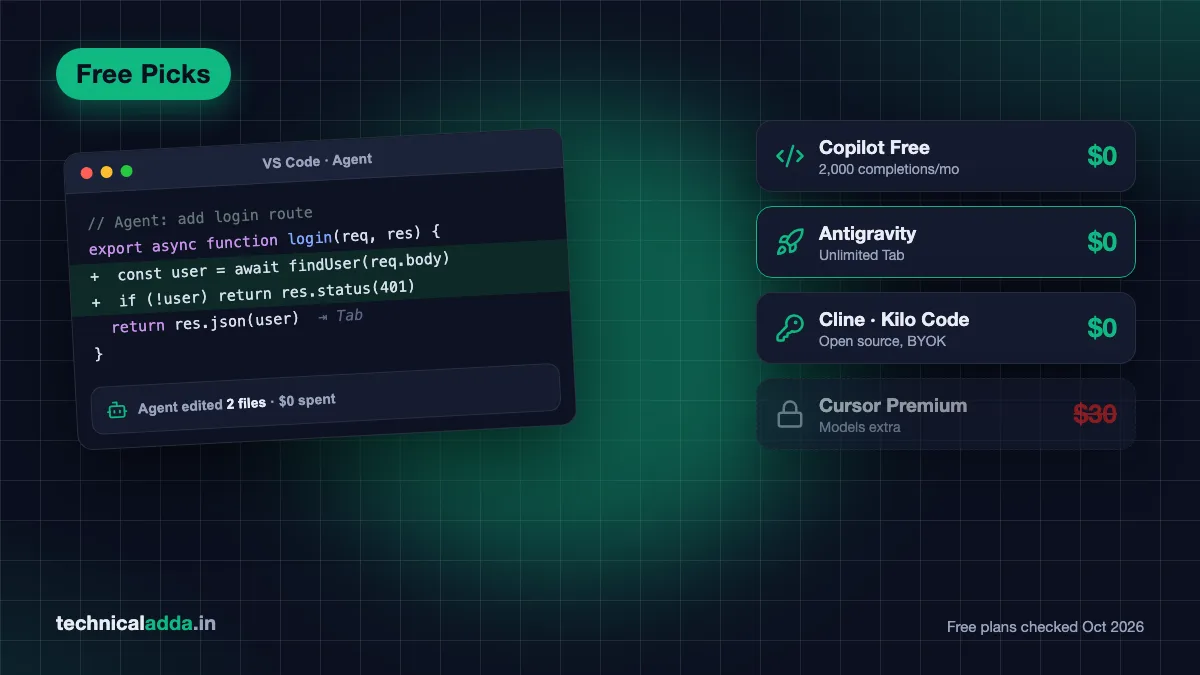
The best free Cursor AI alternative for most Indian developers is GitHub Copilot Free inside VS Code: 2,000 code completions a month, agent mode, and a full free plan if you're a verified student. Want a Cursor-style agent IDE instead? Install Google Antigravity, which is free with weekly limits and unlimited Tab completions.
You're probably here because Cursor changed. Since 12 October 2026, Cursor is part of "The X Subscription" with Grok and X Premium, you now need the $30 Premium plan to use Claude, GPT or Gemini models inside Cursor, and OpenAI has told SpaceX it plans to cut Cursor off from its models on 12 November. Below are nine tools that still give you real AI coding for $0, with the exact free limits we checked on 20 October 2026, and four old favourites you should stop recommending.
Quick answer: The best Cursor AI alternative free of cost is GitHub Copilot Free (2,000 completions a month, agent mode, free Student plan). For a full agent IDE like Cursor, use Google Antigravity or Devin Desktop (formerly Windsurf). For open source with your own or free models, use Cline, Kilo Code or OpenCode.
Why people want a Cursor alternative right now
Cursor's pricing changed more in the last two months than in the previous two years. SpaceX bought Cursor (the deal closed in August 2026), and on 12 October it folded Cursor, Grok and X Premium into one plan called The X Subscription, as Teslarati reported (opens in new tab).
Here's what Cursor's pricing page (opens in new tab) showed on 20 October 2026:
| Cursor plan | Price (excl. tax) | Models you get in Cursor |
|---|---|---|
| Free | $0 | Limited agent and chat requests |
| Plus | $8/month | Grok models only |
| Premium | $30/month | Grok, plus Claude, GPT and Gemini billed separately at API list price |
| Super | $100/month | 15x Plus usage |
| Ultra | $200/month | 50x Plus usage |
What is the cost in Indian rupees? Cursor has no rupee price list now, so at ₹95 per dollar: Plus is about ₹760, Premium about ₹2,850, Super about ₹9,500 and Ultra about ₹19,000 a month, plus 18% GST and your card's forex markup. Free stays ₹0.
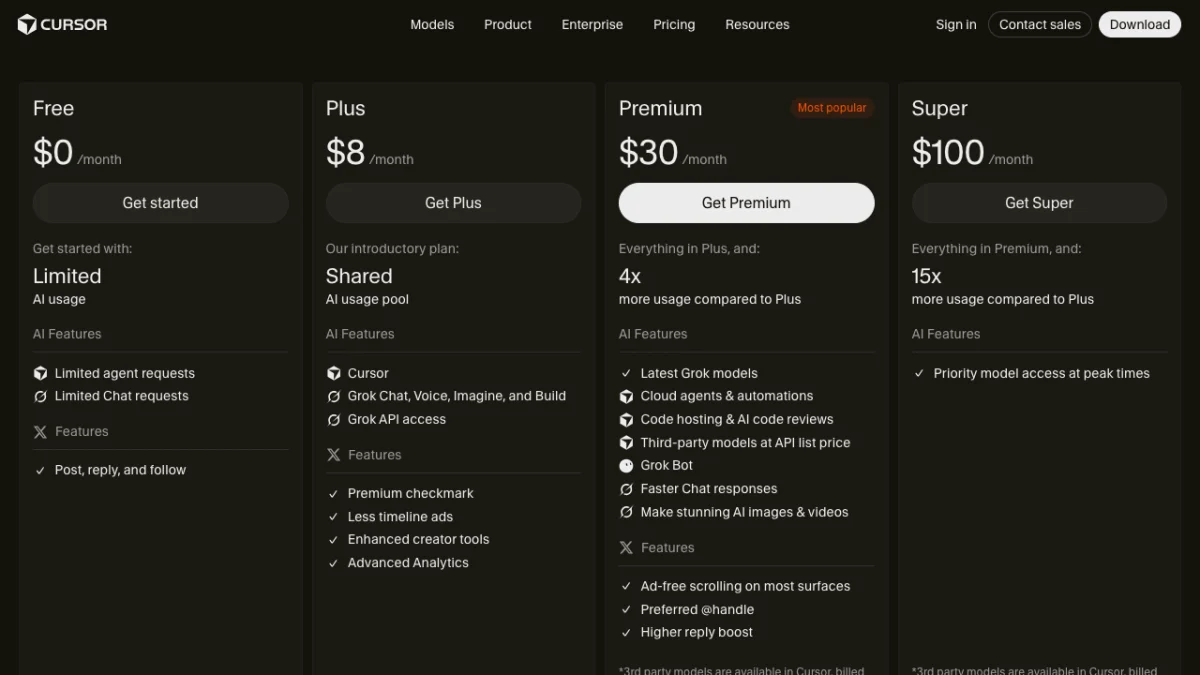
Cursor's pricing page on 20 October 2026: Claude, GPT and Gemini only appear from the $30 Premium plan, and even there they are billed at API list price.
What is the cost in Indian rupees? At ₹95 per dollar, Plus is about ₹760 and Premium about ₹2,850 a month before GST, and model usage on Premium is extra.
Three things push Indian developers to look elsewhere:
- The India Start plan (about $7, sold at ₹649) is gone from the pricing page. Our Cursor vs GitHub Copilot comparison recommended it in October. It no longer appears.
- Third-party models now cost extra. Even on the $30 Premium plan, Claude, GPT and Gemini usage inside Cursor is charged at API list price on top of the plan.
- OpenAI models are leaving. OpenAI told SpaceX it plans to end Cursor's access to its models on 12 November 2026, according to The New Stack (opens in new tab). Reports say the two sides are still discussing the final date. Grok, Claude and Gemini stay.
If Cursor's free tier still covers you, keep it. If you've hit its limits, or don't want your coding tool tied to a social media subscription, read on.
Free Cursor AI alternatives compared
Every free allowance below comes from the tool's own pricing page on 20 October 2026. "BYOK" means bring your own key: you paste an API key from a model provider and pay that provider directly, or use a free model.
| Tool | Type | What's free | Paid plan | Best for |
|---|---|---|---|---|
| GitHub Copilot Free | Extension (VS Code, JetBrains, more) | 2,000 completions/month, limited chat and agent | Pro $10/month | Most people, students |
| Google Antigravity | Agent IDE + CLI | Unlimited Tab, basic weekly agent limits | Google AI Pro / Ultra | Closest free Cursor feel |
| Devin Desktop (formerly Windsurf) | Agent IDE | Unlimited Tab and inline edits, light agent quota | Pro $20/month | Ex-Windsurf users |
| Cline | Open source VS Code agent + CLI | Tool is free, pay only for models (BYOK) | None for individuals | Control over models and cost |
| Kilo Code | Open source agent (VS Code, JetBrains, CLI) | Tool free, "Auto Free" routes to free models | Kilo Pass from $19/month | Free models with zero setup |
| OpenCode | Open source terminal agent | Free models included, any provider | Optional Zen credits | Claude Code free alternative |
| Kiro | Agent IDE (AWS) | 50 credits/month, Claude Sonnet 4.5 + open models | Pro $20/month | Spec-driven projects |
| Trae | Agent IDE | Auto mode, 5,000 completions/month | Pro $20/month | Generous free autocomplete |
| Zed | Fast editor | Free forever with your own keys or external agents | Pro $10/month | Speed, low-RAM laptops |
What is the cost in Indian rupees? All nine start at ₹0. If you upgrade, all bill in dollars, so at ₹95 per dollar Copilot Pro and Zed Pro are about ₹950 a month, Devin, Kiro and Trae Pro about ₹1,900, and Kilo Pass from about ₹1,805, plus GST and forex markup.

Most free Cursor alternatives live inside an editor you already know, with the AI assistant as a side panel next to your code.
The 9 best free Cursor alternatives in 2026
1. GitHub Copilot Free: best free Cursor alternative for most people
Copilot Free is the safest pick because it works inside the editor you already use. Install the extension in VS Code (or JetBrains, Visual Studio, Xcode and others), sign in with GitHub, and you get 2,000 inline completions a month plus limited chat and agent mode, according to GitHub's plans page (opens in new tab).
- Free limits: 2,000 completions a month; chat and agent usage drawn from a small allowance of GitHub AI Credits. Free and Student plans use automatic model selection only, so you can't pick a specific model.
- Students: verified students get Copilot Student free. Apply through GitHub Education with your college ID or email.
- Paid upgrade: Copilot Pro at $10 a month adds model choice and more credits.
- Missing on Free: cloud agent and code review.
Copilot's agent is less aggressive than Cursor's at large multi-file rewrites. For daily autocomplete, explaining errors and small features, it's more than enough, and it costs nothing.
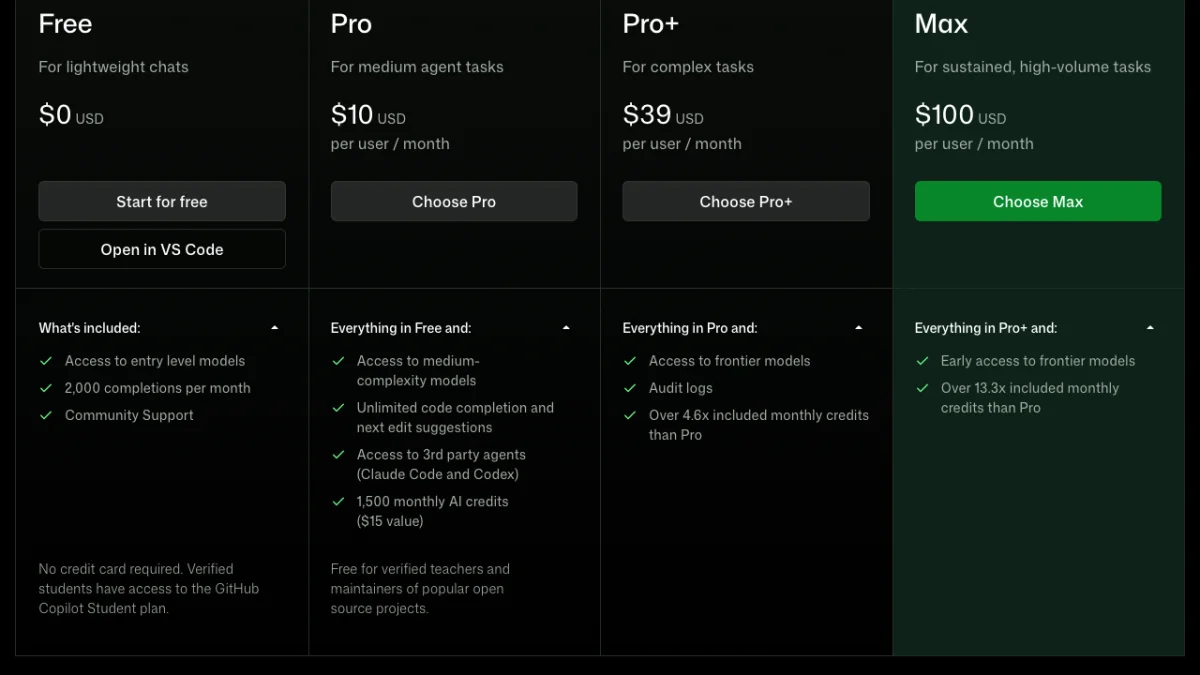
GitHub's Copilot plans page on 20 October 2026: Free needs no card and includes 2,000 completions a month, and verified students get the Student plan.
What is the cost in Indian rupees? Free and Student cost ₹0. At ₹95 per dollar, Pro is about ₹950, Pro+ about ₹3,705 and Max about ₹9,500 a month, billed in dollars plus GST.
2. Google Antigravity: best free agent IDE
Antigravity is Google's agent-first coding platform, and it's the closest free match for the Cursor experience: a VS Code-style editor with an agent that plans, edits many files, runs the terminal and checks results in a browser. Its download page (opens in new tab) lists Windows, macOS and Linux builds.
- Free limits: the individual plan is $0 with unlimited Tab completions, unlimited command requests and "basic weekly rate limits" on agent models, per Antigravity's pricing page (opens in new tab). Google doesn't publish the exact numbers.
- Paid upgrade: Google AI Pro and Ultra subscribers get higher limits.
- Also includes: Antigravity CLI, which Google names as the move for free Gemini CLI users after their sign-in stopped working on 18 June 2026.
Weekly limits suit students well: heavy use on a project weekend, lighter use on weekdays. If you used Gemini Code Assist for free in 2025, Antigravity is where that free access moved.
3. Devin Desktop (formerly Windsurf): closest to old Cursor
Windsurf's website now redirects to Devin, and the editor is sold as Devin Desktop by Cognition. The free plan is still useful: unlimited Tab completions, unlimited inline edits and a "light quota" for agent work with limited models, per Devin's pricing page (opens in new tab).
- Free limits: unlimited Tab and inline edits, plus a light agent quota with limited models.
- Paid upgrade: Pro at $20 a month adds frontier models from OpenAI, Anthropic, Google and SpaceXAI, plus Devin Cloud agents, with a quota that refreshes daily and weekly.
- Best for: people who liked Cursor's Tab autocomplete more than its agent.
4. Cline: best open source agent for VS Code
Cline is a free, open source (Apache 2.0) extension that turns VS Code into an agent IDE. It reads your project, proposes a plan, edits files and runs commands, asking your permission at each step. It has over 70,000 stars on GitHub.
- What's free: the extension and CLI. You pay only for the AI model you connect, or nothing if you connect a free one.
- Models: Anthropic, Gemini, OpenAI, OpenRouter, DeepSeek, Groq and local models through Ollama or LM Studio.
- Best for: developers who want to see every step and control cost per task.
Cline shows a running cost for each task when you use a paid API. That makes it easy to see how much a feature cost you. Its Plan and Act modes also teach good habits: agree on the plan first, then let it code.
5. Kilo Code: easiest way to use free models
Kilo Code is an open source (MIT) agent for VS Code, JetBrains and the terminal. Its big advantage for a $0 budget is "Auto Free", which routes your requests to free models through the Kilo Gateway, so you can start without any API key or card, per Kilo's pricing page (opens in new tab).
- What's free: the extension, Auto Free routing, BYOK and local models.
- Paid options: pay-as-you-go credits at provider rates, or Kilo Pass from $19 a month with bonus credits.
- Best for: beginners who want an agent working in five minutes, and JetBrains users (IntelliJ, PyCharm, Android Studio).
Free models change often and are slower at busy hours. Use them to learn and for small tasks, then switch to a paid model for a big refactor if you need it.
6. OpenCode: best Claude Code free alternative
If you like terminal agents such as Claude Code, OpenCode is the free, open source option. It runs in the terminal, as a desktop app and as an IDE extension, includes a set of free models, and connects to more than 75 model providers, per OpenCode's site (opens in new tab).
- What's free: the tool and its free models. You can also log in with an existing GitHub Copilot account and use those credits.
- Popularity: over 200,000 GitHub stars, which means many tutorials and fast bug fixes.
- Best for: backend developers, DevOps work and anyone who lives in the terminal or SSHs into a server.
Pair it with our guide on connecting to a VPS using SSH and you can run the agent on a remote machine.
7. Kiro: best for planned, spec-driven projects
Kiro is Amazon's agent IDE. Before writing code it creates requirements, a design and a task list (it calls this "spec-driven development"), which stops the agent from wandering off on large features.
- Free limits: 50 credits a month with Claude Sonnet 4.5 and open-weight models like Qwen3 Coder Next and DeepSeek 3.2, subject to rate limits, per Kiro's pricing page (opens in new tab).
- Paid upgrade: Pro at $20 a month for 1,000 credits.
- Best for: final-year projects and hackathons, where a clear spec matters more than raw speed.
Fifty credits run out fast if you let the agent do everything. Use Kiro for planning and the big pieces, and a free autocomplete tool for the rest.
8. Trae: most free autocomplete in an agent IDE
Trae, from ByteDance, looks and works much like Cursor. Its free plan gives Auto mode (Trae picks the model) with limited usage and 5,000 autocompletions a month, per Trae's pricing page (opens in new tab).
- Free limits: Auto mode only, standard queue, 5,000 completions a month.
- Paid upgrade: Pro at $20 a month.
- Watch out for: data handling. Read Trae's privacy settings before you open office or client code in it, and turn off any data-sharing option you don't want.
9. Zed: fastest free editor for low-RAM laptops
Zed is a fast, open source editor written in Rust. The Personal plan is free forever for use with your own API keys or external agents, per Zed's pricing page (opens in new tab). Pro costs $10 a month and includes unlimited edit predictions and $5 of hosted model usage, with a 14-day free trial.
On an 8 GB RAM laptop, Zed feels quicker than any VS Code-based editor. That matters if your college laptop slows down with Chrome and an Electron editor open together.
Run a Cursor alternative fully offline
Yes, you can run an AI coding agent with no internet and no bill. Install Ollama, download an open coding model, and point Cline, Kilo Code, OpenCode or Zed at it. Your code never leaves the laptop, which is useful for office projects.
The catch is hardware. Small coding models run on a laptop with 16 GB RAM, but they're slower and make more mistakes than cloud models. A dedicated GPU with 8 GB or more of VRAM helps a lot. Our guide on how to run an LLM locally on your laptop covers model sizes and setup.
- Install Ollama and pull a coding model sized for your RAM.
- In Cline or Kilo Code, choose Ollama as the provider.
- Keep tasks small: one file or one function per request.
- Use a cloud model only when the local one gets stuck.

Bring your own key means the editor is free and you choose where the model runs: a cloud provider you pay directly, or a free model on your own machine.
Tools to skip in 2026
Many "best Cursor alternatives" lists still recommend tools that have changed. Check these before you install:
- Continue: it was acquired by Cursor. The open source code stays on GitHub, but it's no longer an independent alternative.
- Roo Code: its GitHub repository is now archived (last code push in May 2026), so it gets no new fixes.
- Void: the open source Cursor clone's repository is archived too.
- Gemini Code Assist for individuals: Google stopped serving the free tier in the IDE extensions and Gemini CLI on 18 June 2026, per Google's deprecation notice (opens in new tab). Free users were moved to Antigravity.
Aider, the terminal pair-programmer, is still open source and works, but its last code push was in May 2026. OpenCode is the more active choice today.
Is Cursor AI unlimited free possible?
No. Cursor's free plan has limited agent and chat requests, and there is no official way to get unlimited Cursor for free. GitHub, YouTube and Telegram are full of "Cursor Pro free" scripts that reset trials or spoof machine IDs. Don't run them.
These scripts ask for admin rights and touch files where your logins and API keys live. Some carry info-stealers. Losing your GitHub or email account is a far bigger cost than $30. If you already ran one, change your GitHub, email and API key passwords from a clean device.
The legitimate route to near-unlimited free coding AI is a mix: Copilot Free or Student for autocomplete, Antigravity's weekly agent limit for big tasks, and Kilo Code's free models or a local model when both run out.

Pick by how you like to work: a terminal agent, a full agent IDE like Cursor, or an offline setup with a local model.
Which free Cursor alternative should you pick?
Pick by situation, not by hype:
- College student: claim Copilot Student first, then add Antigravity for agent work. Our list of free AI tools for students in India has more student offers.
- Fresher building a portfolio: Antigravity or Devin Desktop for the agent, plus Copilot Free for completions. Agents are great for vibe coding a first prototype, but read every change before you commit.
- You want Cursor's exact feel: Devin Desktop or Trae.
- You care about cost control and open source: Cline or Kilo Code with BYOK.
- Terminal person or Claude Code fan: OpenCode.
- Office code that can't leave your machine: Cline or Kilo Code with a local model through Ollama.
- Old laptop with 8 GB RAM: Zed with a cloud model, or Copilot in plain VS Code.
Most of these tools support MCP, the standard way to connect an AI agent to GitHub, databases and other apps. If that's new to you, read what an MCP server is before adding one.
What to remember before you leave Cursor
- The best Cursor AI alternative free for most people is GitHub Copilot Free: 2,000 completions a month, agent mode, and a free Student plan.
- Google Antigravity is the closest free Cursor-style agent IDE, with unlimited Tab and weekly agent limits.
- Cursor now sits inside The X Subscription; Claude, GPT and Gemini need the $30 Premium plan plus API-price usage, and OpenAI plans to pull its models on 12 November 2026.
- Cline, Kilo Code and OpenCode are open source; you pay only for models, or nothing with free or local ones.
- Skip Continue, Roo Code, Void and the old free Gemini Code Assist tier, and never run "Cursor Pro free" scripts.
Our pick: Copilot Free plus Antigravity
If you want one free Cursor AI alternative setup to copy, use GitHub Copilot Free (or Student) for completions plus Google Antigravity for agent work, with Kilo Code or a local model as backup. You get most of what Cursor offered, pay $0, and aren't tied to one company's model deals.
Still deciding whether Cursor's paid plans are worth it for you? Read our Cursor vs GitHub Copilot comparison next, or browse more guides in AI Coding.
FAQ
Frequently Asked Questions
What is the best free alternative to Cursor AI?
GitHub Copilot Free is the best free alternative to Cursor AI for most developers. It works inside VS Code and JetBrains, gives 2,000 completions a month with limited chat and agent mode, and verified students get Copilot Student free. If you want a full agent IDE like Cursor, Google Antigravity is free with unlimited Tab completions and weekly agent limits.
Is Cursor still free in 2026?
Yes, Cursor still has a free plan in 2026, but it only includes limited agent and chat requests. Since 12 October 2026 Cursor is part of The X Subscription, where Plus ($8) gives Grok models only and Premium ($30) is needed for Claude, GPT and Gemini, which are billed separately at API list price.
Is there an open source Cursor alternative?
Yes. Cline (Apache 2.0) and Kilo Code (MIT) are open source agents that run inside VS Code, and Kilo Code also works in JetBrains. OpenCode is an open source terminal agent, and Zed is an open source editor. All of them let you connect your own API key, a free model or a local model through Ollama.
What is a free alternative to Claude Code?
OpenCode is the best free alternative to Claude Code. It is an open source terminal agent with free models included, and it can connect to more than 75 model providers, including local models. Google's Antigravity CLI is another free option, with weekly limits. Cline also has a CLI if you prefer its approval-based workflow.
Can I use Cursor AI unlimited for free?
No, there is no legitimate way to use Cursor unlimited for free. Its free plan has limited agent and chat requests. Avoid "Cursor Pro free" or trial-reset scripts, because they need admin access and can steal saved logins and API keys. Combining Copilot Free, Antigravity and free models in Kilo Code gives you plenty of free usage legally.
Is GitHub Copilot free for students in India?
Yes. Verified students in India can get GitHub Copilot Student for free through GitHub Education. You verify with a college email, ID card or other proof of enrolment. Copilot Student includes an allowance of AI credits with automatic model selection, and it works in VS Code, JetBrains IDEs and other supported editors.
What happened to Windsurf?
Windsurf's website now redirects to Devin, and the editor is offered as Devin Desktop by Cognition. It still has a free plan with unlimited Tab completions, unlimited inline edits and a light quota for agent work with limited models. The Pro plan costs $20 a month and adds frontier models and Devin Cloud agents.
Is Google Gemini Code Assist still free?
No. Google stopped serving the free Gemini Code Assist for individuals tier, in both the IDE extensions and Gemini CLI, on 18 June 2026. Google moved those users to Antigravity, which has a free individual plan with unlimited Tab completions and basic weekly rate limits. Paid Code Assist Standard and Enterprise follow a separate deprecation schedule.
Can I run an AI code editor offline for free?
Yes. Install Ollama, download an open coding model, and connect it to Cline, Kilo Code, OpenCode or Zed. Everything runs on your laptop, so it costs nothing and your code stays private. Expect slower and less accurate results than cloud models, and plan for at least 16 GB of RAM.
Where to buy
-
Visit official site (opens in new tab)
Google Antigravity
-
Visit official site (opens in new tab)
Devin Desktop
-
Visit official site (opens in new tab)
Cline
-
Visit official site (opens in new tab)
Kilo Code
-
Visit official site (opens in new tab)
Kiro