Business Email Not Receiving Emails: Often MX Records Lost in a Nameserver Move
Web Hosting & Servers 15 min read By Xavio Thomas
In this articleTable of contents12
Last updated: 6 November 2026
If no email at all is arriving, the fault is almost always DNS: your MX records point to the wrong server, an old record is still there, or the domain itself has expired. If only some emails go missing, look at spam quarantine, filters, a full mailbox or the sender's own setup instead. Those two cases have different fixes, so work out which one you have first.
When your business email is not receiving emails, every hour costs you leads and invoices. This guide is a troubleshooting tree for Zoho Mail, Google Workspace, Hostinger Email, cPanel email and Microsoft 365: seven checks in order, with the exact records and settings to compare.
Quick answer: If your business email isn't receiving emails, send a test from Gmail and read any bounce message. Then check your domain's MX records with an MX lookup tool and compare them with your provider's values, delete old MX records, confirm the domain hasn't expired, and check spam, quarantine, filters and storage quota.
First, work out what is missing
How much mail is missing tells you where to look. Nothing at all points to DNS. Some mail points to filtering. Mail that's in webmail but not on your phone points to the app.
| What's happening | Most likely cause | Go to |
|---|---|---|
| No email from anyone, outgoing works fine | MX records wrong or missing, domain expired | Checks 2 and 3 |
| Stopped right after changing hosting or nameservers | MX records not recreated on the new DNS | Checks 2 and 3 |
| Mail from some senders missing, others arrive | Spam, quarantine, a filter, or the sender's SPF/DMARC failing | Check 4 and sender's side |
| Senders get "mailbox full" or "quota exceeded" | Storage full | Check 5 |
| Website contact form emails never arrive | Local mail delivery on the web server | Check 6 |
| Mail shows in webmail but not in Outlook or phone app | IMAP/POP settings, sync or plan limits | Check 7 |
| Mail fetched into personal Gmail stopped | Gmail is removing POP fetching and Gmailify | Check 7 |
Always test from outside. Sending from your own business address to itself often skips the public route, so it can look fine while the outside world can't reach you.

First work out whether every email is missing or only mail from some senders, because each case points to a different fix.
Check 1: Send a test and read the bounce
Send an email from a personal Gmail or Outlook.com account to your business address. Wait five minutes. If it doesn't arrive, check the Gmail inbox for a bounce message (also called an NDR, non-delivery report). The bounce usually names the exact problem.
| Bounce code or text | What it means | Fix |
|---|---|---|
| 550 5.1.1 "user unknown" or "no such user" | The mailbox doesn't exist at the server your MX points to | Check spelling, create the user, or fix MX if it points to the old host |
| 552 5.2.2 "mailbox full" or "quota exceeded" | Storage limit reached | Check 5 |
| 550 5.7.1 or 554 5.7.1 "rejected" or "policy" | Your server refused the message as spam or by policy | Check quarantine and block lists (Check 4) |
| "Domain not found" or "DNS error" | No MX record, or the domain doesn't resolve | Checks 2 and 3 |
| 4xx code, "delayed", "will retry" | Temporary failure; the sender's server keeps retrying | Usually DNS or a server outage; recheck in a few hours |
No bounce and no email usually means the message was accepted somewhere: your spam folder, a quarantine, an old mail server your MX still points to, or a forwarding rule. Keep going.
Check 2: MX records, the usual reason business email is not receiving emails
MX (mail exchanger) records are DNS entries that tell every other mail server on the internet where to deliver email for your domain. If they point to the wrong place, mail goes there or bounces, even though your mailbox is working perfectly.
How to look up your MX records
Use any of these free MX record checkers:
- Google Admin Toolbox Check MX: toolbox.googleapps.com/apps/checkmx (opens in new tab) checks MX and flags common problems. It's built for Google Workspace but shows the records for any domain.
- MXToolbox: type your domain into the MX Lookup box on mxtoolbox.com.
- Command line: on Windows, run
nslookup -type=mx yourdomain.com. On Mac or Linux, rundig MX yourdomain.com +short.
Compare with your provider's values
| Provider | MX value(s) | Priority |
|---|---|---|
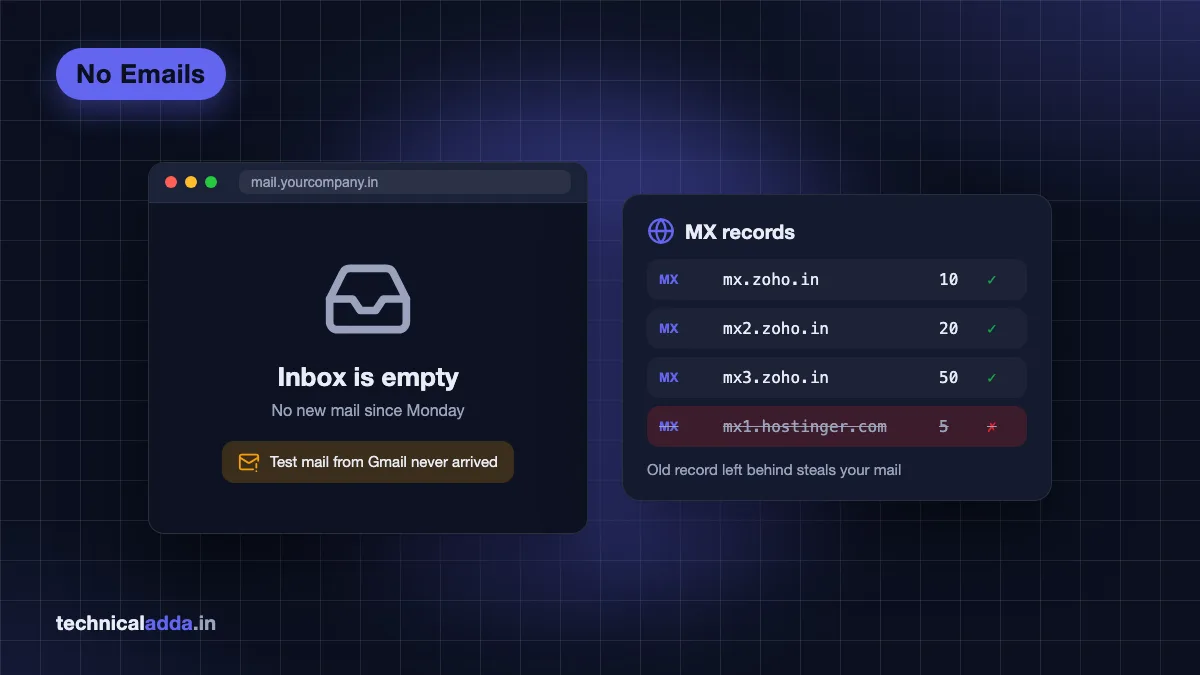
| Zoho Mail (India data centre) | mx.zoho.in, mx2.zoho.in, mx3.zoho.in | 10, 20, 50 |
| Zoho Mail (US data centre) | mx.zoho.com, mx2.zoho.com, mx3.zoho.com | 10, 20, 50 |
| Google Workspace | smtp.google.com | 1 |
| Hostinger Email | mx1.hostinger.com, mx2.hostinger.com | 5, 10 |
| Microsoft 365 | The value shown in Microsoft 365 admin centre, ending in mail.protection.outlook.com | 0 |
| cPanel hosting email | Usually your own domain or mail.yourdomain.com | As set by host |
Sources: Google's MX setup page (opens in new tab) (Workspace accounts set up before 2023 may still use the older ASPMX values, which Google still supports), Zoho's email delivery guide (opens in new tab) and Hostinger's MX records page (opens in new tab). Zoho's suffix depends on your data centre, so always copy the exact values from Admin Console > Domains > your domain > Email configuration. Our Zoho Mail free custom domain guide walks through that screen.
The five most common MX mistakes
- Old MX records left behind. You moved to Zoho or Google but your hosting company's MX (like mx1.hostinger.com) is still there. Mail gets split between two providers, or goes entirely to the old one if its priority number is lower. Delete every MX record that isn't your current provider's. Google and Zoho both say this.
- Host field filled wrong. Put
@(or leave blank, depending on the panel) for the root domain. Typingyourdomain.comin the host field on some panels creates a record foryourdomain.com.yourdomain.com. - Pointing MX at an IP address or a CNAME. An MX value must be a hostname with its own A record, never a raw IP.
- Records added at the wrong DNS provider. See Check 3. This is the single most common reason for "I added the records but nothing changed."
- Not waiting. Google says MX changes can take up to 72 hours to be recognised, and Zoho says 12 to 24 hours depending on TTL. With a low TTL, changes often show up much sooner.

MX records are the delivery address for your email, so one wrong or missing record sends mail to the wrong place or nowhere.
Check 3: Nameservers and domain expiry
Your MX records only count if they're in the DNS zone your domain actually uses. That zone lives wherever your nameservers point, which may not be where you bought the domain.
Find which DNS zone is live
Look up your domain's nameservers with a WHOIS lookup or the DNS tool at your registrar. Then:
- Nameservers point to your registrar (GoDaddy, BigRock, Hostinger and so on): edit MX in the registrar's DNS panel.
- Nameservers point to your web host (for example, ns1.yourhost.com): edit MX in the host's DNS zone editor, often in cPanel or hPanel.
- Nameservers point to Cloudflare: edit MX in the Cloudflare dashboard. Records at your registrar are ignored.
The classic failure: someone changes nameservers to a new host or Cloudflare to move the website, and the new zone has only the A record. Every MX, SPF and DKIM record that lived in the old zone stops working at once. If that's your story, recreate them from your provider's admin console. Our guide to transferring a website and email to a new host lists every record to copy before a switch.
Cloudflare-specific traps
- Cloudflare Email Routing adds its own MX records. If you've since signed up for Zoho or Google Workspace, disable Email Routing or it'll keep catching mail.
- Self-hosted mail behind the orange cloud. If your MX points to
mail.yourdomain.comand that A record is proxied (orange cloud), mail breaks, because Cloudflare's proxy only handles web traffic. Set that record to DNS only (grey cloud).
Has the domain expired?
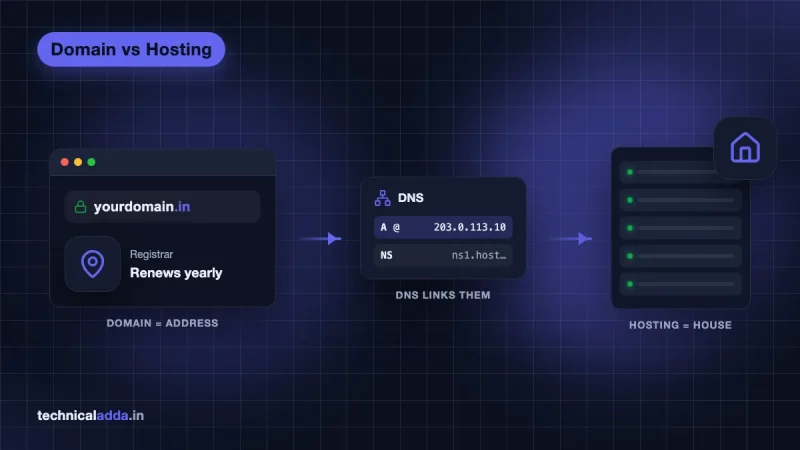
When a domain expires, its DNS stops working and so does every mailbox on it, even if your email plan is paid up. Log in to your registrar and check the expiry date and auto-renew. Small businesses often lose email because the domain was registered on a former employee's card or an agency's account. Our domain vs hosting explainer covers why the two renew separately.
Check 4: Spam, quarantine, filters and forwarding
If some emails arrive and others don't, the missing ones were probably delivered somewhere you're not looking. Check these four places.
Spam or junk folder. Search webmail, not just the phone app, because apps sometimes hide spam. Mark anything legitimate as Not spam so the filter learns.
Admin quarantine. Business email services can hold suspicious mail before it ever reaches a user's spam folder. In Zoho Mail, an admin can check Admin Console > Security & Compliance > Quarantine and release held messages. Zoho holds mail there for reasons like SPF, DKIM or DMARC failures, a sender on a block list, or a lookalike domain. In Google Workspace, an admin can trace a specific message with Email Log Search in the Admin console under Reporting, which shows whether Google received it and what happened next.
Filters and rules. A rule in webmail, Outlook or the Gmail app can move, archive or delete mail before you see it. Look for rules on sender, subject keywords or "delete". Check blocked-sender lists too.
Forwarding you didn't set. An auto-forward to an unknown address, or a rule that deletes after forwarding, is a sign the account was compromised. Remove it, change the password, and turn on two-factor authentication.

Missing mail often sits in spam, quarantine or a filter rule, so check those before you change any DNS settings.
Check 5: Mailbox storage full
A full mailbox rejects new mail and senders get a "mailbox full" bounce. You usually see no error at all on your side, which is why this one goes unnoticed for days.
| Provider and plan | Storage per user (as of November 2026) | Where it's counted |
|---|---|---|
| Zoho Mail Forever Free | 5 GB | Mail only |
| Google Workspace Business Starter | 30 GB pooled | Shared across Gmail, Drive and Photos |
| Hostinger Email and cPanel email | Varies by plan | Shown in hPanel or cPanel |
Google Workspace storage is pooled with Drive, so a few large video files in Drive can stop Gmail from receiving. Clear out large attachments (search larger:10M in Gmail), empty trash and spam, or upgrade the plan. Our Google Workspace price guide lists storage per plan if you need more.
On cPanel hosting, also check the account-wide disk quota. If the hosting account itself is full, every mailbox on it stops receiving.
Check 6: Website contact form emails not arriving
When everyone can email you except your own website, the web server is delivering the form's mail to itself instead of sending it out. This happens when your website is on cPanel hosting but your email is on Google Workspace, Zoho or Microsoft 365.
The server sees that the domain is "local" and drops the mail into a mailbox on the hosting account that nobody checks. The fix is in cPanel > Email > Email Routing. cPanel's documentation (opens in new tab) describes four options:
- Automatically Detect Configuration: sets routing from the MX records in the local zone, but doesn't recheck after DNS changes.
- Local Mail Exchanger: always delivers locally. Wrong if your email is with Google or Zoho.
- Backup Mail Exchanger: holds mail until the main server is available.
- Remote Mail Exchanger: sends all mail to your real MX. Pick this one when email is hosted elsewhere.
After that, make sure the form sends through proper SMTP. On WordPress, an SMTP plugin connected to your Zoho or Google account is more reliable than the server's default PHP mail, which often fails SPF and lands in spam. If you're new to the panel, our explainer on what cPanel is shows where these menus sit.
Check 7: The mail app, not the mailbox
If the mail is in webmail but not in Outlook, Thunderbird or your phone, your mailbox is fine. The app is the problem.
- Wrong server settings. Compare incoming server, port and encryption with your provider's help page. IMAP over SSL usually uses port 993, and POP over SSL uses port 995.
- POP downloaded and deleted it. A POP account on an old laptop may download mail and remove it from the server before your phone sees it. Switch every device to IMAP.
- Plan doesn't include IMAP. Zoho Mail's free plan works only in the web and Zoho Mail apps, without IMAP or POP access. Outlook and other apps won't sync on it.
- Phone app sync. Check that sync is on for that account and that battery saver isn't stopping background refresh.
Business email not working in Gmail
Many Indian small businesses read business mail inside a personal Gmail account. Google is removing Gmail's "Check mail from other accounts" (POP fetching) and Gmailify. Its help page on the change (opens in new tab) says new users lost access after the first quarter of 2026 and existing users can keep it only until January 2027. If you can't add the account, or fetching has stopped, your business mailbox is still receiving the mail.
The fix is to set up forwarding from your business email provider to Gmail, and add your business address under "Send mail as" in Gmail settings so replies go out from the right address. If you'd rather have one proper inbox, compare the options in our business email providers in India comparison.
When the problem is on the sender's side
Sometimes your setup is fine and one sender's mail never arrives. Their domain might have broken SPF or DKIM, or a DMARC policy that tells your provider to reject anything that fails. Your provider is then doing exactly what the sender's domain asked.
Ask the sender to forward the bounce they received. If it mentions SPF, DKIM or DMARC, they need to fix their DNS. In the meantime, an admin can add the sender to an allowed list (for example, from Zoho's quarantine, release with Deliver & Add), but don't make that a long-term habit for senders who fail authentication.
Here is the whole tree in one place, in the order to run it:
- Send from outside and read any bounce.
- Look up MX records and compare with your provider's values.
- Confirm the nameservers and edit DNS where the zone is live.
- Check the domain hasn't expired.
- Search spam and quarantine, then filters and forwarding.
- Check storage, including pooled Drive storage.
- For contact forms, set cPanel Email Routing to Remote.
- If webmail has the mail, fix the app or switch to forwarding.
More guides on domains, DNS and hosting are in our hosting section.
What usually fixes missing business email
- No mail from anyone points to MX records or the domain itself: wrong values, leftover old records, the wrong DNS zone or an expired domain.
- Use a free MX checker such as Google Admin Toolbox or MXToolbox and compare against your provider's exact values.
- Changing nameservers without recreating MX, SPF and DKIM records is the most common way to break working email.
- Missing mail from some senders usually sits in spam, admin quarantine or a filter, or fails the sender's own SPF/DMARC.
- Contact form emails vanish when cPanel delivers locally. Set Email Routing to Remote Mail Exchanger.
- Gmail is phasing out POP fetching (closed to new users after early 2026, fully by January 2027). Use forwarding plus "Send mail as" instead.
Start with the MX record, then work down the list
If your business email is not receiving emails, don't jump straight to support. Run the checks in order: test from outside and read the bounce, compare MX records with your provider's values, confirm you're editing the live DNS zone and the domain hasn't expired, then check spam, quarantine, filters and storage. Fix contact forms in cPanel Email Routing and phone sync in the app. Most cases end at the MX or DNS check. If you're setting up mail on a new domain, start with our Zoho Mail free custom domain guide so the records are right the first time.
FAQ
Frequently Asked Questions
Why is my business email not receiving emails?
The most common reason is wrong MX records: they point to an old host, an old record wasn't deleted, or they were added in a DNS zone your domain doesn't use. Other causes are an expired domain, a full mailbox, spam quarantine and filters. If you can send but not receive, check MX records first with a free MX lookup tool.
How do I check my MX records?
Use a free MX record checker such as Google Admin Toolbox Check MX or the MX Lookup on MXToolbox, and enter your domain. On a computer you can also run nslookup -type=mx yourdomain.com on Windows, or dig MX yourdomain.com on Mac and Linux. Compare the results with the values in your email provider's admin console.
How long do MX record changes take to work?
MX changes often start working quickly when the TTL is low, but full propagation can take longer. Zoho says 12 to 24 hours depending on TTL, and Google says up to 72 hours for Workspace. Lower the TTL a day before planned changes, and keep the old mail service active for a few days afterwards to catch stragglers.
Why can I send emails but not receive them?
Sending and receiving use different routes. Outgoing mail goes through your provider's SMTP server, which works as long as you can log in. Incoming mail depends on your domain's MX records pointing to that provider. So when sending works but receiving doesn't, the MX records, nameservers or domain expiry are almost always the problem, not your mailbox.
Why are my website contact form emails not arriving?
Usually the web server is delivering form emails to a local mailbox on the hosting account instead of your real email provider. On cPanel, open Email Routing and choose Remote Mail Exchanger if your email is on Google Workspace, Zoho or Microsoft 365. Then send form mail through an SMTP plugin connected to your email account so it passes SPF checks.
Can a full mailbox stop new emails?
Yes. When a mailbox reaches its storage limit, the server rejects new messages and senders get a "mailbox full" bounce, usually code 552. You often see no warning yourself. On Google Workspace, storage is shared with Drive and Photos, so large Drive files can block Gmail. Delete big attachments, empty trash, or upgrade storage.
Why is my business email not working in Gmail?
If you read business mail inside personal Gmail through "Check mail from other accounts", that feature is being removed. Google closed POP fetching and Gmailify to new users after early 2026, and existing users lose it by January 2027. Your business mailbox still receives mail. Set up automatic forwarding from your email provider to Gmail, and add your business address under "Send mail as" to reply from it.
What happens to my email if my domain expires?
When a domain expires, its DNS stops resolving, so MX records stop working and every mailbox on that domain stops receiving mail. Senders get bounces or delays. Your email plan may still be paid, but it won't receive anything until you renew the domain. Turn on auto-renew and keep the registrar account under a company email you control.
Why are emails from one particular sender not arriving?
That sender's domain may fail SPF, DKIM or DMARC checks, and your provider may reject or quarantine their mail. It can also be your own filter or blocked-sender list. Ask the sender to forward any bounce they received, check your spam and admin quarantine, and review filters. The sender should fix their DNS if authentication fails.
Do I need to delete old MX records?
Yes. Keep only your current email provider's MX records. If an old record from a previous host stays, some or all mail can go to the old server, especially if its priority number is lower. Google Workspace and Zoho both tell you to remove other MX records when setting up, because leftover entries are a common cause of missing mail.