Phone Charging Slow Reason: It’s Usually the Charger’s Protocol, Not the Battery
How-To & Troubleshooting 14 min read By Harshvardhan Singh
In this articleTable of contents11
Last updated: 23 November 2026
The usual phone charging slow reason is a charger and phone that can't agree on fast charging: wrong adapter, a cheap cable, or a laptop USB port. Heat and using the phone while it charges come next. A worn battery or damaged port is the least likely cause, so check it last.
This guide is for phones that do charge, just slowly. If yours won't charge at all, shows a moisture alert or stops at 80%, our phone not charging fix covers those cases. Below, each cause gets a quick test and a fix, with brand-specific settings for Samsung, iPhone, Pixel, OnePlus, Xiaomi, Vivo and realme.
Quick answer: A phone charges slowly when the adapter or cable can't deliver its fast-charging protocol, fast charging is switched off in settings, the phone is hot, or apps and screen use eat the power coming in. Use the original adapter and cable, plug into a wall socket, keep the phone cool and idle, and check the fast charging toggle.
First, check if it's really slow
Measure before you fix anything. "Slow" often means "slower than the box promised", and box figures are measured from a low battery with the screen off.
Run this 30-minute test:
- Let the battery drop to about 20%.
- Plug in the adapter and cable you normally use, into a wall socket.
- Lock the screen and leave the phone alone on a table, out of the sun.
- Note the percentage after 30 minutes.
Now compare with what the maker claims. Apple's fast charge page (opens in new tab) says an iPhone 17 reaches about 50% in around 20 minutes on a 40W or higher adapter, and an iPhone Air or 17e about 50% in around 30 minutes on 20W or higher. Android makers print a similar "0 to 50%" figure on the product page. If your phone gains less than half of that, something in the chain is holding it back.
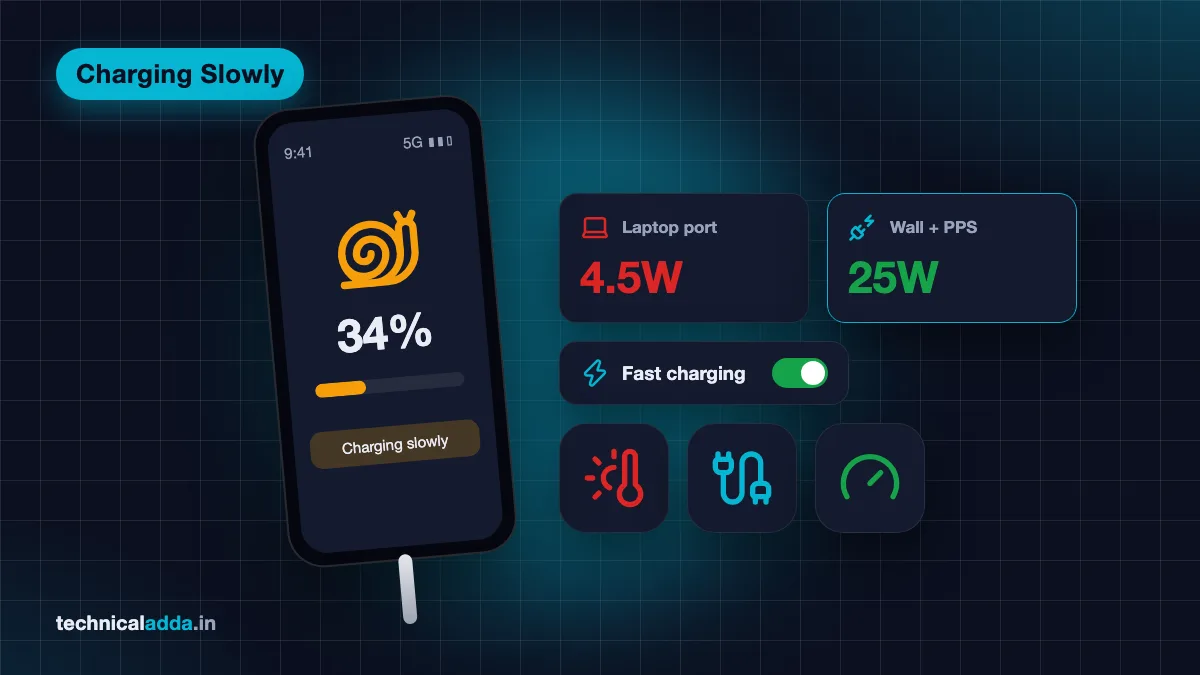
Also look at the lock screen while plugged in. Many Android phones show "Charging slowly" or drop the "Fast charging" label when the charger can't do fast charging. That single line tells you the problem is the adapter or cable before you test anything else.
For a precise answer, a USB-C power meter sits between the cable and the phone and shows the actual watts flowing in. It's a cheap tool and settles the "is it the charger or the phone" question in a minute.
Phone charging slow reason: match your symptom
Find the row that matches what you see, then go to that section.
| What you see | Most likely reason | Go to |
|---|---|---|
| "Charging slowly" message on lock screen | Adapter or cable can't do fast charging | Charger and cable causes |
| Fast charging stopped after a new charger or cable | Protocol mismatch or under-rated cable | Charger and cable causes |
| No fast charging label even with the original charger | Fast charging toggle off, or a software glitch | Settings that slow charging |
| Fast in the morning, slow in the afternoon | Phone or room is hot | Heat and usage causes |
| Percentage barely moves while gaming or on a video call | Phone is using power as fast as it gets it | Heat and usage causes |
| Fast to 80%, then crawls to 100% | Normal taper or a battery-care setting | Settings that slow charging |
| Charging slowly and discharging fast | Worn battery or a background app | Battery and hardware causes |
| Speed changes when you move the cable | Lint in the port or a loose port | Battery and hardware causes |
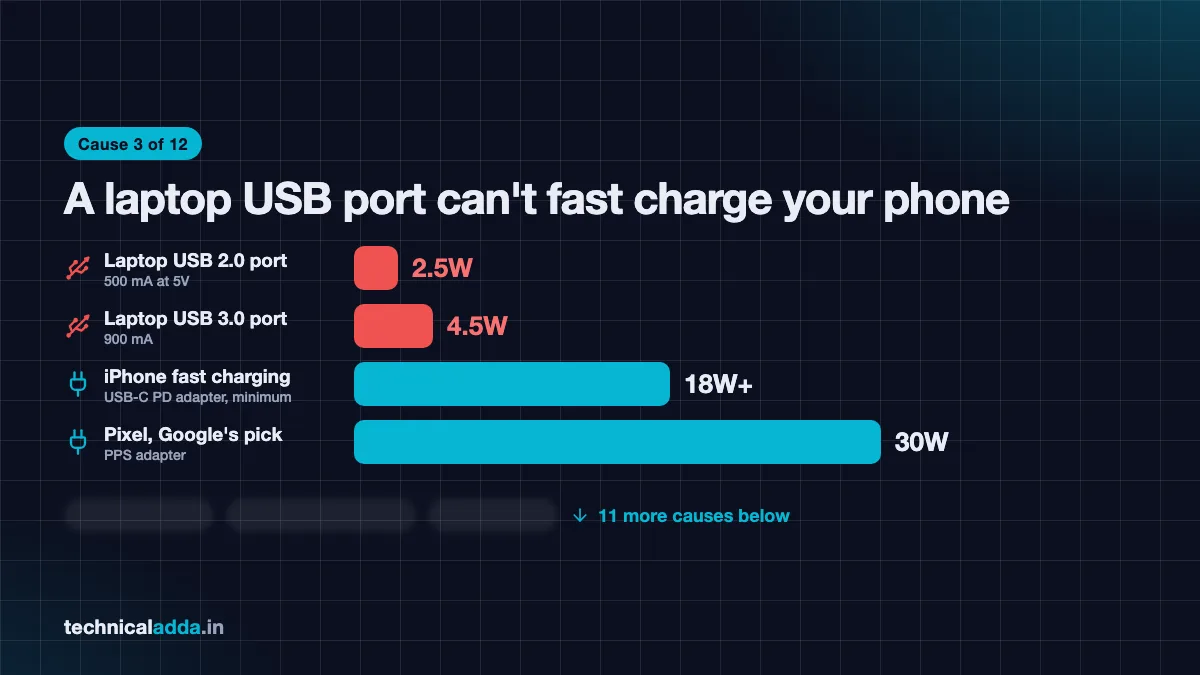
A laptop USB port supplies 2.5W to 4.5W, a fraction of what a fast wall charger delivers.
Charger and cable causes
Most slow charging traces back here. Your phone only fast charges when the adapter, the cable and the phone all support the same fast-charging method.
1. The adapter doesn't speak your phone's fast-charging protocol
Before charging starts, the phone and adapter "talk" to agree on a voltage. If they don't share a protocol, they fall back to basic 5V charging, which is slow. That's why a 65W laptop charger can charge some phones at a fraction of its rating.
- Samsung Galaxy needs USB PD with PPS for Super fast charging. Samsung's own fast charging guide (opens in new tab) says to check for PPS support rather than only the maximum wattage.
- iPhone 15 and later need a USB-C Power Delivery adapter of 18W or more for fast charging.
- Google Pixel: Google's Pixel charging help (opens in new tab) recommends a 30W PPS adapter, or a USB PD adapter of at least 15W.
- OnePlus, Oppo, realme, Xiaomi, Vivo and iQOO reach their highest speeds (SUPERVOOC, HyperCharge, FlashCharge) only with the brand's own adapter and cable. A third-party PD charger works, but slower.
The wattage printed on the adapter body also matters. An old 5W or 10W brick from a previous phone will take hours on a modern 5,000 mAh battery. Our guide on which fast charger is best matches adapters to each brand if you need a new one.
2. The cable is the bottleneck
A cable that charges fine can still be the reason your phone stopped fast charging. Cheap Type-C cables often carry less current, and damaged ones lose contact inside the plug.
- Rating: Samsung notes that its 45W "Super fast charging 2.0" needs a 5A cable on most models (Galaxy S25 and later work with the 3A cable in the box). A basic 2A cable will hold any phone back.
- Brand cables: SUPERVOOC and other brand systems need the brand's cable. A standard Type-C cable falls back to a slower mode.
- Wear: Samsung says some third-party cables with higher resistance can make charging stop and start. If the charging icon flickers, replace the cable.
Test quickly: swap only the cable, keep the same adapter, and repeat the 30-minute test.
3. You're charging from a laptop, car or power bank
A laptop's USB-A port was never meant to fast charge a phone. A standard USB 2.0 port supplies 500 mA at 5V (2.5W) and USB 3.0 supplies 900 mA (4.5W), which a phone in use can drain faster than it fills. Samsung states plainly that fast charging doesn't activate on a PC or standard USB port.
Car chargers and older power banks have the same problem unless they support PD or your brand's protocol. If you rely on a power bank, pick one with PD output; our list of power banks under ₹1,000 notes which ones support it.
4. Wireless charging
Wireless pads are slower than a cable on almost every phone, and they lose speed if the phone isn't centred or a thick case sits in the way. Google's Pixel page says it directly: for best charging performance, use a wired plug. Use the pad overnight and the cable when you're in a hurry.
Settings that slow charging
If the adapter and cable are right but the "Fast charging" label never appears, check the software side.
5. Fast charging is switched off
Samsung lets you turn fast charging off, and it's easy to do by mistake or after a reset. Go to Settings > Battery > Charging settings and turn on Fast charging (and Fast wireless charging if you use a pad). On the Galaxy S23 series and later, one Fast charging toggle covers both fast and Super fast charging. Menu names vary by model and One UI version.
Other brands bury similar options. Open Settings, tap the search bar and type "fast charging" or "charging". Turn battery saver or power-saving mode off while you test too, so it can't interfere with the result.
6. Battery-care settings slow the last stretch
Every phone slows down near the top on purpose. Charging is fastest from low battery to around 50%, then tapers. Samsung's guide notes that maximum current depends on battery level, so the phone won't always pull peak power.
Battery-care features add to that. iPhone's Optimized Battery Charging waits to finish past 80% until you usually unplug, and Pixel's Adaptive Charging spreads overnight charging so it hits 100% near your alarm. That's slow by design and good for the battery. If you need a fast top-up, turn these off in the Battery menu. If your phone stops at 80% every time instead of just slowing, see the stuck-at-80% section of our phone not charging fix.
7. A software update or stuck app
Fast charging sometimes breaks after a system update, then comes back in the next patch. Samsung community threads have users reporting fast charging stopped after a monthly security update, with fixes ranging from a restart to running the charging test in Samsung Members. Treat those as anecdotes, but the order of checks is sound:
- Restart the phone.
- Install any pending system update.
- Boot into safe mode and test charging. If it's fast in safe mode, a third-party app is the cause.
- On Samsung, run Samsung Members > Diagnostics > Cable charging with your usual charger.
Heat and usage causes
These two make even the right charger look slow, and both are common in Indian summers.
8. The phone is hot
Phones cut charging power when the battery warms up, because heat ages lithium-ion cells faster. Apple's iPhone charging page (opens in new tab) says that if the battery gets too warm, software might limit charging above 80%, and to move the phone and charger somewhere cooler. Samsung says heat from use or a hot room can reduce charging speed.
Common heat traps:
- Charging under a pillow, on a bed or inside a thick rugged case.
- A car dashboard, a sunny window sill, or a room without a fan in May and June.
- Gaming or a long video call while plugged in.
Take the case off, put the phone on a hard surface near a fan, and let it cool before you judge the speed. If it runs hot even off the charger, read our phone heating problem solution guide.
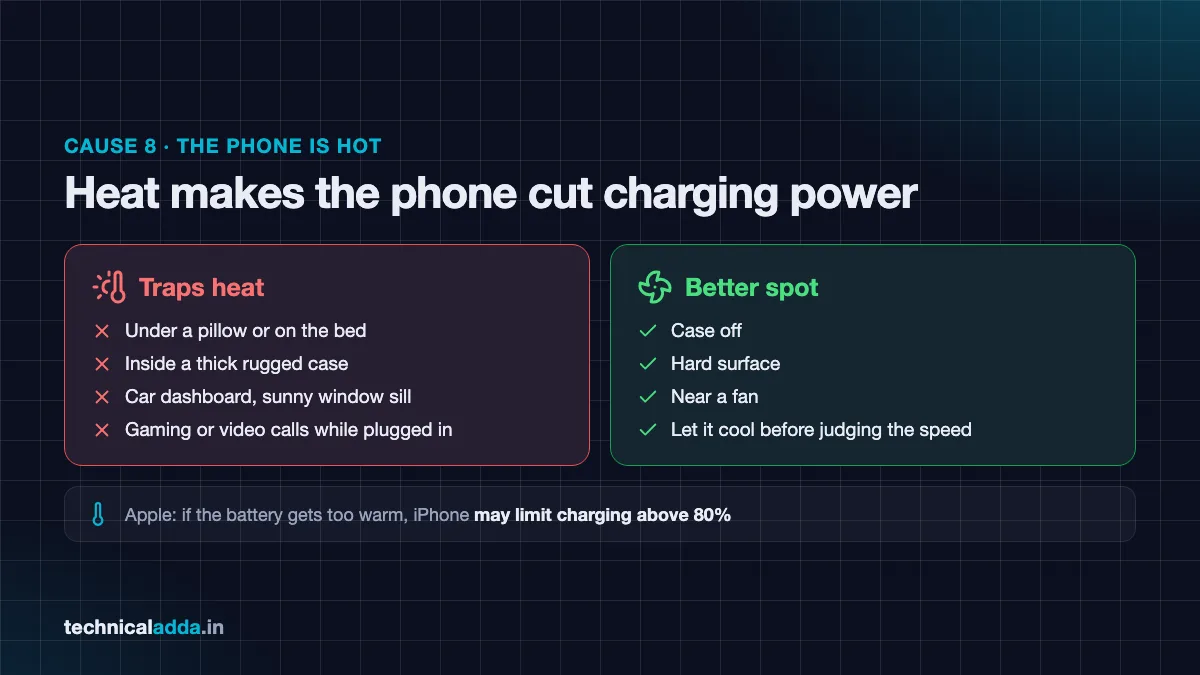
A hot phone cuts charging power. Take the case off and charge on a hard surface near a fan.
9. You're using the phone while it charges
The charger feeds two things at once: the battery and whatever the phone is doing. A bright screen, a game, navigation, hotspot or a video call can use most of the incoming power, so the battery gains little. Samsung's guide says turning the phone off or keeping the screen off while charging helps maximise speed.
Weak mobile signal adds hidden load because the modem works harder to stay connected. If you charge in a basement or a room with one bar of Jio or Airtel signal, try airplane mode (or Wi-Fi only) for 30 minutes and compare.
Battery and hardware causes
Check these only after the charger, cable, settings and heat are ruled out.
10. Lint or dirt in the charging port
A port half packed with pocket lint lets the plug sit loose. The phone still charges, but contact is poor, so it may refuse fast charging or switch between fast and slow as you move. If the plug doesn't click in firmly, clean the port with a wooden toothpick while the phone is off. The step-by-step method and what never to use (pins, SIM tools) are in our charging port cleaning guide.
11. A worn battery
An old battery has higher internal resistance. It warms up faster on the charger, so the phone throttles sooner, and it holds less charge. The pattern people describe as "charging slowly and discharging fast" is classic battery wear, especially on phones that have been charged daily for a few years.
Check health where your phone shows it: on iPhone, Settings > Battery > Battery Health; on Samsung, Samsung Members diagnostics; many other Android phones show it under Settings > Battery or need a service centre check. If the battery drains fast even when you're not using it, our battery draining fast Android fix helps you separate an app problem from a tired battery.
12. A damaged port or charging chip
If the speed keeps changing when you wiggle the cable even after cleaning, the port's contacts may be worn. A useful test: if wireless charging works at its normal speed but wired is slow on every cable, the port is the likely fault. Slow charging on both wired and wireless with several good chargers points to the charging circuit or battery. Both are service centre jobs.
A swollen battery is a safety problem, not a speed one. If the back panel or screen is lifting, stop charging and get it replaced.
Phone stopped fast charging suddenly: the 5-minute check
When fast charging worked yesterday and doesn't today, run these in order and stop when the "Fast charging" label returns.
- Swap the cable for the one that came with the phone. Cables fail more often than adapters.
- Swap the adapter for the original or one that supports your phone's protocol.
- Move to a different wall socket. Skip extension boards with loose sockets and laptop ports for this test.
- Check the fast charging toggle under Settings > Battery (search "fast charging" if you can't find it).
- Restart the phone and let it cool to room temperature.
- Look into the port with a torch and clean out any lint.
- Check for a system update, then test in safe mode.
If none of that helps, the battery or port needs a professional look. Back up your phone and visit the brand's authorised service centre for a diagnosis before paying a local shop for parts.
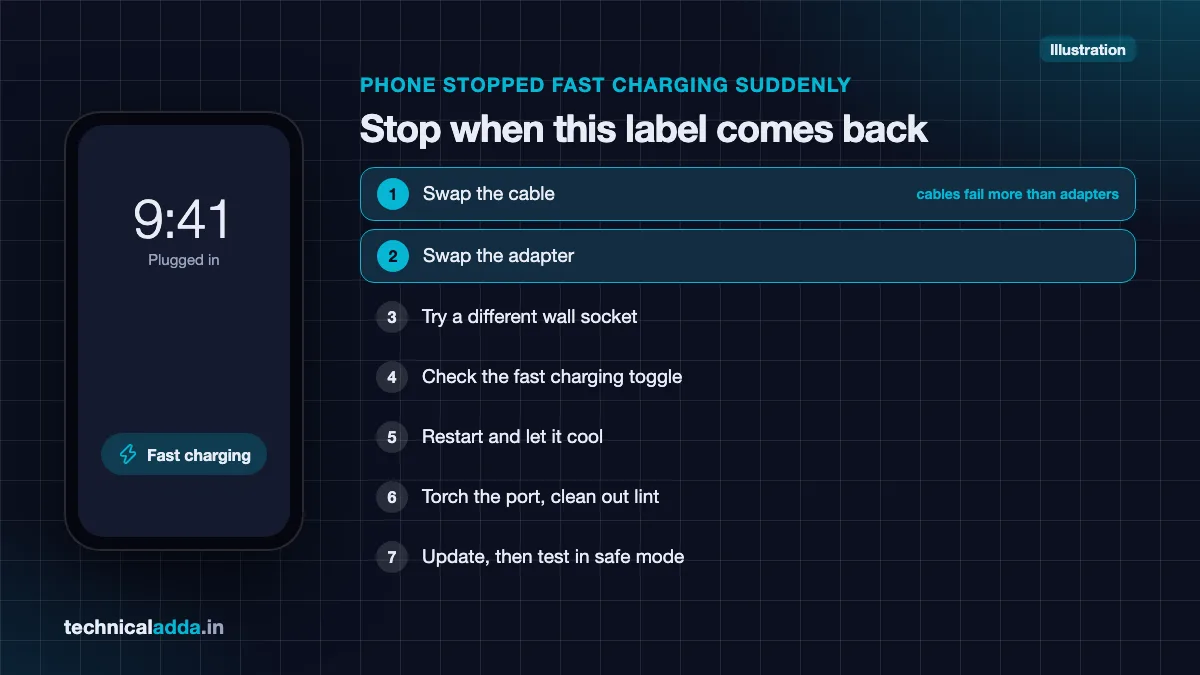
Run the checks in order, cable first, and stop as soon as the Fast charging label comes back.
Brand-by-brand fast charging checks
The causes above apply to every phone. This table adds what's specific to each brand.
| Brand | Charger it needs for full speed | Setting to check | Quick test |
|---|---|---|---|
| Samsung Galaxy | USB PD with PPS (25W or 45W); 5A cable for 45W on most models | Settings > Battery > Charging settings > Fast charging | Samsung Members > Diagnostics > Cable charging |
| iPhone 15 and later | USB-C PD, 18W or more (40W or more for fastest on iPhone 17) | Settings > Battery > Charging (Optimized Battery Charging, charge limit) | 30-minute test with screen off |
| Google Pixel | 30W PPS, or USB PD 15W or more | Settings > Battery > Adaptive Charging | Watch for "Check charging accessory" |
| OnePlus, Oppo, realme | Brand SUPERVOOC adapter and cable | Search "charging" in Settings | Original brick vs third-party brick |
| Xiaomi, Redmi, POCO | Brand HyperCharge adapter and cable | Search "charging" in Settings | Original brick vs third-party brick |
| Vivo, iQOO | Brand FlashCharge adapter and cable | Search "charging" in Settings | Original brick vs third-party brick |
If you need a replacement Samsung charger, the official 25W adapter is the safe pick for most Galaxy phones.
Buy chargers with a BIS registration number (it starts with R-), which you can look up in the government's BIS Care app. More everyday phone fixes are in our how-to guides.
Six checks that fix most slow charging
- The top phone charging slow reason is a charger or cable that doesn't support your phone's fast-charging protocol. Look for a "Charging slowly" message.
- Laptop USB ports, car chargers and wireless pads are slow by nature. Use a wall socket and a cable for speed.
- On Samsung, check Settings > Battery > Charging settings > Fast charging. Other brands: search "fast charging" in Settings.
- Heat and phone use while charging cut speed sharply. Charge with the screen off, case off, somewhere cool.
- Slowing after 80% is normal. Crawling all the way, plus fast drain, points to a worn battery.
- If wireless is fine but wired is slow on every cable, the port is the likely fault.
Start with the cable, end with the battery
Work through the cheapest checks first: the 30-minute test, then swap the cable, swap the adapter, use a wall socket, turn on fast charging, and keep the phone cool and idle. Most phones get their speed back before you reach the battery and port checks, because the usual phone charging slow reason is the accessory, not the phone. If yours needs a new adapter, our guide to which fast charger is best shows the right one for each brand, and if it won't charge at all, go to the phone not charging fix.
FAQ
Frequently Asked Questions
Why is my phone charging so slowly all of a sudden?
A sudden slowdown usually means the cable has started failing, you switched to a different adapter, or the phone is hot. Swap in the original cable first, then the original adapter, and charge in a cool spot with the screen off. If it's still slow, check the fast charging toggle in Settings > Battery and look for a pending software update.
What does "Charging slowly" mean on Android?
It means the phone isn't getting enough power for fast charging. The adapter may be low-wattage, the cable may be under-rated or damaged, or the charger doesn't support your phone's fast-charging protocol. Plugging into a laptop USB port also triggers it. Switch to the original adapter and cable in a wall socket and the message should change to fast charging.
Why did my phone stop fast charging?
The most common reasons are a worn or third-party cable, a charger without your phone's protocol (such as PPS for Samsung), fast charging switched off in settings, or heat. A recent system update can also break it until the next patch. Swap the cable, use the original adapter, check Settings > Battery, restart the phone and test again.
Does using the phone while charging make it slower?
Yes. The charger powers the screen, apps and modem at the same time as the battery, so heavy use like gaming, video calls or hotspot leaves little for charging. The phone also gets warmer, which makes it reduce charging power. Lock the screen while charging, or at least avoid games and video, to get the full speed your charger can give.
Why does my phone charge fast to 80% and then slow down?
That's normal. Lithium-ion batteries charge fastest when they're low, and every phone tapers the current near full to protect the battery. Features like iPhone's Optimized Battery Charging and Pixel's Adaptive Charging slow things further on purpose, especially overnight. If you need a quick top-up, turn those off in the Battery settings.
Why is my phone charging slowly and discharging fast?
Together, those two signs usually point to a worn battery. An ageing battery heats up faster on the charger, so the phone throttles charging, and it holds less charge, so it drains quickly. A background app can cause fast drain too. Check battery health in Settings or Samsung Members, and get the battery tested at a service centre if it's low.
Can a bad cable cause slow charging?
Yes, and it's one of the most common causes. Many cheap Type-C cables are rated for 3A or less, and Samsung's 45W charging needs a 5A cable on most models. Damaged cables lose contact inside the plug, so charging flickers or drops to slow mode. Test by swapping only the cable while keeping the same adapter.
Is it bad to charge my phone from a laptop?
It isn't harmful, just slow. A standard USB-A port gives 2.5W to 4.5W, and Samsung says fast charging doesn't activate on a PC or standard USB port. If you use the phone at the same time, it may barely gain charge. A laptop USB-C port with Power Delivery can be faster, but a wall adapter is still the quickest option.
Does heat make phone charging slower?
Yes. Phones reduce charging power when the battery gets warm, to protect it from damage. Apple says iPhone software may limit charging above 80% if the battery is too warm. Charging under a pillow, in direct sun or inside a thick case all slow things down. Remove the case and charge on a hard surface near a fan.
Where to buy
-
Check price on Amazon (opens in new tab)
USB C Power Meter
-
Check price on Amazon (opens in new tab)
Samsung 25W Travel Adapter